Google Nexus 7 Review

image

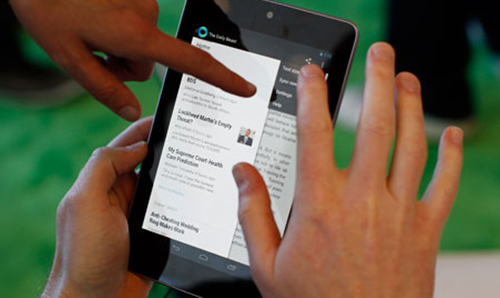
I think other folks have used the gag about needing three hands to work it, so I won’t

Warren told me that I’d get a Google Nexus 7. I protested. ‘There is no way I need one of those’ I said. But the one Adam had bought looked very nice. And the price is pretty amazing. And I was going to get number one wife a Kindle Touch for her birthday. And the Nexus will do a lot more than just read books. So there you are. We ended up with one each, mainly because I hate the idea of number one wife having better gadgets than me. And I have just been paid.

The device is very nice. Works a treat. Binds tightly to your Google account. Has this Google Now thing that is supposed to tell you all kinds of important stuff about your life. At the moment it is just telling me that it is 18 degrees in Cottingham, which is about right.

You get 15 pounds of credit in the Google Play store with the device. I’ve spent 70 pence on Real Racing, which is on offer at the moment. It runs very well and really shows off the power of the device. I also wanted to download BBC iPlayer (one of the best reasons for owning a device like this) but at the moment it doesn’t work, which is pretty terrible. I think this is because the Nexus is “Flash Free” and iPlayer needs that. Whatever it is, it needs to be sorted out soon. There are some other irritations in applications, some of them assume they are headed for a phone screen, and look wrong. Also, for some reason the default setting of the device is to lock in portrait mode, which is a bit of a pain. Number one wife was upset to find that you can’t get Scrabble for it if you are outside the USA, which is unfortunate.

You can rent (but I can see how to buy) movies on the device. You do get a free copy of the latest Transformers movie though. And a Jeffry Archer book. I’m looking forward to loading up the 16G of internal memory with some music and videos of my own. Battery life seems OK, I’ve not run it flat yet but 7 hours seems a reasonable amount. It has WiFi and Bluetooth, but not mobile data. For me this isn’t a problem, as I can us the Lumia as a hotspot if I need to. The 7 inch screen is bright and clear and the software is responsive, even if the UI seems a bit more complex than it needs to be – but then again I am used to Windows Phone on touch devices. There is no video out facility, but given the fairly limited internal space on the device I don’t think you ‘d be using it as a video library really.

All in all, you’d be bonkers to spend any more than the price of a Nexus on a tablet of this kind. The hardware is excellent and there’s no way they can be making much, if any, profit on it. This does of course mean that you are meant to be part of the product, and so you can expect all your actions on the device to be comprehensively mined for selling opportunities. Having said that, you can just use it and it will deliver a very good, and eminently portable tablet experience.
Nintendo 3DS XL

image

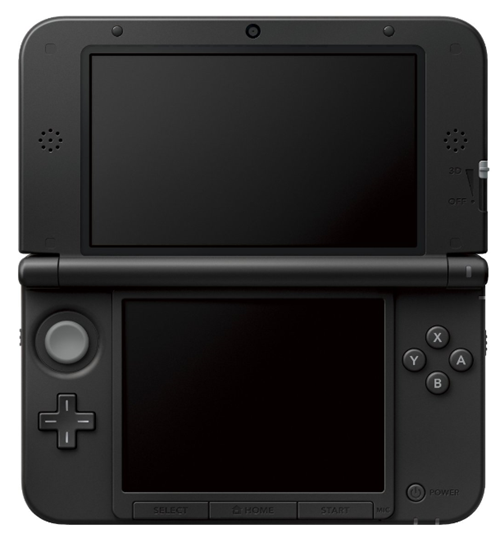
The Nintendo 3DS is a nice little portable console. The 3D effect doesn’t do a great deal for me (apart from make me slightly queasy after a while) but there are some very good games for it. I rather like Pilot Wings, Street Fighter and Mario Kart 7.

Now Nintendo have released an XL version of the 3DS, like they released a full fat version of the DSi a while back. It works exactly like the 3DS, only with a bigger screen. I really like this. Although the device is a bit bigger to cart around, it is not prohibitively larger and I’ve got much better at games like Ridge Racer as I can now see further into the distance because the dots on the screen are larger.

However, the XL version does have a much less “premium” feel than the original 3DS. That came with a power supply and a docking station. The 3DS XL comes with, well, just a cardboard box. Not even a power supply. This is a bit of a problem if your business model for your upgrade involves selling the old 3DS. Fortunately I have a spare supply lying around from way back.

The original 3DS was made of expensive looking plastic of different colours and levels of shinyness. I don’t think that this added a great deal to the gaming experience, but it did make it feel a bit special. The 3DS XL is not badly made, but the plastics and the finish seem to have been built to meet a price, rather than to make an impression. The large 3D screen is very impressive, but not particularly 3D as far as I’m concerned.  Battery life is no worse than the original device and the transfer from one device to another is painless and fun to watch, as a horde of Pikmin characters carry the information from your old machine to your new one.

If you have a 3DS that you have to squint at, you will appreciate the improvement. I certainly have.

Microsoft Bluetooth Keyboard

image

Another day, another plug from Rob for some Microsoft stuff. Actually I do buy things from other companies too you know, as far as I’m aware Microsoft do not make Strawberry flavoured milk yet.

Anyhoo, they do make some things that are quite nice. I’ve always liked their bendy keyboards, being fairly sure that the main reason that my fingers have not dropped off/seized up yet is that I’ve been using their Natural Keyboards for many years now. They provide very good wrist support and let you type at a more natural angle. Of course you lose all that when you open up your laptop. Until now.

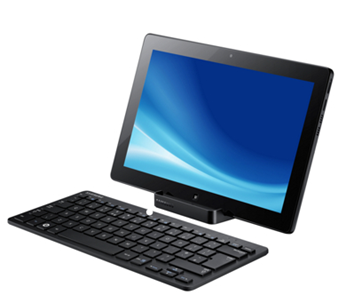
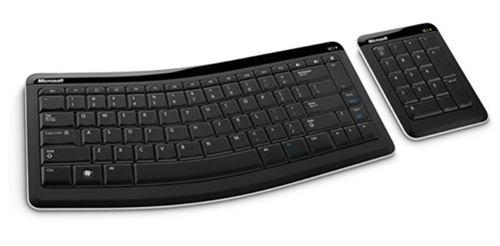
The Microsoft Bluetooth Mobile Keyboard 6000, which you can see above, is intentionally bent. It also comes with a somewhat superfluous numeric keyboard which I’ve left in the box as I can’t see the point of it. But the keyboard is very good. I’ve paired it with the Samsung Slate and it works a treat. It is very thin, so it fits in my bag with no problems, and when I’m typing I can feel the difference.

The key action is pretty good for a device of this type. The Bluetooth keyboard that comes with the Samsung Slate has a very nice action, but is not bendy, and for me some of the keys are now wonky on that keyboard, which is a bit annoying. Actually, the mobile keyboard with the best key action is the Apple Bluetooth one, but unfortunately it isn’t bendy – at least not in a way that would leave it useful afterwards.

I picked up my keyboard cheap from Amazon. They have this thing now where you can find used examples of stuff that you want, and for the first time I tried this. It worked very well, the item arrived well packaged and in good time. This is looking like a good alternative to eBay. None of the bidding daftness, and the prices are very competitive too.

Microsoft Surface for Windows 8: Something else to want

image

I love my iPad. But I don’t find it useful as such. It is great for playing games or consuming data, and should I ever feel the need to paint a portrait or compose some music it might prove useful I suppose. But I like to spend my time creating programs and documents and stuff like that, which the iPad just won’t let me do. But the new Microsoft Surface should.

At the moment I’m loving my Samsung Series 7 Slate, which gets pretty close to the larger of the two new Surface devices. I’ve got my slate running Windows 8 Release Preview and it is a properly useful device. In fact at the moment it is my main computer. I’ve got two docking stations, one at home and one at work, and I now carry my desktop around with me. The machine has more than enough power to do what I want, which is use Office, Visual Studio, Photoshop, play a bit of media and browse the interwebs. It is a bit restricted in terms of built in storage, but I’ve got around 20G free at the moment and a 32G SD card plugged in the side which has got a whole bunch of movies and other stuff on there. Battery life is fine too, with at least 5 hours if I work the machine hard, and up to 8 if I take it a bit easier.

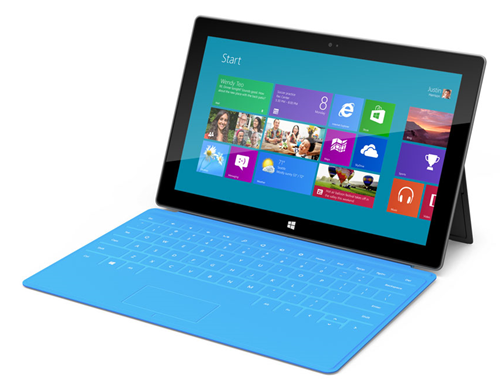
The Surface should be rather like this, but better. It has a case that turns into a touch keyboard, and another that turns into a keyboard with moving keys. It also has a kickstand to make it easy to stand on the desk. The two words that come to mind for me are “want” and “one”. The only snag with the Surface is that it isn’t in the shops yet. But when it is, I’ll be there, queuing up for a blue one.

Making Things

A gadget that makes gadgets is probably the ultimate gadget. So a few weeks ago I sold a whole bunch more cameras (I seem to do all my saving by means of the “camera bank”.) and ordered an Ultimaker. Peter reckoned that this was the best of the 3D printers and I was attracted to it by the level of detail that you could print with, and the fact that it came in a kit, which I could spend the upcoming bank holiday working on with Number One Son.

WP_000020 (1).jpg

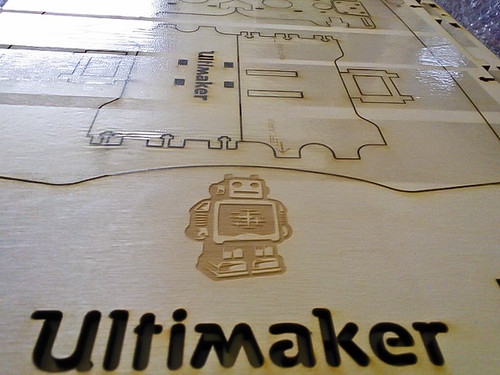
Several weeks later a heavy box arrived which contained motors, circuits and some lovely laser cut birch plywood which would be fitted together to make the finished printer. So, armed with the very detailed instructions and beautifully packaged and labelled pieces we set to work.

It was great fun. Like Lego, but bigger and with bits that light up, bits that get hot and bits that move. And you learn lots of new terms like “Bowden Tube”, “Peek insulator” and “STL file”. And at the end of it you have a thing that makes things. The principle is very simple. At one end you push a plastic fibre which goes down a tube to the “extruder head” which contains a heater and a very fine nozzle.

IMG_0091.jpg

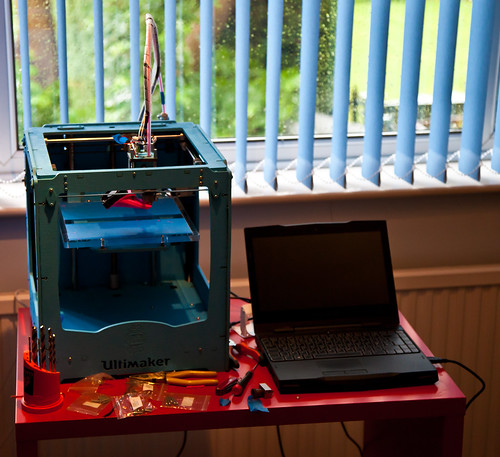
This is the finished product, I painted it blue. The machine “prints” in 3D by moving the head over a build surface, adding successive layers of extruded plastic to create the design you fed into it. It is fascinating to watch the head buzzing around. Number one son made a video of it printing out a Companion Cube here.

One of the great things about the printer is that it can print extra bits for itself. If you look at the picture above you can see a bright pink fan ducting on the print head which I printed and then fitted to replace the one that the printer ships with. The new duct does a better job of focusing the cool air onto the print so that it hardens more quickly. If I have an idea for a better design I’ll simply print that out and then fit it.

Tonight I decided to print out a new locking assembly for the “Bowden Tube”. This is the tube that guides the raw plastic fibre into the extruder head. I was especially interested in this because it contains a screw thread, and I wanted to see how this would turn out. The print did not go well, mainly because I left the printer heated for too long, and some fibre in the tube melted and formed a plug that stopped the flow. I had to strip down the print head, clean out the blockage and then rebuild everything. Two hours of messing around with bits and bobs. And I loved it. At the moment it is extruding very well, but I’ve got a little leak of plastic around the nozzle which I’ll have to seal up. I’m looking forward to adding some sealant and then trying again.

IMG_0095.jpg

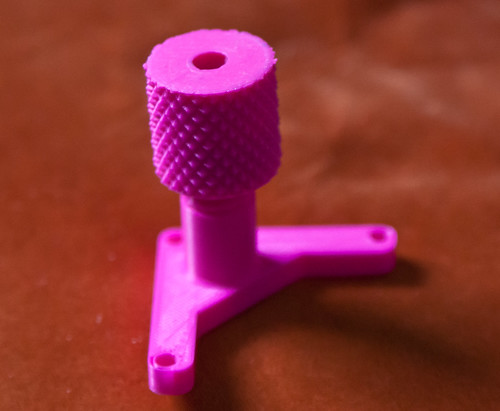
This is the assembly I printed tonight, with a knurled nut on top of the fitting and a thread that works really well. Perhaps I should get some different coloured plastic to work with…

The main reason I got my Ultimaker was not to print parts for it (which would be kind of recursive) but to make cases for other gadgets. The Gadgeteer platform provides a lovely way of making devices, but they will still need a box. As long as the box is smaller than 8 inches in any direction (the build volume of the Ulitimaker) I can design and print it. We already managed to print out a box for number one son’s Raspberry Pie device.

This is not a technology ready for prime time. But it is a tinkerers delight. You don’t just get to play with the bits, you get to make more bits to play with too. There might be people out there who will say that in the future everyone will have an Ultimaker, and that one day the machines will make themselves. This might happen at some point, but great as it is I can’t see my little blue box printing out a Stepper Motor or a Microcontroller any time soon. To me it is very similar to the very first TVs that were made by John Logie Baird. They worked by spinning disks and flashing lights and were thoroughly impractical for proper viewing. But they got people engaged with the idea of being able to view things over long distances. The Ultimaker is just like this. It is slow (although really fast for a 3D printer), noisy and not 100% reliable, but that doesn’t matter. What it does seems as magical as watching someone 100 miles away must have seemed in 1925. When people really figure out how to do this, how to make different colours and build more quickly, then I can see that there really will be one in every household. And another piece of Star Trek technology will have arrived in our lives.

We will be launching a spin off from Three Thing Game (Three Thing Thing) later this year when we will get people building gadgets using Gadgeteer (keep your diaries clear for the 27th – 28th of October folks) and I’ll bring along the printer so that we can make some boxes for whatever gets made.

Oh, and if you want to find out more about Gadgeteer, Peter has produced some superb posts about the platform.

How to sell on eBay

IMG_4889-Edit.jpg

Ebay is probably seen as old hat these days, but if, like me, you have a gadget habit to pay for and limited funds, then one way to get some cash is to sell some of the gadgets that you have around the place. I’ve been doing a lot of this lately. Here are my tips for successful sales:

  • Give the auction plenty of time to run, and let it end at a time when folks are sure to be around and take part in a “bidding frenzy”. I quite like Sunday evening for this.
  • Use Buy It Now. I had a lot problems with people making “kamikaze bids” at the last moment to try and snipe the auction. The problem is that if two people are using this “cunning” trick the result is an enormous bid that they is promptly rescinded, leaving you stuck with no sale. The good news is that you do get to hear some great excuses from people about why they did the bid, and how the cat must have pressed the keys, etc, etc, but the bad news is that you have to run the auction over again. For some reason, Buy It Now sales, where you set a price you will instantly sell it for, stop these folk. If you set a price around 10 pounds or so less than the last one sold for then you will at least get the market rate or near enough. You can use Completed Listings on a search to find out how much this was. This can be depressing, but remember the thing you are selling is only worth what people are willing to pay. If charge what you think it is worth you will just lose your listing fees. And sometimes people get so carried away bidding that you actually get paid more than the Buy It Now price, which is rather nice.
  • Have it packed and ready to post before you put it up for sale. As far as I’m concerned, the gadget is gone as soon as the listing goes live. Purchasers expect to get their item as soon as they have paid for it, and so you must have it down at the Post Office the following day and away on Next Day delivery.
  • Do some research on postage prices. I’ve got stung once or twice where the thing I was selling turned out to be a lot more expensive to post than I expected. As a guide, a small mobile phone will cost around 7 pounds for next day, insured, delivery. A laptop will cost around 25 pounds to send. Of course you should always use tracked, signed for, delivery.
  • Use PayPal. And nothing else. Nuff said.
  • Be nice. When you’ve posted the item, send the tracking number in an email so that they can watch the progress of their parcel. And you can use the tracking number to make sure that it has been collected at the far end.
  • If you are buying a gadget that you might fall out of love with one day (it does happen) then keep the box and all the bits so that you can send out a complete package if you do sell it. This helps with both the price and the speed of the sale. And don’t lose the driver disks.

Getting Started with Gadgeteer

image

WE had the folks from Microsoft Gadgeteer here to see us yesterday. They brought with them all kinds of cool interfaces that I’m looking forward to playing with, after I’ve finished marking. If you’ve not come across Gadgeteer before it is a .NET Micro Framework based platform for creating, well, er, gadgets.

If you’ve ever wanted to create a data logging, remote controlled, catflap. Or a GPS-enabled TV remote, or a motion detecting chicken counting camera, etc etc, then Gadgeteer gives you the modules to plug together to make the hardware and Visual Studio and C# to write the software, including in device debugging of your code.

There are a huge number of modules available now including camera, LCD panel, gyro, compass, lights, switches, multi-io boards, barometer, soil moisture sensors, heart rate sensors,  Bluetooth, WiFi, GPS, GPRS, infra-red, ethernet, USB Host and USB client. Plus you can bring out the individual signals from the processor and use them directly.

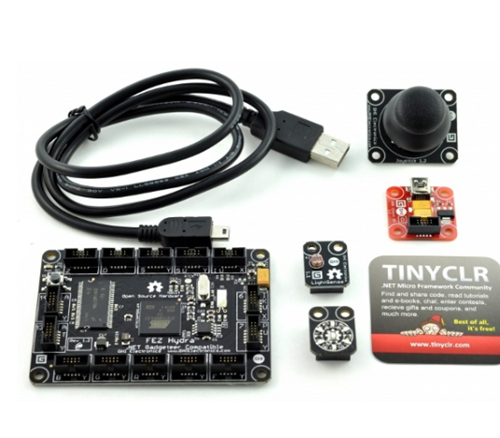
You can get started with the Fez Hydra Basic Kit, which you can see above. This costs around the same as a video game and a half. The sensors range from a fiver to quite expensive (for things like the VGA adapter, if you need it). If you want to get started in embedded development, or have an idea for a device and want to make it come to life, the Gadgeteer is a great place to start, particularly if you already have C# skills.

We have been using the Gadgeteer’s older brother, the .NET Micro Framework, for the last couple of years and it has been a very successful means of introducing students to the joys of making hardware do stuff. If you want to have a go with this kind of thing you should take a look.

If you are a student at Hull and you have have a really good idea for a device, and you want some hardware to play with over summer, then come and see me and I’ll see if I can find a kit to loan you.

Nokia Lumia 900

lumia 900

The guy serving me in the chip shop on Friday caught a glimpse of my Lumia 800. “Good phone that.” he observed. “A mate’s got one. My iPhone is up for renewal soon and so I thought I’d get one as well”. Smooth move.

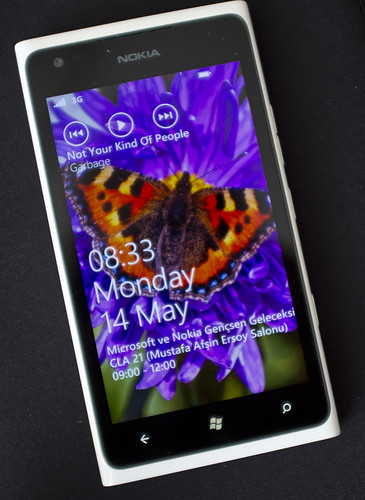
I really like my Lumia 800. The latest update has removed the only real issue I had with it, the battery life is now excellent. Of course, I’m selling mine now. On Saturday I went up town to not look at, and definitely not buy, the new Nokia 900. Which you can get in White at Phones4U. So I didn’t go in. And I didn’t look at it. And I definitely didn’t want one. But then…..

Having done all the maths and looked up the price on ebay of Lumia 800’s I concluded that if I sold my old iPhone (which I’ve been keeping for mainly sentimental reasons) and my Samsung Omnia 7 plus a few other bits and bobs I could run out even on the deal if I bought an unlocked device. Particularly as the chap in the shop uttered the magic phrase “It does tethering”. This means I can use the phone as a WIFI access point for any other devices that want to talk to the internets on the move. Tethering is promised for the Lumia 800, but my reasoning here is that it is not guaranteed that all carriers will enable it. However, if I have an unlocked device I can just turn it on and it will work. Which I have, and it does.

There is nothing wrong with my Lumia 800 at all. All the problems are with my eyes and fingers. I find the screen just a tiny bit too small to read easily and the keyboard is just a bit too tiny for my lanky fingers to find their way around. It is on eBay at the moment and I’ve had some expressions of interest already.

Changing phones was not too bad. Microsoft Exchange made sure that my address book moved over with no problem. All the pictures from the phone are already on Skydrive. The only real problem is that I’ve lost all my SMS conversations, but I can live with that. The Lumia 900 is properly lovely. I might even show it to the bloke in the chip shop.

Samsung Series 7 Slate Rocks

image

I blame Black Marble. A week or so ago Robert (Boss) Hogg and Steve Spencer from the company came over to see us and give a presentation on professional software development. Very good it was too. As we were chatting at the end of the session the conversation turned to tablets. I mentioned the Samsung Series 7 Slate that I fancied and Boss said “Oh, we have a few of those. Found a very good price on the internets and Samsung are doing a “VAT back” offer that makes them even cheaper”.

And that was me sold. I had to sell some cameras and lenses to get there, but for a price slightly higher than a fully loaded iPad I’ve now got a really proper portable tablet. It has an i5 processor and 4G of ram, which makes it the second fastest machine I own. The only slight snag is that it has a small-ish 64G internal SSD, but since I’ve been using Live Mesh and Dropbox to store my data I’m used to making do with carrying fairly small amounts of data around with me. At the moment I’ve got pretty much all the software I need loaded up along with data and I’ve still got over 20G left. If I want to take some movies with me I can put them onto a micro SD card and pop them in the slot on the top. I can also be very confident it will play anything without conversion because at the end of the day its a PC.

One standout feature is the Wacom pen support. There is multi-touch of course, but I can also write on the screen surface with a digitiser pen. I can’t really put into words how good this is. The OneNote program, which I’ve always liked but never had the right platform for, suddenly comes alive. I can convert my dodgy handwriting into text and search it, and put my documents into Skydrive for instant sharing. Taking notes in meetings will never be the same.

The tablet also comes with a docking station which gives me HDMI video out and a second USB port (could really do with more). I’ve got at least four hours of use out of my first charge of the battery.

Last night I put Windows 8 on it, following the instructions on the Samsung Windows 8 Preview site. The only really scary bit was deleting every partition on the disk so that I could get the installer to complete, but after that everything went well. And it just works.

I love my iPad, but I hate using it to create anything larger than an email. The Samsung gives me a touchy interface that makes it easy to consume data, plus raw power and a productive environment and all my familiar tools. And a fantastic pen based interface. This and Photoshop would be awesome.

This machine has even replaced the twisty tablet in my affections. I reckon this is a little slice of the future and when Windows 8 launches and these become the norm there is going to be a second wave of tablets coming along, but these will be properly useful.

One note of mild warning: There has been a bit of kerfuffle about problems with the screen glass coming away from the bezel. Some people have had problems with this, particularly with early versions of the hardware. Mine doesn’t look like it is prone to this and the rate of reports of the problem are dying down a bit at the moment. It is hard to make things this small and slim without there being some manufacturing issues. I remember that my first iPhone 3g wasn’t exactly well stuck together, with an overlap on one edge that made the sides not quite flat, but it worked fine for the time that I had it. However, if you are buying one second hand I’d advise that you take a careful look at what you are getting.

Don’t Buy Dodgy SD Cards

IMG_7487-Edit.jpg

Some time back I bought a couple of economically priced cheap SD cards. They were rated at category 10 (the fastest you can get) and were huge (32G). They were from a shop based in the Channel Islands who have sold me good stuff in the past. I can’t precisely recall their name, but I seem to remember that they are open all week.

Anyhoo, one failed shortly after purchase and the other has developed the interesting ability to turn filenames into guacamole and move datestamps into 2315. Having thought about this properly I’ve decided that perhaps I should have spent the same amount of cash on cards that were around a half (or perhaps even a quarter) the size but were from companies that I’ve actually heard of. It is very unlikely that I’ll wander out and take 650 pictures in a single trip (even assuming I’ve got enough battery power to do this).

I’ve come to the conclusion SD cards are one area where false economy will not just fail to save me money, but also raises the possibility that I might not get my pictures back home.

My Two Dogs

IMG_7423-Edit.jpg

Digby and Wrex

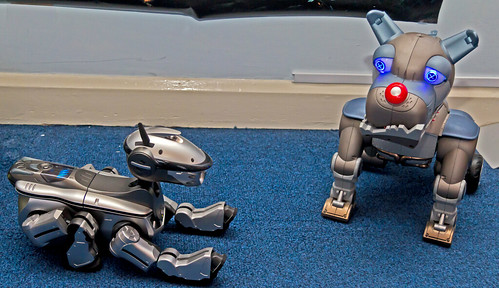
Simon Grey has been posting about his dogs. So I thought I’d post about my two. On the left we have Digby, who is sufficiently autonomous that he can fall downstairs unaided. On the right we have Wrex, who doesn’t do much by himself but has a really cool remote control.

Digby doesn’t get out much these days. But today I powered him up and let him wander around for a while. The best comment about him that I ever heard was from someone who actually owned a dog. “That’s just what my dog used to do” she said as she watched him wander around. It is a crying shame that Sony stopped making Aibo robots, they were just getting interesting when the company pulled the plug.

With all the sensor and processor developments taking place at the moment Aibo 2.0 would be awesome.

HDMI to VGA in one Easy Step

If you have a nice new laptop with only an HDMI output, and a rather old monitor with only a VGA input, then I’ve got some good news. I’ve just discovered that you can now get an adapter (like the one above) which for a lot less than the iPad one (like around 15 quid) will convert your twenty first century digital output into twentieth century analogue signals. This is particularly useful if you work somewhere where every lecture theatre has VGA connections for laptops. Like The University of Hull. The adapter I got was from a UK seller with good feedback, you can get them directly from China for even less.

Important Note: There are a lot of people selling HDIM to VGA cables that purport to connect HDMI and VGA systems together. These will not work. The kind of thing you want must have a built in chip that performs the digital to analogue conversion. Make sure that the thing you buy looks like the picture above (with quite a big lump on the VGA socket) and look for phrases like “with chip” and discussions of which video modes are supported in the description.

Gadgets Going

p1

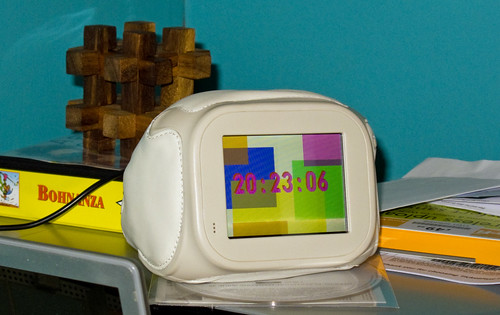
It looks like a couple of my gadgets are going the way of all things. My Chumby, which I got for myself a couple of Christmases ago may shortly turn into a paperweight rather than the Flash Powered internet connected appliance that I’ve had on my desk at home for the last couple of years. This illustrates a flaw in the business model of companies that sell these devices. Once you’ve had the initial hit of profit from the customer buying your product you are then committed to a lifetime of support for it. Advertising doesn’t always work in these situations and so once your funding runs out it is time to shut down those servers. And all your customers become paperweight owners. It’s not all doom and gloom I suppose. The servers are staying up at the moment and there is always a chance that some enterprising folks will stop in and provide their own solutions, but I think that would require some “unlocking” of the devices themselves that might not come to pass.

Then I find out that Alienware are discontinuing the M11x range of high performance gaming netbooks. I got one of these last year, mainly because a student had one and I loved the way the keyboard lit up. I’ve carried it around the world on trips and it has never failed to turn heads. It is a genuinely nice machine, that benefitted greatly from the solid state drive I dropped into it to speed things up a bit. Battery life is good and you can play games on it too. Having said that, I think it might be a laptop too many for me just at the moment. I can get by on my little “twisty top” machine most of the time. So if anyone wants to make me an offer…..

Undercover Laptop Sleeve

image

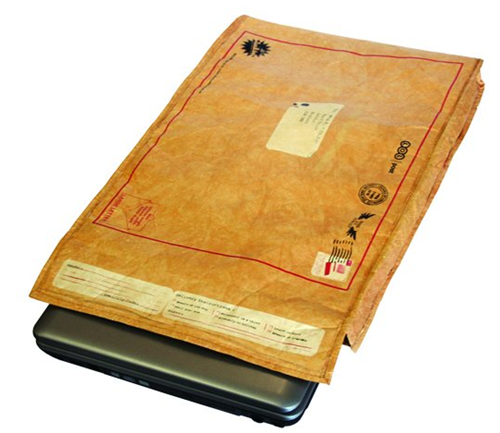
If you want something to carry around your big laptop (or even your tiny Butterfly Touch) you could do a lot worse than the Undercover Laptop Sleeve. I got mine last year while I was in the ‘states, and I was quite surprised to find that they are actually made by a UK company. They are basically a thick, padded envelope with a nice soft lining that you can put your laptop in. The envelope is printed with lots of (rather amusing) fake stamps and address stuff that make it look like you are carrying an old envelope, rather than your super expensive laptop.

If you have a tiny tablet like mine you can fold the whole thing double for even better protection and the top uses velcro to keep everything nicely sealed. It is perhaps a bit expensive just for a laptop sleeve (although I’ve seen some with really eye-watering prices) but if friends or family are looking for things to get you for your birthday this would make a really nice present. They also do a smaller envelope that would fit an iPad.

My iPad Beater

image

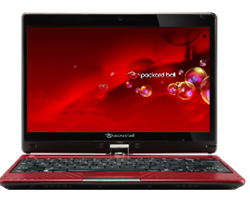
A while back I got myself a Packard Bell Butterfly Touch laptop. It reminded me a bit of the Toshiba M200 I used to know and love, with a twisty screen that made it into a tablet or a notebook. I quite liked the machine and found it much more useful to carry round than any device whose name begins with i. A few weeks ago I popped a solid state drive in it (you can get the OCZ Agility 3 120G drives for less than 100 pounds now – excellent value) and loaded it up with Windows 8. Result = happiness. I’m in the process of getting used to Windows 8 (I keep starting up Internet Explorer rather than the Start button) but what I’ve got now is a really useful device with a battery that seems to go on for ever.

I took this machine to Singapore and, although it is a teensy bit underpowered to run Kinect programs, it did everything else I asked of it with aplomb. I did quite literally a whole day’s work at Schipol airport using the device. I really can get 10 hours of useful battery life out of it.  And it can boot faster than my iPad.

Windows 8 on the touch screen works very well, it seems to support the swiping gestures very well, and the fact that I can open it up and start typing into Word, or PowerPoint, or Visual Studio, is just wonderful. I even wrote my first Windows 8 application on the device while I was at the airport, along with my sessions for CampFire.

There are not many “twisty top” laptops out there at the moment, perhaps this will change when Windows 8 gets going. And while I was at CampFire I got a look at Shane’s really nice Samsung Series 7 Slate. But for now this is my weapon of choice for carrying around and doing stuff.

Nerf Firepower

image

One of my ambitions is never to hold or fire a real gun. But that doesn’t stop me from playing with toy ones every now and then. At Three Thing Game we had a kind of mini arms-race when Christophe turned up with his little Nerf gun and James went home and came back with one of the above. Which is astonishing. It is two guns that make into one big one. It has a sight and everything. And of course I had to have one.

Turns out that ToysRus have them on offer. And if you reserve on-line you get a five pound voucher that you can spend at the store next month. I’m going to use mine to buy some more darts…..

Media Magnet

DSCF6366.jpg

Jake Zukerman of BBC Look North sets up Lindsay for another take….

In between all the lectures and labs and other stuff for today we had BBC Radio Humberside drop by for a chat with some of our students and then BBC Look North came by to find out more about Three Thing Game and Platform Expo. The radio session was a hoot. Steve Redgrave (someone I’ve known since before he was famous) came along and did a storming interview with a bunch of our First Year students who told him all about the joys of studying Computer Science at Hull.

The filming was fun too, although I never know where to put my eyes when someone is taking video of me. If I look at the camera I worry about seeming too intense, and if I look around I worry about seeming too shifty. And then there is the vexed question of which is my best side….

Anyhoo, it all passed off well enough. Yesterday we had a reporter and a photographer from the Hull Daily Mail come to see us and today I was delighted to find that the article had made it to print, with a great picture of some of our students and some quotes from a bloke referred to as “Rob Mile”. I’ll take that as close enough..

Later on Darren did a very good session about PS Suite, which is the new Sony game development they will be releasing later this year. We’ve got special permission for our students to use it in the Three Thing Game competition, and Stuart Lovegrove of Sony Studios in Liverpool will be taking a look at the things that they have made.

All gripping stuff. And then tonight I’ve managed to build a Gadgeteer device that can talk to my Eggbot. Exciting times.