Connected Little Boxes Two Button Game
/
Here we have two Connected Little Boxes using an MQTT server to play the Two Button Game.
I really think we should press the red button……
Here we have two Connected Little Boxes using an MQTT server to play the Two Button Game.
I really think we should press the red button……
Another lovely father’s day gift I got on Father’s Day (what a coincidence) was a box of biscuits from around the world from the Biscuit Baron. They came in a box with a book about each biscuit and even a scoring form that you can fill in. The ones above were wonderful.
The Two Button Game that I made for a Raspberry Pi Jam way back is about to achieve fame. I’m writing an article for Hackspace magazine about creating portable games that run across different platforms and I’m using the game engine as the basis of the piece. Quite fun.
Conversation at the Meetup last week turned to magic wands. As it does. We managed to find this project so I’ve ordered one of the devices. I wonder if I could magic up some time to play with it.
A while ago I bought 100 coloured dice. I’ve no idea why (although I do want to teach number one granddaughter about probability at an early age). However, they are nice to take pictures of.
Windows 11 looks rather nice. Lots of neat changes to make things easier to use. Not sure if I’ll ever want to install an Android app on my PC, but it is nice to know that I’d be able to if I want to I suppose. And the graphical enhancements are beautiful.
The only snag for me is that according to the testing tool that has been released alongside this announcement, none of the PCs that I own will be able to run the operating system. It’s all to do with processor versions and Trusted Platform Modules.
I was hoping to keep my existing machine, which is five years old and does exactly what I want with a minimum of fuss, for a very long time. Perhaps I’ve been lulled into a false sense of security by the way that I’ve been able to put Windows 10 onto 10 year old machines. Anyhoo, I’m not in any hurry to get rid of my present platforms and so it looks like I’ll be sitting out of this upgrade. Which is a shame because I think that some of the new features are really, really nice.
In an age when electronic waste is a huge environmental problem, forcing people to get rid of working devices so that they can have the benefits that Windows 11 offers seems a bit out of touch. I really hope that as we get closer to the release date this situation changes for the better.
Update: I’ve had a proper think about this. Find my proper thoughts here.
The Connected Humber CIC company has just made a substantial (for the company) investment in meaningless numbers. We’ve bought 150 tiny little memory chips, each of which comes loaded with a unique 32 bit number. We’re going to use the numbers the chips contain as IDs for devices we want to connect to the LoRa network.
The rules are changing in version 3.0 of the Lora wide area network, so that if you want to give your devices unique numbers they are not made for you, you have to get your own. And not just any old unique numbers, they want ones with some provenance. This is fair enough. It is rather important that we don’t have several devices sharing the same ID. When the chips arrive we’ll have to read the numbers out of them for us to use in our devices. Alternatively we could wire the chips in and have the hardware read them.
If we have any left over we can always sell them on to the highest bidder. There seems to be quite a market for meaningless unique numbers at the moment.
Servos are a great, cheap, way of giving your devices a bit of physical movement. You can pick little ones up for around a pound each and a single Arduino can control quite a few servos. You can make a Connected Little Box control a servo. In the example shown above you turn the knob on the left and the servo on the box on the right turns, tracking it. However, there are two bad things that a servo can do:
Not move as far as you might want it to.
Burst into flames trying to move to a point that it can’t get to.
The writers of the Arduino servo library have decided that point 2 is actually more important than point 1. So they’ve changed the way that the servo libraries work. This caused some of our servos to misbehave. How did we fix them? Read on…..
When you want a servo to move you give it a pulse of a particular length. The servo converts this pulse into a value which is matched against one that represents the position of the servo output shaft. The servo attempts to turn the shaft so that the two values are the same, causing it to move to a particular position. If something tries to move the shaft away from this position the servo will push back. If the pulse size changes the servo will move the output shaft in response. So far, so wonderful.
But what happens if the computer gives a pulse that is converted to a value that the servo shaft can’t match? The answer is that the servo will try to move to that position and get stuck on the way, stubbornly pushing until coils heat up and melt, gears break and so on. And then you have to buy a new servo.
The original Arduino libraries for the servo assumed a range of movement that some servos can’t match. So they’ve reduced this range. The range boils down to two values that used to be 544-2400 but are now 1000-2000. The new range makes servos a lot safer, there is less chance that they will move into dangerous positions, but it does significantly reduce the amount of movement that you get. The good news is that you can override the pre-set values when you attach to your servo:
servo = new Servo();
servo.attach(2,544, 2400);
The statements above show you how to do this. The first statement creates the servo. The second attaches the server to GPIO pin 2 and restores the range of movement to the values used in the bad old dangerous days.
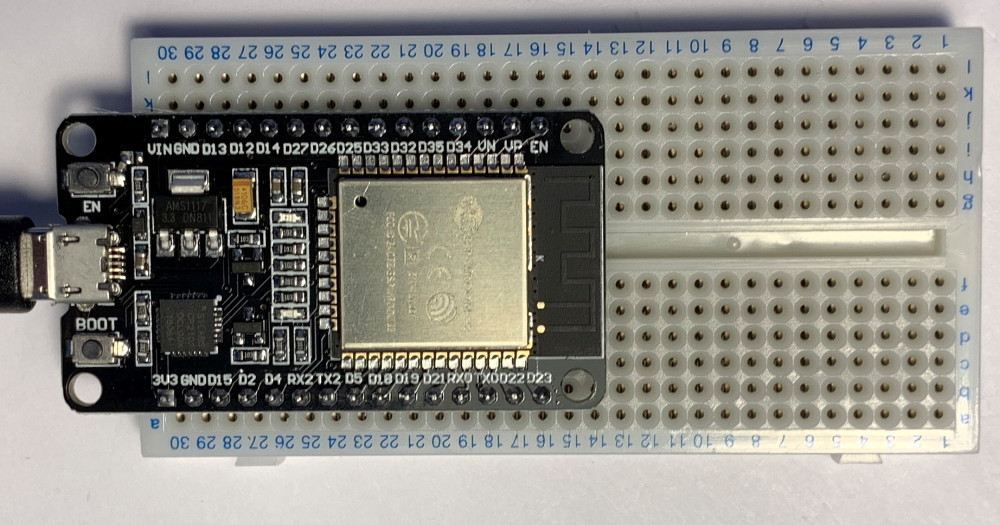
One of the things I like about WEMOS ESP devices is that they can be reset into boot mode via their usb serial connection. However, I’ve also bought a bunch of these ESP32 DOIT devices which are really cheap, which is nice, but you need to boot them by hand whenever you want to transfer new code into them. I thought I’d write down the process, since I seem to keep forgetting it:
1. EN down
2. BOOT down
3. EN up
4. BOOT up
Do this while PlatformIO (or Arduino) is trying to load a program into your device and it should connect and work.
Satoru Iwata was a corporate president who disproved the notion that heads of large companies must have egos to match their salaries. After running his own software company for a while he became Chief Executive Officer of Nintendo at a time when the company was not at its best. He transformed their fortunes by launching a bunch of ground breaking products including the 3DS and the Wii.
He was taken from us at the tragically young age of 55, but not before he had inspired a whole generation of engineers with his constructive and empathic leadership. The good news, for us, is we can get a copy of Ask Iwata, a set of essays and musings from the man himself. I got one today as a Father’s Day present and it is a lovely read for anyone interested in working with people and achieving great things.
I’ve just released the latest version of the Connected Little Boxes software. You can load it into your device here.
One little tip for developers. Keep track of what your project can actually do. Otherwise you will find yourself trying to implement the same feature twice. Although I guess this might just be me.
Trying a new blogging approach. Blogging when I have something to say, rather than fretting about making a post every day……
Only a code magician can fix a program by renaming a variable. That’s me.
I’ve just encountered an hilarious (and by hilarious I mean horrible) bug with an upgrade to the ESP8266 compiler. I’ve been building my Connected Little Boxes software for quite a while now and it just works. Today I noticed that I had upgrades to the Espressif SDK in Platform IO. So, like a fool (and I do mean that) I pressed OK to upgrade them.
And suddenly my newly built program broke. It would start running and then spontaneously explode with Exception(29). Which means that my program is twiddling a memory location that is not where it should be.
First step was to recompile the code for the ESP32 processor (my code works on both). That worked fine. OK, so it is not necessarily something stupid that I’ve done. Back to the ESP8266.
It’s hard to debug code running in a separate device, but after a few minutes (I am pretty good at this - although I was slowed down as bit by the way that the bug vanished when I enabled debug mode) I’d isolated it to this statement:
RegistrationProcessDescriptor.status = REGISTRATION_OFF;
It runs during startup and turns off the registration process. But I guess you’d already worked that out because my commenting game is so good. Anyhoo, when this statement runs the device explodes.
OK. Welcome to planet weird. First thought is that RegistrationProcessDescriptor is not pointing to the right place. But it is. Otherwise the call to the exploding function would not have worked. So, second thought is that REGISTRATION_OFF is a silly value. It isn’t. It’s 1004 since you asked. And status is an integer property in case you were wondering, so everything make sense and the code has been working perfectly for ages…..
Of course I’ve fixed it. I’ve renamed the variable RegistrationProcessDescriptor to RegistrationProcess. Something deep in the compiler must be getting upset about long variable names and dropping dodgy code. There were a few clues:
It works with a different compiler
It worked when I changed the code a bit (by adding debug)
The variable name was a bit longer than ones I normally use
I’m not happy that the problem occurred, but I’m pleased I was able to fix it.
We’re getting new carpet. Well, after over 20 years it is probably time. Anyhoo, we wanted to get something very similar to what we already had, only with more of the carpet stuff. We solved the problem by taking a corner of old carpet to the shop. I think we got quite a good match….
I said goodbye to over 50 years of my past today. Two men came and took away the piano. Our family got it in the 1960s and I, and my sister did our piano practice on it. Then it found its way into our house and we inflicted piano lessons on our kids too. It has been a fixture in our house every since.
It’s been rather neglected for the past few years though. It was heralded as an interesting instrument when it was launched because it used a novel, weight-saving design to mount the keys. Unfortunately this design also meant that after a while all the plastic key mountings fell to pieces giving the instrument a rather snaggle toothed appearance and making the keys not work properly. Then the felts all got sticky so that notes would play forever so for the last while it has been a nice ornament but not really useful. So we decided to get rid of it and get something more up to date that we might actually play. This was done with a heavy heart, but you have to keep moving forwards in this life.
I asked the man who took it away if it would go to a good home. I had a vision of some kind of retirement home for pianos where they could see out their days with plenty of tunes and whatnot. “Well”, he said “we’ll melt down the frame and turn the case into firelighters”. Oh well…
Blimey. Long blog posts are fun to write if you have nothing else to do. I may need to rethink this….
I’ve just spent nearly seventy quids on a video game. Oof. That ‘s a lot of money. And I haven’t got anything to show for it. Just an entry on a server somewhere in the land of Sony noting the fact that they have just made me a bit poorer. My PS5 is one of the ones that doesn’t have a disk drive. I was very happy to get it back last year when they were very hard to source. I don’t buy many video games. This is the first one I’ve purchased since the first week of ownership. I find that the PlayStation Plus monthly subscription gets me enough new toys to play with. However, I’d been planning to get this game since the console came out.
It is very good. The only jarring note for me was the way that the first screen I saw after downloading (a 45G download in about 12 minutes or so - thanks KC) was one offering me a chance to spend an extra 10 quids on the “deluxe” edition of the game. As if. However, the gameplay, the writing and the effects are very impressive. Movie impressive. They’ve used all the colours in their paint box, plus a few new ones, to make a bright and vibrant environment for you to blast your way through. I’ve not played it for that long, but I know enough to want to play it through to the very end. Then I want to go back through again and spend more time looking at the scenery.
And I seem to remember that when the first PlayStation came out all those years ago some of the games were nudging 60 pounds or so a pop which, allowing for inflation must have been a sizeable chunk of change back in the day.
It’s been a bit quiet on the blog for the last few weeks. I always said that I blog because I want to force myself to do interesting things so I can write about them. Recently there have been so many interesting things going on that I’ve not had time to write the blog, which is an interesting problem. Or perhaps I’ve persuaded myself that I’m too busy to blog…
That is going to change a bit now though. I’ve decided to experiment with “project blogging”. I’m going to take the thing I’ve just done, which is create some JavaScript code that runs in a web page and can load code into ESP devices, and write it up. I’m doing this retrospectively from diaries that I kept during the development process. If you’re a programmer it might be an interesting read. The posts will appear around the time I did each task. I’ve tidied things up a bit to reduce the number of dead ends and whatnot.
They start around here. If you then click the left hand link at the bottom of the text on each post you can move through them in order. There will be other topics here and there too, and some pictures. You can just see the project posts by using this link.
I’d love to know what you think of it and how I can improve the presentation content. Feel free to comment (he said dangerously).
I’ve added a new feature to the Connected Little Boxes software. You can now ask a servo to move to a certain position, stay their for a specified length of time and then move back to its previous position. This makes it much easier to create devices where you want to open a lock or wave a flag.
{"process":"servo","command":"pulseservopos","value":1,"pulselen":2.5}
The command above will move the servo to the end of its travel (the value 1) and hold it there for 2.5 seconds before returning it to its original position.
I’ve spent most of today fixing bugs in my software. I didn’t find them myself. Brian fell over them when he was kind enough to have a go with the latest Connected Little Boxes version. I actually quite like fixing bugs. Every one I fix makes the program better.
Rob Miles is technology author and educator who spent many years as a lecturer in Computer Science at the University of Hull. He is also a Microsoft Developer Technologies MVP. He is into technology, teaching and photography. He is the author of the World Famous C# Yellow Book and almost as handsome as he thinks he is.