Heading for London

DSC_0196.jpg

Ian Livingstone playing the game that got us to London. He reckons we should set it in space, and I think he might just be onto something….

To start with, a bit of history. What seems like ages ago David, Simon, Lewis, David and me took part in Global Game Jam Hull. And we built a game. Then Microsoft offered a prize for the best Windows 8 game that came out of the Game Jam and made it into Windows Marketplace. So David and Simon took the game engine, made it marketplace ready and shipped it. And Heartotron won. At the time we weren’t sure just what we had won, but part of the prize turned out to be a trip to London to tour a game development studio and meet up with some of folks who made the game industry what it is. And so we found ourselves on a train at 8:00 am in the morning, speeding through the sunshine and looking forward to an interesting day.

Which we got in spades. It was great. First up was a look around Lift London, a shiny new Microsoft game studio with a focus on making games the Indy way. No big (or at least huge) teams, flexibility, appropriate technology and total commitment to the product are the order of the day. Lift London also sees incubating fledgling games developers such as Dlala as part of their remit, which is very interesting.

With people on the team who can say things like “..and then we went on to write Banjo-Kazooie…” or “..and then we did Singstar..” alongside folks who have grown up writing and pitching games any way they can I reckon we can look forward to some fun stuff in the future.

We got to look at some work in progress, which was fascinating for me. The transition from ideas to drawings to models on the screen was intriguing.. I get very jealous of people who can draw, and loved seeing these people in action, and how they can turn out lovely looking artwork with just a flourish of their Wacom pens. Most impressive.

Then it was time to move on to Modern Jago, a pop up venue in Shoreditch, for workshop with the gaming legends Ian Livingstone (Vice chairman of Ukie, Games Workshop founder, president at Eidos), Andy Payne (chairman of UKIE and CEO of Mastertronic) and Philip Oliver (TIGA board member and CEO of Blitz Games Studios).

Each had plenty of time to speak and plenty to say. Some things that I took away, in bullet form:

  • There has never been a better time to be writing games. Cheap tools and an easy path to market give you amazing potential.
  • There has never been a more competitive time to be writing games. The statement above is true for everybody.
  • Put your monetisation in at the start. If you are going to sell your game, be up front about that (although recognise that very few people will part with cash to buy it). If you have a pay to play model, put that in the central game mechanic. It is impossible to add it later.
  • Use metrics and feedback. Track downloads, watch for reviews and scores, use telemetry to be able to tell how far people get through the game, how long they play for, and when they give up. Phase your releases so that you get feedback from one part of the world (for some reason Canada and New Zealand are popular for this) before you go global.
  • Look for the “soft” market. A big splash in a small pond with a future has more potential than trying to make an impression in a huge marketplace with scant resources.
  • Get a following. Napoleon reckoned that with 1,000 followers you have an army of your own. He wasn’t on Twitter, but you can be. Give opinions and help to people out there and build a following of folks who like you. A crowd who like what you do and want to see what you do next are great to have around. Be loyal to them and they will replay you by supporting what you do.
  • Get a job. You might plan to be a lone gunfighter releasing your fantastic stuff for the world to marvel at, but it much easier to do this with a roof over your head and a full stomach. One of the things you need to succeed is luck (everyone said this). Napoleon (him again) reckoned that he always preferred his lucky generals to his clever ones. If the luck isn’t there, and it may not be, you still need to eat. Make time for your development and go at it full tilt, but there’s nothing wrong with having a backup plan.
  • Get some “skin in the game”. This kind of goes against the above but I still feel it is something to think about. If you feel that the stars are aligning and that this is “the one” then feel free to go for it every way you can. Living in a van for six months while you raise funds and build your product base might be the thing you have to do to achieve success. Worst case maybe your boss (see above) will have you back – particularly if you part on good terms.
  • The three most important aspects of a game are playability, playability and playability. But graphics and high production values are a way to distinguish your product and get people in to discover just how good your game is. But this, of course, costs money and time. As does buying a place in the charts that gets you noticed, something else which might be a necessity.
  • Put yourself out there. I was particularly pleased to hear this one, as it chimes with what I’ve thought for years. You need to be able to do the “front of house” stuff. This is really bad news for software developers, who tend not to be the most extrovert folks, but it is a necessary skill. Get yourself in front of people. Practise doing stand-up, meeting and greeting and networking. If you don’t have these skills other people will not compensate for your lack of them. They’ll just find someone else more interesting to talk to. Ian Livingstone himself said that this is one lesson he took a long time to learn. The great thing about computer folks is that they are used to picking up new tools and APIs. Treat this as just another thing you have to learn and get good at.
  • Make a good story. The press is interested in you, but only if you are interesting to them. “I’ve made a fishing game” is not useful to them. But “I’ve made a fishing game that I wrote underwater whilst wrestling a Great White Shark on the Barrier Reef” is. Make sure that you have a good tale to tell. Use your followers (see above) to big you up and help you get noticed.
  • If you are working as a team, set some ground rules (another favourite of mine). Have a plan for what to do if your lead developer gets a “proper” job and stops writing your game engine. Have a protocol and a policy for re-negotiating your arrangements when these events happen.
  • You don’t need to be the best, or cleverest. Just there are the right time, in the right place, with the right thing. Try lots of things, in lots of places as frequently as you can. Don’t expect success to happen the first, second or perhaps even the third time. But as soon as you get a sniff of something that seems to be working, follow it, develop it and ride it, and you might be the next big thing.

All in all a fantastic day out. Thanks to Microsoft for setting it up.

Big Risk–Big Reward

The Zone

I’ve spent a lot of the last few days sitting in on Seed exit interviews. These are actually great fun, although they are also very hard work. They are part of the assessment process for our MEng students. Essentially we get them to write a case for the marks that they think they deserve, and then they come to see us and try to justify them. For more details of the kind of things we are about, take a look at this blog post from Tom.

Anyhoo, the meetings take around an hour each and they can get pretty intense. Students put very strong arguments that they should get 5 out of 5 for a particular category, and we have been known to revise their scores up as well as down. One of the assessment categories has to do with planning. This is always an interesting issue. I made a point of heading straight for the Risk Assessments that we get the development teams to produce for their projects. These are supposed to set out the major risks to a successful outcome of the project.

Managing risk is a very good plan in a project, most of the projects that fail do so because of a failure to identify and track the things that could go wrong. But sometimes folks didn’t seem to quite get the whole story. Most of the Risk Assessments covered things like data loss, changes to personnel and the like, but some missed out the most important risk of all.

“What if we can’t get it to work?”

It is not unknown for a project in real life (and our projects are as close to real life as we can get them) to fail on this one. The system can have a beautifully crafted user interface, a carefully targeted audience and snappy marketing but if it doesn’t work, all this comes to naught. If you ever, ever, get into a development project you should make it your business to put this in the Risk Assessment and then track it. Maybe the Risk can be removed really quickly, once you’ve built a working prototype. Maybe it’s a slow burner, when you have to do a bunch of work and wait on other people before you find out whether it is a workable proposition.

I make this point as often as I can, and I often get the response “Well, Duh! The project is all about making this thing work, why would you add this as a risk?”. That’s true, but I know about projects, and people, and that defect in human nature that tends to push tricky things away into the distance where you don’t have to think about them too hard. Much easier to design that pretty user interface than work on that nasty interrupt handler code, or whatever.

With experience you learn to identify the “stoppers” in a project; the things that, if you can’t make them work, render the project a failure. These go onto the Risks and are tracked regularly to make sure that nothing in the project is built on sand. By the end of the meetings I think that the students we saw had taken this point on board, which I think is a one of the many really useful outcome from this part of the course.

Black Marble Wisdom

DSCF1577.jpg
Steve Spencer and Rob (Boss) Hogg get down to business

We were very lucky enough to have Steve and Rob from Black Marble come over to Hull today to tell us about the business of software development. I think everyone should see talks like those, particularly people who think that creating software solutions is a technical problem. Because it isn’t. It’s pretty much an “everything else” problem with a bit of technology thrown in to make it work. Steve and Rob give about the best exposition of this that I have ever seen. They can talk about the mistakes that developers and managers make because they are candid enough to admit that they have made most of them over their time in business.

The staggering number of software projects that fail in the real world is down to human frailty as much as anything else, and what Steve and Rob do is point out the behaviours to watch for and the strategies that you can use to mitigate the problems.

My only regret about the talk was that we did not have more students there to get the benefit of it. Folks, if you thought about going but didn’t bother in the end, you have seriously missed out. With a bit of luck Rob and Steve will be back again next year, and you can get the benefit then.

Alien Invasion

WP_20130306_003.jpg

Lindsay and David, standing against each other’s names.

Today a couple of ex-Hull bods came to see us. They now both work for Boss Alien down in Brighton and they came up to give a talk about working as a game developer.

Great talk guys. The thing that came out most strongly for me was that if you want to get into the game you must have a good portfolio of your work to show off. This should include not just coursework assignments that you’ve completed, but also things you have done of your own. Make sure that this is easy to find on your website or blog and keep adding to it. It looks like there is plenty of work out there for good developers, make sure that you do a good job of showing off your skills.

Very Useful Seminar

image

We did our Rather Useful Seminar today about presentation skills. You can find out more here. Then I went over to a student presented seminar about game development. This was run by the Video Game Society. It was excellent. I had to leave early as I had to go off to a meeting, but what I saw set out very well what we had been talking about earlier. There were some nerves, but one of my rules is that the day I don’t get a bit nervous before I go out before an audience is the day that I retire from this job. If you don’t worry about doing it right, then you might not do it right.

Great work guys, looking forward to the next one. You can find the slides and sample code here.

Visual Studio Express 2012 for Windows Desktop

image

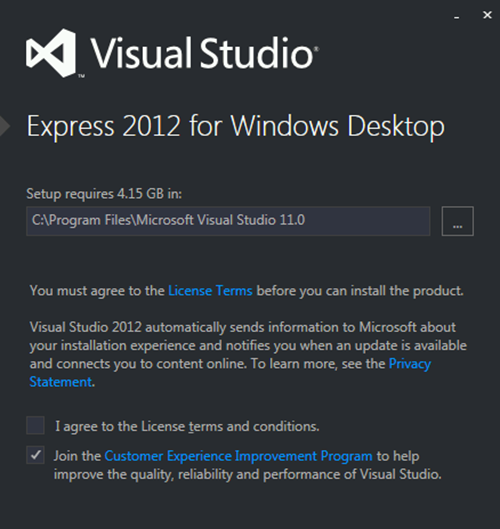
The new Visual Studio 2012 Express is very nice to use. I’m even liking the funky dark colour scheme. But the fact that all you can create with it are Metro apps is a bit of a bind. However, Microsoft have now released Visual Studio Express 2012 for Windows Desktop. It lets you use the fancy new version of Visual Studio 2012, complete with SHOUTY MENU BAR, to create desktop applications in C#, C++ and Visual Basic.

Incidentally, if you want to put the menu bars back to how they used to be, Deborah will tell you how. She writes a really good Visual Studio blog with some very useful tips on the program.

Windows Dev Center Open for Business

image

I’ve just registered as a Windows 8 “Metro Style” developer. It went very smoothly, most of the stuff carried over from my Microsoft account. For the princely sum of 32 pounds a year I now have the ability to publish Windows 8 applications to the world. I wonder if the world is ready for a “Metro Style” Cheese Lander?

You can sign up here.

Cloud Gaming Debate at Platform Expo

image

If you’re around and about Hull tomorrow and interested in the games industry you might like to drop into the Cloud Gaming debate organised by Platform Expos. They’ve got Chris Deering, Founder of Sony Computer Entertainment Europe, Nick Thopmpson from KC, Mike Hewitt from O2 and Jiveen Lal from Hiscox insurance, who are also sponsoring the event. Also Ubisoft are bringing along a playable demo of Assassin's Creed 3 which will be well worth a look.

If you want to go along send an email to ian.archibald@wtchumber.com and he will sort you out a ticket.

C# Yellow Book 2012 Now Available

Yellow Pages

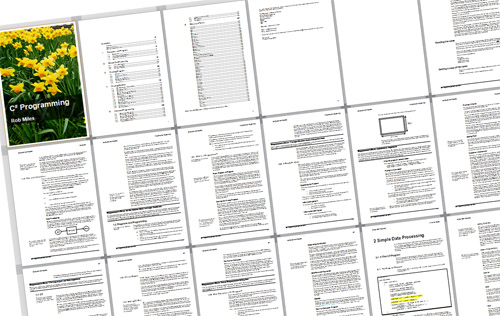
The latest version of the C# Yellow Book is now available for free download. You can get it here, or you can press the spiffy new short cut on this page.

There are a few changes. I’ve fixed all the mistakes that have been sent in (and probably added a few more). The section on Graphical User Interfaces now covers XAML rather than Windows Forms. And the text now mentions “The Wizard of Oz”

Control the Horizontal and the Vertical

Flying

I got an email today from a student looking for an interpolation technique to create smooth curves from a series of points. The reason he was after this was that he was making a game. His problem was that the technique looked a bit complicated and hard to implement on the target platform.

My advice in these situations is always “don’t sweat the complexity”. The simplest way to do this kind of thing is as a series of straight line segments. These are easy and quick to implement and should let you get something working really quickly. If the gameplay works OK, just stick with that technique and work with it. Remember that the player enjoying the game doesn’t know that you originally wanted to add curves. Only put the curves in if your game needs it.

If it turns out that lines would not be appropriate for your game theme, just change the game to one where lines do make sense. Remember that games are like “The Twilight Zone”. You control the horizontal and the vertical. The player is entering your universe, so you can define it as you like. Straight lines or curves, it’s all up to you. But start simple.

How to put files in sensible places

DSCF2695-Edit.jpg

I’ve been in the lab marking student work all day. I’ve watched around 25 or so demonstrations of software. Great fun. You might find it surprising, but I actually like this part of the job. Very hard work, but worth it just to see what students have done with the problem that we set. Every now and then I tell a student about something and they say “You should blog that”. And so here goes.

One of the things you often need to do is store a file from your program. You want to put the file somewhere sensible, for example in the user’s documents folder. If you want to find out where this is you can use an environment variable:

string docPath = 
    System.Environment.GetFolderPath(
System.Environment.SpecialFolder.MyDocuments); string fileName = docPath + @"\MyFile.txt";

The code above creates a string variable called docPath which refers to the documents folder for that user. It then creates a filename (remembering to put the backslash path separator in and use the string notation that stops it from turning into a control character) which can be used to create a file called MyFile.txt in that folder.

If you use Intellisense you can find lots of other special folders, including the ones for music and photos.

Event Today: Real Life Software Engineering

image

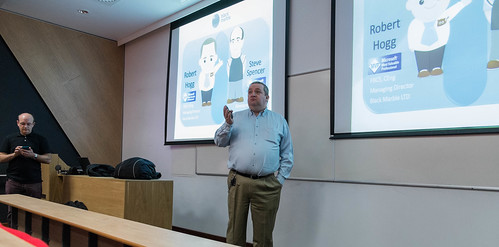
Anyone at Hull who fancies an hour’s break from coursework and revision today can pop along to a lunchtime event run by Robert Hogg and Steve Spencer of Black Marble. Rob and Steve are Microsoft MVPs (but none the worse for that) who have a lot (and I mean a lot) of experience of writing software for customers. If you want to hear some “Tales from Real Life” then you should go along to LTA in the Robert Blackburn Building at 1:15 pm today.

This event would be particularly useful for any First or Second Year students who want to learn more about the software development process.

I’ll be there…. taking notes….

C# Yield Return Fun

public static IEnumerable YieldFun()
{
    yield return 1;
    yield return 2;
    yield return 3;
}

static void Main(string[] args)
{
    foreach (int i in YieldFun())
    {
        Console.WriteLine(i);
    }
}

If you can tell me what the code above does, you understand how yield return works. If you can’t, read on……

In a C# program you can mark things as implementing the IEnumerable interface (to use this you need to have a using System.Collections; at the top of your program). This means the thing can be enumerated,  i.e. it means that I can get a succession of objects from it.

The best way to work through something that can be enumerated is by using the foreach construction, as shown above. You’ve probably seen foreach when you’ve worked through items in a collection such as a List or an array.  In the above code we are using foreach to work through the enumerable results that the YieldFun method returns. 

The code inside YieldFun looks a bit scary. The yield return keyword combination is followed by the thing that you want to send back for this iteration. In this case I’m just returning a different number each time. What happens when the yield return is reached is that the method stops at that point, returns the result and then, when the foreach asks for the next value, the method wakes up and continues at the next statement. The result of the program is simply the sequence:

1
2
3

If you want to programmatically supply a sequence of items to a consumer then this is  a great way to do it. 

What Computer should I get for University?

Seattle Museum.jpg

We got an email last week asking what kind of computer works best at university. Here are my thoughts on the matter:

Netbook

Netbooks based on the Atom processor are very cheap and great for web surfing, email and writing essays but they are a bit underpowered for the more demanding stuff like image editing and HD video. While you can use large tools like Visual Studio on an Atom powered Netbook it will not be a particularly enjoyable experience, particularly if you only have 1G of RAM in the machine.  However, they are great for taking notes, very portable and their batteries should see out a day on campus if you are careful. And they are so cheap you won’t suffer an enormous loss if you drop or lose yours.

Laptop

If you are buying a laptop I would go for at least a Core 2 of some kind. Machines based on the i3 processor are becoming affordable and are worth a look. If you are buying a laptop make sure that it has (or you can upgrade it to) at least 4G of RAM. If you want to write games with the machine it really needs a separate graphics adapter, those with built in graphics might work, but their performance will not be good. Take a look here for details of requirements to write XNA games:

http://msdn.microsoft.com/en-us/library/bb203925.aspx

Such a machine need not cost too much, I got an Dell Studio 15 with ATI graphics for around the 600 pound mark last year, and I’m sure things have moved on since then. Of course the snag with buying a “proper” portable computer is that it is properly heavy and scarily expensive to cart round with you.   This might mean that it gets left back at your house most of the time, which kind of negates the purpose of a laptop.

You should also look very carefully at the battery life. Bear in mind that although there are some charging stations on campus these are the exception rather than the rule and so a machine that can last all day is a good plan. I used to have a rule of thumb that I would take the manufacturers’ claimed life and halve it, so a machine that was supposed to be good for 3 hours would actually give only 90 minutes. However, I think things are improving a bit. My latest little machine claims 9 hours of use, and pretty much gets there.

Desktop

I’m in the process of returning to my desktop roots at the moment. I moved onto a laptop a while back because I loved the idea of having all my data with me at all times. It meant that I could pretty much work anywhere.  However, I can now have my data anywhere by using Live Mesh and Dropbox, and I fancy having a go with two monitors, so moving back to desktop makes sense. If you are buying a desktop now you should take a look at the new Intel “SandyBridge” I5 processor, which is not that expensive and provides a big leap in performance terms. Such a machine with at least 4G of ram and a 1T hard disk  and a reasonable graphics card should come in at around that magic 600 pounds (if you shop carefully)  and will provide a big leap in performance over a laptop of similar price. 

Some students have a great big hulking desktop at home and carry a tiny cheap netbook around during the day to take notes. This can work very well, particular if you use one of the cloud services (see backup below) to keep everything synchronised.

Apple

Apple seem to have figured out what makes something a pleasure to own and use, and then bottled it and sold it. All their machines run Windows really well, although the native OS X operating system has a lot to commend it and gives you access to wonderful programs like Garageband which come free with each Mac. And of course if you have a Mac you can write programs for the iPhone. 

I would place a slight question mark over the reliability and longevity of their hardware though. My MacBook Pro has been through two batteries, a power supply and a main board since I got it, and my little MacBook is on its second battery. I've bought machines from lots of other suppliers, Dell, Sony, Toshiba and Acer, and never had this failure rate with them.

If you are in academia make sure that you buy using the Apple academic discount scheme, you will save a little money but you will also get three years of Applecare warranty, which is well worth having. 

Software

Don’t forget software when you are pricing your systems. All our students get Microsoft Academic Alliance usernames shortly after they arrive with us and you can get Microsoft Operating systems and development tools for free from this:

http://msdn.microsoft.com/en-gb/academic/default

The only thing that you will miss from this is Microsoft Office, which you can get quite cheaply from here:

http://www.microsoft.com/uk/education/studentoffer/

If you want to try Linux I’d recommend taking a look at Ubuntu, which provides one of the best turnkey Unix experiences.

Backup

It seems that you have to lose a big chunk of work before you appreciate the importance of making backups of your data. One of my project students had their hard disk crash the night after they had just finished writing a very important report. Of course they hadn’t backed up the files…. 

These days, rather than remembering take a backup I use Dropbox and LiveMesh to make sure that files on my computers are all synchronised. During a working day I’ll probably move between two or three different platforms and these technologies make sure that the data on all of them always lines up. They are also provide browser based interfaces, so that you can get at all your important files anywhere you can find a web connection. 

http://explore.live.com/windows-live-mesh

http://dropbox.com/

The main problem with these services is the limited amount of space they offer. Live Mesh will give you 5G of online storage for free, with Dropbox you have to make do with 2G for free, although you can have more if you pay. However, this is not an issue for me. I don’t put any of my music or video on them, I simply use them to store “work in progress”, which for all the taught content and presentations that I gave last year only amounts to around 2 or so gig.

Insurance

If you do buy lots of fancy hardware do make sure that it is insured. Sometimes home insurance needs to be modified to cover expensive single items and if you move away from home you may need to get a policy of your own to cover your gadgets.

Final Words

Don’t spend too much on a computer. You don’t need a huge powerful machine to do our courses at Hull, actually most of the work (apart from 3D game writing) could be performed on a fairly basic system costing less than 300 pounds. We do have machines on campus which you can use, including some really powerful ones in the games lab which are available to students who need a lot of horsepower. Remember that anyone who tells you that you need the most expensive and powerful system they have is probably a computer salesman….

Hull Digital Windows Phone Fun

Hull Developers

I didn’t actually shout out “Look ‘Thoughtful’ Folks”, but it looks as if I might have done….

Had a great time at the Hull Digital Group meeting tonight. The topic for the night was mobile development. First up was John Connolly who gave a smashing talk on the pitfalls and potential of mobile development.

Then there was me. I gave a “Biased Overview of Windows Phone 7” where I extolled the virtues of the platform and very nearly showed my Windows Phone Twitter reader working. The audience was great, with some lovely discussion and very thoughtful questions at the end.  You can find the presentation and code files (including a version of that video game grate “Cheese Lander”) here.

DDD Manchester

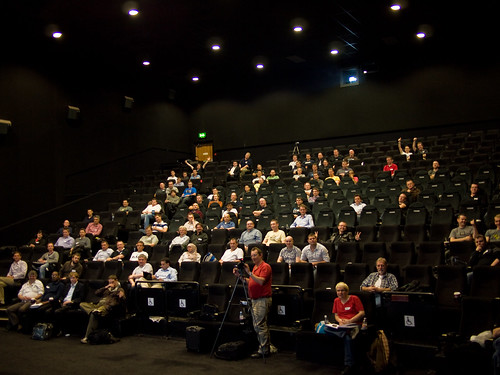
DDD Audience

A great audience. Even though not all of them like cheese.

Today I got on the train to Manchester, did 90 minutes of standup with a broken voice and then got on a train back to Hull. I had to wear two microphones, that’s how bad my voice was.

Anyhoo, the sessions I did (Writing Windows Phone Games and Windows Phone Marketplace) seemed to go OK. Thanks to the guys at Appamundi for inviting me to speak.

I said I’d put the slides and sample code up on the net and, as a man of my croaky word, you can find it all here.

On the way out of Manchester I, of course, took some photos.

DDD Odeon

Print Works and Odeon looking good

The Wheel of Manchester

“The Wheel of Manchester” – it doesn’t half go round fast…

Free Windows Phone Developer Event Next Week

alt

Coming to a cinema near you. Probably.

Hot on the heels of the Windows Phone 7 Live training that we did last week in Bellevue,  Andy and myself will be presenting at a Developer, Developer Developer (DDD) event in Manchester next week on Thursday 7th October (seems appropriate).

If you want to find out how to get started with Windows Phone then come along to the free day’s worth of training. I’ll be doing two sessions on XNA for Windows Phone. I’ll also be telling the jokes that I wasn’t able to use in the Live Broadcasts…. Should be fun.

You can sign up here.

C# Fun with Pexforfun

image

pexforfun is fun. Especially if you like writing code. It gives you a mental workout, teaches you programming smarts and has a lovely test driven, puzzle powered approach based on “Code Duels”.

You are set the task of writing a program that behaves in the same way as some “mystery code”. You type your code into the browser (you get intellisense support and everything) and then hit the “Ask Pex!” button. Pex then compiles your program and runs it against the test cases for that mystery code. If your program works you get bragging rights and then move on to the next puzzle. If your program fails you get to see which tests failed, so that you can refine your code for next time.  You can log into the system so that you can track your progress through the puzzles or you can just turn up and have a go, like I did.

I’ve just done one puzzle and really enjoyed it. I think we will be using pex during our first year programming labs at Hull, it really is a nice way to sharpen your C# skills. Find out more here:

http://www.pexforfun.com/

Unblocking Files from the Internet

image

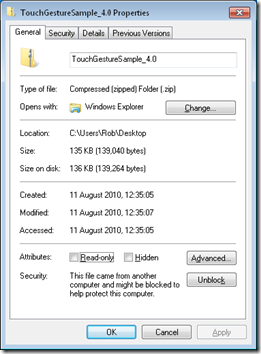
Sometimes you get a file from the internets, or in an email, which you actually trust. Thing is, Windows doesn’t. This can result in fun and games when you try to use this file or, if it is an archive, files from the archive.

As an example, I downloaded the TouchGestureSample from the Creators Club and I don’t want any messages about un-trusted files in Visual Studio 2010.

Solving this is actually quite easy (and best done before you remove the files from the archive). Right click on the item and then click Unblock to say that you trust this file.

(of course, if you do this with dangerous files it might not have a happy ending)