Hull Global Game Jam Lives

HullGlobalGameJam

If you liked Three Thing Game, you’ll love Global Game Jam. It is the same, only the fun goes on much longer. Twice as long. It also lets you meet up with gaming experts and specialists in media and content creation, as well as programmer types.

For Hull students it is pretty much perfectly timed, at the end of the inter-semester week, far away from any coursework deadlines. You must, must, must take part.

Find out more and sign up at the web site: http://globalgamejamhull.com/

Successful 3D Printing

Untitled

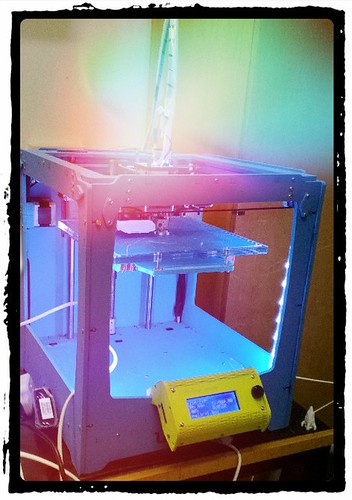
I’ve been playing with my Ultimaker 3D printer for a while now and I’ve reached the point where it is almost, but not quite, an appliance. By that I mean that I can walk up to the printer with a desire to print something and produce what I want. Most of the time. Here are Rob’s top tips for printing.

Raw Materials

Get the latest software:  The best software for Ultimaker is Cura. It was specially written for the device and it works a treat. It is updated regularly and gets even better each time. The latest version, which starts a print off by “dive bombing” the print surface, works really, really well.

Use the right plastic: I only use stuff from the Ultimaker shop or Faberdashery. These places do a range of colours and I’ve found the consistency and quality of what they produce to be very high. The Ultimaker forums are full of people who have had problems with systems when they started to use some cheap stuff they got from an auction site or wherever. Once you get dodgy bits into your print head it is very hard to clean it out. There are two kinds of plastic you can use in your printer, PLA or ABS. I must admit I’m a confirmed PLA chap. This stuff melts at a lower temperature and I’ve found it much easier to work with. It sticks to the print bed really well and doesn’t shrink as much during printing, which reduces the amount of warping that you get.

The Ultimaker people recommend that you print something using the higher temperature ABS to “seal” the print head and block any holes with high melting point plastic so that if you perform later prints with PLA there will be no seepage. I tried this and what happened to me is that I managed to completely block the print head with some high melting point plastic which meant I had to use the “fit a new one” cleaning technique. The new print head design, which you must have, is not prone to leaks in my experience, as long as you make sure that you tighten the head up when it is hot.

Setting Up

Spend a while getting the height of the print bed just right: It is only important to get the print bed alignment right if you actually want to print anything. If you get the height wrong you will either see nothing printed (because the print head is pressed hard against the print bed and no plastic is coming out) or print balls of wool (because the print head is too far away and the stream of fibre just goes out into the air). One trick that worked for me was replacing the bolts and springs that support the print bed. I put in some much longer bolts and some springs that I stole from ball point pens. These give a much longer range of travel for the print bed and make the bed less likely to move. Then I used “Rob’s Patent Bed Levelling Technique”, which goes like this:

  1. Adjust the screws to make the print bed as low as possible.
  2. Move the print head into the middle of the printing area.
  3. Manually turn the Z axis screw until the print bed is a few millimetres away from the print head.
  4. Adjust the Z limit switch so that it triggers at this point. Test this by turning the Z screw by hand to make sure that it trigers. Do this before you use the software to send the print head home.
  5. If you have got this right you should have a situation where when you send the print head home it ends up a few mm above the print surface. Now you can level the bed off using the adjustment screws.
  6. The four screw positions for the adjustment bolts form a square. It is very important that you adjust the height of the print head on the lines of this square and nowhere else. Otherwise, when you adjust the height at one screw you will affect the height at another, which will drive you nuts. The idea is that if you get the height right on these lines it will be right for the entire surface, because your print surface is flat. 
  7. Adjust the bolts so that you can slide a single piece of paper between the print head and the print surface. Do the final adjustments when the print head is hot. I always do a sanity check before every print where I send the print head home and then slide my magic paper to make sure that the clearance is still OK. This ensures that if the bed has got pushed down while I was removing the previous piece from the surface I discover this and pop the bed back into place. Once you get the height right you will never have to adjust the bolts again.

Make sure that the plastic is flowing before a print: At the start of a print you can turn the print feed drive to push fibre out of the head. Do this. Make sure that you are getting a nice stream of plastic out of the head just before you print. As soon as the head is hot you should hand feed some plastic and then set the print going. Any hiccups in the plastic feed at the start of the print process will probably stop the first layer from sticking to the print bed, which will end badly. Some people use “retraction”, where the software pulls the fibre back during printing to remove spurious bits from the print and make it tidier. I’ve never used this, the idea of sucking hot plastic into a cold part of the print head just scares me. And I’ve been perfectly happy with the results of ordinary printing.

Printing

Keep an eye on the print process: My experience has been that if I leave the machine for too long, bad things happen. And anyway, it’s fun to watch.

Make sure the fibre is feeding well: I’ve had a few situations where the roll of material on the back of the printer has “gummed up”, stopping the feed of plastic into the printer. Make sure there is plenty of slack. Actually, I now don’t use the roll on the back at all. Lots of fibre is supplied loose, and so I just lay it on the floor underneath the desk where the printer is standing and then just turn the roll round as the fibre is used. I did experiment with a turntable that would feed fibre from a roll laid on top of it, but that didn’t work very well so now I manually rotate the roll every quarter of an hour or so. This means that I have a reason to keep an eye on the printer, which is nice.

Après Print

Never leave the print head hot: If the head is hot, it should be printing. When I started using the printer I thought that giving the printer a few minutes to properly warm up would make printing better. It really, really does not. What happens instead is that the heat travels up the print fibre which melts and then solidifies when you start printing, forming a plug which takes ages to fix.

Release the Fibre Feed when you leave the printer: I’ve no idea whether this solves a problem or not, but it works for me. Whenever I know I’m leaving the printer for a while (more than a day or so) I release the fibre drive at the back of the printer. My theory is that taking the tension off the drive bolt and associated parts will make them last longer. I’ve no idea if this works or not, but I’ve not had any problems feeding fibre into the machine, and I want to to stay that way.

Keep the print head clean: This is particularly important if you change the colour of your prints a lot. I have a “sacrificial rag” that I use to wipe down the print nozzle just after a print, when it is still hot. This stops a print from picking up stray bits of plastic of a different colour. Do this carefully, so you don’t burn your hands.

Enjoy your Printer

Look for things to print: I bought the printer as a way of making cases for gadgets. I’ve done that, but I’ve also had a lot of fun finding things on thingiverse and just printing them. Especially the rocket.

Try different colours: Faberdashery do lots of colours, and even luminous fibre. They also do a “variety pack” of different colours which is great fun.

Show it off: The printer is quite portable, I use a big blue Ikea bag to carry it around. I’ve not found that it loses calibration when it is moved, which is nice.

Global GameJam Hull Venue

Pics (4 of 5)
Great things are destined to happen here….

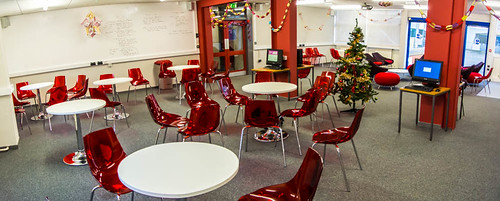
Today we took a look at the site for the our Hull Global Gamejam event. We are holding it at the Hull Studio School right in the centre of Hull. If you are serious about game development, or just fancy having a “Weekend of Fun”™ then keep the weekend of the 26th and 27th of January free next year.

Pics (5 of 5)

The venue has this entrance foyer with really funky chairs.

We will have a registration site and a whole bunch of details about the event coming up soon.

It is going to be such fun.

Face Lens for Windows Phone

Untitled

I’ve been playing with some of the Lens programs that you can get for Windows Phone 8. These application sit on the front of the camera application (a bit like a lens does I suppose) and do things with the image. The Face Lens program puts things onto the faces that it sees. The application is free, but you can buy extra bits and bobs to add to images. Above you can see what it does to the face of a well known local newsreader. Quite fun.

Christmas Bash Wordsearch Bonus

DSCF0023.jpg

This could be you…

I’ve got a second Nerf Gun for the person that the highest number of the 54 “Departmental Christmas” words in the Wordsearch below:

D G S Z T G R Y S U I R O T S I P E I L A C R F X W C E X Z
M G U F T T E S P M O T N A I R B C L K V E G Y O S H V T Z
B I P T U Y D B P X G R A X S I M N M O D L I E B M R H D H
W D E C K N O S N I B O R R E T E P M N E A R R X I I O J W
D A R S L L E B K R A M J K U I L S A O N E X G H K S O I B
S O L A Z N E N F I U I N K T S D X N N T O A D X E T V A J
E Q A B V E I K C M N E R R A D E A I U A L J I Y B M Y P M
L Z B M A R T I N W A L K E R L R S P B G N W V A I A Q W I
I D A V I D G L O V E R V V A D P M U A E X I A S E S I A C
M W O R D S E A R C H M P E O A O E N I K L N D E L A K R R
B T M U U R W S E M I A N B P C Y D L R S S D C K B M R R O
O T I I A Y I Q W J J A O A X W R G B H I V O F O Y A V E S
R H K L Q D Q H V S J T D C A O O T F W D C W F O D N J N O
K J E O R Z C D M A T O I K I R U R G H D X S A R K D O V F
C O B A B J Y W M A P W R D D V Y Q U X R G T T B B A H I T
O G R T I S W M C O D A X O T F U J I Z A T E Z M U M N A N
C N A N N O E I U C H A N D R A K A M B H A M P A T I R N O
N A Y A G N B L G S T H G I R W N E L E H Y Y R H R L A T S
A I S H W Y O F L L D A R R Y L D A V I S Q J P A E L Y N I
H J H D A S P E R Y Y E D Y X U D B N F I K N L R R S N Z P
W G A C N A N L E N L Q A C S H P F I N J S W R G H O E E P
E N W U G E E E P N S G V Z V Z O B G U C A E F B O N R C A
R I S B L K H C P M T M I H D J P D G G Z T M G R Y F W E L
D P H E X Z M N O O A G D F C L E K V G S V T E G Z B I T C
N U H U Y D O B H R R P P X G L Y E R G N O M I S O R A X O
A S I M L Z N M N R B O A H I D H W D R O C K E T W O C K J
M O J W A L D A A E U S R J K U I L S X H O I B O A A G Z N
E N F M I U I N O L C K K Y T I S R E V I N U L L U H R L T
S D A O A X V A J L K J E Q J A N S P R I N G E R B V A D E
L J Y Y P Z B G A Q S V R S P A C E C H E E S E B A T T L E

Send me a picture of your solution and you can puck up the prize from my office if you are the the best one. Pictures must be sent in before the end of today (Thursday).

Simon Grey is not allowed to take part.

Christmas Bash 2012

We had a great Christmas Bash today. A nice select turnout and plenty of fun was had.

DSCF0011.jpg

We had a whole bunch of expensive hardware and a Wordsearch. Guess what everyone spent their time doing.

DSCF0015.jpg

… and guess who won.

DSCF0028.jpg

A lot of fun was had with Simon’s newly acquired toy…

DSCF0016.jpg

What a room full of Computer Scientists do if you shout “Strike a Pose”

DSCF0036.jpg

..and we even had Rocksmith as well. You can find all the pictures I took here.

Delegates and Dice

IMG_5589_90_91.jpg

I’ve been marking the First Year “Space Cheese Battle” implementations and it has been great fun. The aim of the work is to implement the board game “Space Cheese Battle”, which is a bit like Snakes and Ladders crossed with Ludo. Using rockets. And cheese.

The program uses a dice to control movement and in the final implementation this must of course be completely random. However when the program is being tested a random dice is exactly what you don’t want. What you want is a way of getting particular numbers so that you can test the program more easily. I first hit this kind of problem when I wrote a pontoon (blackjack) playing program and I had to wait for ages for the game to deliver a King followed by an Ace, so I could test the part of the program that deals with that. Eventually I figured out that a good way to speed things up was to allow me to type in the card being dealt, rather than have it picked randomly. Later on I worked out that it is even easier to test if you have a “pre-set” list of cards that are dealt automatically.

We can do the same thing with the dice for Space Cheese Battle. I can make three dice methods:

static Random rand = new Random();

static int RandomThrow()
{
    return rand.Next(1, 7);
}

This is the “production” dice throw method. It just delivers a value between 1 and 6.

static int InputThrow()
{
    int result = 0;

    while (true)
    {
        Console.Write("Enter throw value: ");
        try
        {
            result = int.Parse(Console.ReadLine());
            break;
        }
        catch { }
    }
    return result;
}

This is the “manual entry” dice method. It returns whatever the user types in. Note that I’ve not limited the values at all. It is sometimes useful to put in very large dice throws so that you can move the player onto particular squares for testing.

static int[] diceValues = new int[] { 
    3,4,5,4       
};

static int throwPos = 0;

static int FixedThrow()
{
    int result = diceValues[throwPos];
    throwPos = throwPos + 1;
    if (throwPos == diceValues.Length) throwPos = 0;
    return result;
}

This is the “fixed sequence” dice. I can create a whole set of values and then have them replayed by the dice. This is great for automated testing.

Of course the difficultly comes when I have to write my program and I need to switch between these dice behaviours. The students had hit this problem too, and some had created tests that checked the dice mode and then called the appropriate method when the program ran. These work, but the best way to select the kind of dice that you want to use is to create a delegate which refers to a particular method.

delegate int DiceThrow();

A delegate is a type of variable that can refer to a method with a particular signature. The statement above creates a delegate type called DiceThrow which can refer to a method that accepts no parameters and returns an integer, just like the dice methods above.  I can create a variable of type DiceThrow.

static DiceThrow ActiveDice;

The variable ActiveDice can refer to any method that accepts no parameters and returns an integer. I use it like this:

ActiveDice = new DiceThrow(RandomThrow);

The variable ActiveDice now refers to a new delegate instance connected to the RandomThrow method. Which means that the statement:

Console.WriteLine(ActiveDice());

- will call the RandomThrow method and print out what it returns.  In other words I can use the ActiveDice method exactly as if it was a method that accepts no parameters and returns an integer. When the delegate is called it will follow the reference to the method it has been connected to and then run that method. The great thing about my game code is that I don’t need to change the code that uses the dice to make it pick up new dice behaviours. I just have to call the delegate.

Note: The C# implementation also incudes a Delegate class (note the capital D) which intellisense might try to get you to use. This does something different and confusing. Make sure you use the delegate with the lower case d.

Christmas Bash 2012 is Coming

Poster

We will be having our Christmas Bash on Wednesday 12th of December in the department. There will be hastily set up video games, food ordered at the last minute, and staff arriving just in time to be beaten at Team Fortress and whatever other gaming goodies that we can find, including a Wii U or two if we can get them to work. There will also be a last minute wordsearch with a prize that we will only just have had time to buy. In fact, this event is so "thrown together" that we've had to use the artwork from a couple of years ago.

But it will be fun for all that. Tickets are available from the departmental office. The fun starts at 4:30 pm in the Design Lab. And yes, we will be setting up the famous “Pink Christmas trees” once we’ve found them in the office stores.

Watching Progress Bars

IMG_2347_8_9.jpg

I’ve bought a replacement disk for the SSD that has failed. I’ve got a Samsung one instead of the OCZ one that I used to have. It went into the desktop at around lunchtime and by mid afternoon I had Windows 8 back and running fine. Now I’ve been re-installing all the software and trying to remember just what I used to have on the machine.

And don’t tell me I should have made a backup – I had done, but Windows 8 refuses to recognise it. I made the stupid mistake of thinking that the Windows 7 backup tools that are present in Windows 8 could be used to restore a backup into Windows 8. What I probably should have done (although I’ve no way of knowing this) is install Windows 7 and then restore the Windows 8 backup from that.

Hull Global Game Jam is Coming

DSCF8936-Edit.jpg

How many of these folks will sign up I wonder? All of them, I hope.

People, keep the weekend of the 26th and 27th of January 2013 clear. If you are a Hull student this is the perfect way to celebrate the end of your inter-semester gap week. We are very pleased to announce that Hull will be taking part in Global Game Jam. This is a bit like Three Thing Game, but better and with more people. We are working in conjunction with the Platform Expos folks to put together something really special. If you are serious about writing games and want to make lots of new friends and learn stuff, then you must, must, must come along.

We had a meeting today where we moved things forward and I got to meet some of the wonderful folks who are going to make it all work.

More details soon. V. excited.

Mending Stuff

IMG_2227_8_9-2-Edit.jpg

I’m now officially fit enough to mend things. Today it was the turn of the doorbell. I did ask someone to come round and fix it but that didn’t end well. Apparently they turned up earlier this week but didn’t think there was anyone home (Old Joke Alert).

I’ve replaced the batteries in both ends and now it seems to work. Of course what I really want is one of the new fancy doorbells that plays MP3 files when someone presses the button. I could have some real fun with that….

Wii U Fun and Games

image

I swore I wasn’t going to get a Wii U. Of course not. Silly idea. Another console under the telly. Why would I want to do that?

Indeed.

But it is very nice. A lot nicer than I expected. And even better after the enormous update that it insisted on performing just after I’d plugged it in. Actually the thing that got me excited in the first place was the potential for media management that the device brings. The large controller with a screen is a great way to browse for and view media, and you can also use it to turn your telly on and off. If Nintendo play their cards right (historical fun fact – they used to sell playing cards before they sold video games) they could make this into a proper media hub with the benefits of dual screen that the controller brings. Microsoft have “Smart Glass” which is a big step in the same direction, but Nintendo sell you a complete solution all in one, rather than relying on you bringing a Smartphone to the party. If it all comes together, say in three or four enormous updates, I can see folks in the family really appreciating the ability to find and play media on Netflix, Love Film and the various iPlayeresque services.

The hardware is impressive. The remote screen is very good and there is no noticeable lag between it and the main screen. The fact that it is a resistive touch screen doesn’t cause problems, and even makes it easier to use a stylus where required. The worst thing about the shiny black devices is that they really do attract fingerprints and dust. However, we finally have a Nintendo device with proper video output. The HDMI plug just goes straight in and produces nice looking video and surround sound.

The games are great too. If you get a Wii U you must get NintendoLand. No ifs, no buts. You’ll also need to dig out 4 Wii controllers too (preferably with Motion Plus) to get the full five player action, but it is worth it. The “asymmetric” games are great. My favourite is the one based around Luigi’s Mansion where you have a ghost (who uses the big controller see where everyone is) sneaking up on players who have only got there torches to see what’s around them. I don’t think NIntendoLand will have the same long term appeal as Wii Sports did, but it will really make all your Christmas parties go with a swing.

We also had a go at Zombie U, which is quite frankly terrifying, Super Mario which brings Mario into high definition and adds some very interesting variations with players able to use the controller to change platform the environment and finally Tekken, which is, well, Tekken.

One surprising thing about the Wii U is the number of launch games available. The actual arrival of the console has been fairly low key in my opinion, perhaps because they haven’t made a huge number, but the range of games available is very impressive. Some of them (step forward EA with FIFA 13) are just Nintendoised versions of their offerings on other platforms (and in the case of FIFA it’s FIFA 12 too) but some look very interesting.

If you want a glimpse into an interesting video game future then the Wii U is well worth a look.

The Evils of Solid State Disks

IMGP0143_4_5.jpg

You’d think that a solid state disk would be more reliable than one which contains tiny moving parts that whizz around in close proximity to each other, but that doesn’t seem to be the case. And with solid state disks you don’t get any warning.

With hard disks I’m quite good at detecting when something is amiss. Files that take a long time to arrive, clicking noises from the box, all give warning of bad stuff to come. But with an SSD they can just fail. And not just one track or sector, but the whole thing at once. At least my SSD went a bit wobbly before it finally expired. It worked fine when cold, and failed when it had warmed up. The good news is that ebuyer sent me direct replacement of the broken disk. The bad news is that the replacement is way too identical to the original. It doesn’t work either. And the ebuyer system seems to come unstuck if you try to return a return.

Ho hum.

Therapeutic Pottering

IMGP0131_2_3.jpg

I’m definitely getting better. It’s rather strange. I’m perfectly happy to dash around the place, running errands and fetching things, but I have real problems sitting down and doing stuff, especially at a computer. I mentioned that I didn’t feel “normal” last week to the doctor, and he made the perfectly reasonable response “Just what is normal anyway?”. Fair point.

Anyhoo, at the moment I’m just pottering around the house doing bits and bobs and taking every excuse to go out for a walk.