Paid my Office 365 Subscription

I paid my annual Office 365 subscription today. And I don’t mind doing it. It’s around the price of a proper video game and it gives me a whole bunch of online storage along with all of Microsoft Office to work with.

I ‘m a great believer in paying for things that I use. Two reasons:

  • the business model is nice and clear. I’m giving them money and they are giving me a service. I don’t want to waste brain power trying to work out how my suppliers are making a living. I also don’t want to have to worry what will happen when the venture capital runs out and the service is withdrawn.

  • I like my suppliers to have some “skin in the game”. If something breaks I want them working to fix it otherwise they won’t get paid.

3D Printer Tip - use good quality filament

I remember a while ago someone saying that the average 3D printer can produce output with the quality of “the toys that you can find in a Christmas Cracker”. Well, we are making our own crackers this year (just for fun) and I’ve found a nice set of animal shapes that we can use. I dropped the designs into Cura and sent it over to Octoprint for printing by Una, my venerable old Ultimaker One. She’s seven years old now, but still prints really well.

I think one reason for the quality of the output is that I’ve stopped buying cheap filament. A few years ago I went through a phase of being impressed by 1Kg reels of printable materials available for only a fiver. I tried a few and the quality varied a lot. And some had the habit of snapping off during feeding, which meant for loads of fun getting the broken bits out of the print head.

I now use this stuff. It’s not cheap, but it is not stupidly expensive either. It is consistent, adheres well and the colours look good. And it comes on nice spools. Bearing in mind the time it takes to print stuff, I’m unlikely to use a hugely expensive amount of it.

Paying the Untidiness Tax

While I was assembling devices earlier this week I discovered that I was finding it hard to work because my desk was a bit of a mess. Having thought about it, I now regard an untidy desk as a kind of “tax on effort”. If it takes ages to find the solder after you’ve put it down then you will take longer to build things. And losing the thing you’ve just made can really slow down development.

This new way of looking at the situation, along with half price storage boxes at Hobbycraft, has had me spend the last couple of days putting my stuff in order and clearing the desks. The idea is that when I want to work on one project I get out the bits for that project, work on it, and then put them away afterwards.

Let’s see how long it lasts….

Measuring Power Consumption

You may be wondering how I can be so sure about the power consumption of my various devices, what with the amounts being so tiny. Well, I’m using one of these. It is supposed to be used for testing batteries and power supplies, but it gives a rather useful four digits of power consumption information. I’ve made up a special connector from an old USB cable and I’m getting depressingly accurate readings.

In case you are wondering about the device at the top, that is something you can use to apply a hefty load to a USB power source. If you do decide to use it, remember that the resistors (the two green things) will get very hot.

Send for the FireBeetle

If you hit a really nasty problem when you are building something, a good way to attack it is to try to change the problem to one that you think will be easier to solve. You can’t always do this; some customers really want particular deliverables. However, you should never make the mistake of assuming that things that are important to you are also important to the customer. In my earlier days I spent ages getting something to work which was dismissed as “..not really something that we want thanks”. If I’d asked the question “How much to you need this?” earlier I’d have saved myself a lot of effort.

In the case of my environmental sensor I’ve had a chat with the “customer” and discovered that the first set of sensors that are required for testing can be WiFi connected. That means that I can put the Heltec Cube back in its box for a while and switch my attention to something that works over WiFi. I’ve had a play with the DFRobot FireBeetle in the past and so I’ve built a sensor that uses that. The FireBeetle has some nice design tweaks that reduce sleep power consumption. It was fairly simple to port over the software I’ve already written, and I’ve designed a little carrier board that takes the Plantronics PMS5003 sensor along with a FireBeetle and a BME280. And it all works.

The only snag is that I’ve discovered that some device specifications have a lot in common with the current political situation. They are full of things that aren’t true when you test them. The FireBeetle consumes a thrifty 1.5 milliamps when asleep, which is just about viable for our application. Unfortunately the Plantronics PMS5003 sensor, specially selected for its low power features, consumes 4.5ma when I turn off the enable signal. This is much, much more than the amount claimed on the data sheet. Oh well. It turns out that to find out how hard it is to build something you have to build something….

Not all Arduino C++ Compilers are the same

When I was writing the code for the Heltec Cube I came across something that has caused me problems before. When you switch from one Arduino device to another you sometimes change compilers.

The compiler is the program that takes your source code and converts it into the low level instructions that the hardware will follow when the program runs. Different processors have different compilers and, what with C++ being a language with a few grey areas, this can change what happens when your program compiles.

In the case of the Heltec Cube I got errors when using structures in function parameters. In C++ you make a structure like this:

struct InputSwitchSettings {
int controlInputPin;
boolean controlInputPinActiveLow;
};

This is the type that describes the input port that allows the user to switch the device into configuration mode. It sets the physical pin number and also whether that pin is active low. Once I’ve got my structure I can then create a variable of that type:

struct InputSwitchSettings configPin;

I might make a function that wants to use the value of configPn, which means the function must have a parameter which is a reference to the variable:

void showPinSettings (struct InputSwitchSettings * switchRef)
{
Serial.println(switchRef->controlInputPin);
Serial.println(switchRef->contrlInputPinActiveLow);
}

The function showPinSettings will print the settings of the given input switch. Note that in the declaration of the function I’ve told the compiler that InputSwitchSettings is a structure (that’s what the word struct does).

However, some compilers let you leave this struct out (because the compiler can work out this information for itself). The compiler for the ESP32 is relaxed like this. However, the Cube compiler insists on having struct there. It took me a while to work out why code that I’d been using for ages suddenly broke. I guess it serves me right for being lazy.

If you start having problems when you target a different device on the Arduino platform, remember that you are not in Kansas any more where compilers are concerned.

Low Power Cube Problems

After the euphoria of getting my Heltec Cube Sensor transmitting data over the weekend I thought I’d take a look at the low power capabilities of the processor. I want to drop the power consumption of our sensor down to tiny levels so that it can run for a very long time on batteries. The device is billed as having a power consumption that drops to micro-amps when in “sleep” mode, and I was keen to try this out.

It was a rather fraught business. Firstly the power consumption never seems to drop below around 20 milliamps, even when in sleep mode. Secondly (and rather annoyingly) when the device wakes up from sleep some of the internal processes don’t seem to work properly - notably the millisecond timer. This might be down to my code though.

The device is very new and definitely a work in progress. I’m hoping that going forwards I can work out what is going on and properly realise its potential.

Sunrise at Radio Humberside

I was at Radio Humberside bright and early this morning to review the newspapers. This was great fun, and enlivened by an awesome sunrise right outside. I pressed my phone up against the glass to try and get a picture and got the image you can see above. The reflections are all caused by the second layer of double glazing that they need for sound proofing. At the time I took the picture I was a bit upset by all the reflections but having thought about it I think they add quite a lot of atmosphere to the shot.

Flying Blind with the Heltec Cube

Now that I’ve got the Heltec Cube sending messages to the Things Network, the next thing to do was to get the device reading from my particle sensor. This was tricky because the sensor uses the one serial port on the Cube. That’s the same port as is used for programming and sending diagnostics. So I had to fly my code “blind”. Fortunately the Cube has a single neopixel on the board which I can control from software. And by using that, plus testing the code on another device first, I managed to get it working.

If you watch the two second video above you can see the pixel flash green when the message goes through. I’m very proud of that….

Heltec Cube Wrestling

A while back I ordered a Heltec Cube Cell device. It’s a very low Arduino compatible device with LoRa built in. I thought it might make a fine platform for an environmental sensor.

Today I got around to having a play with it. The LoRa support is built in to the device, which means no need for any LMIC libraries (which I use with the Semtech devices). In theory you can send AT commands to the device to configure LoRa and set things up. I say “in theory” because I couldn’t get it to work.

However, it turns out that you can also configure LoRa by using a file called commissioning.h which is deep in the innards of the CubeCell hardware libraries. By modifying this and using a rather useful howto I found here I got the device happily sending messages to the Things Network. Tomorrow I’m going to investigate low power mode.

Robot Tracking at the Hardware Meetup

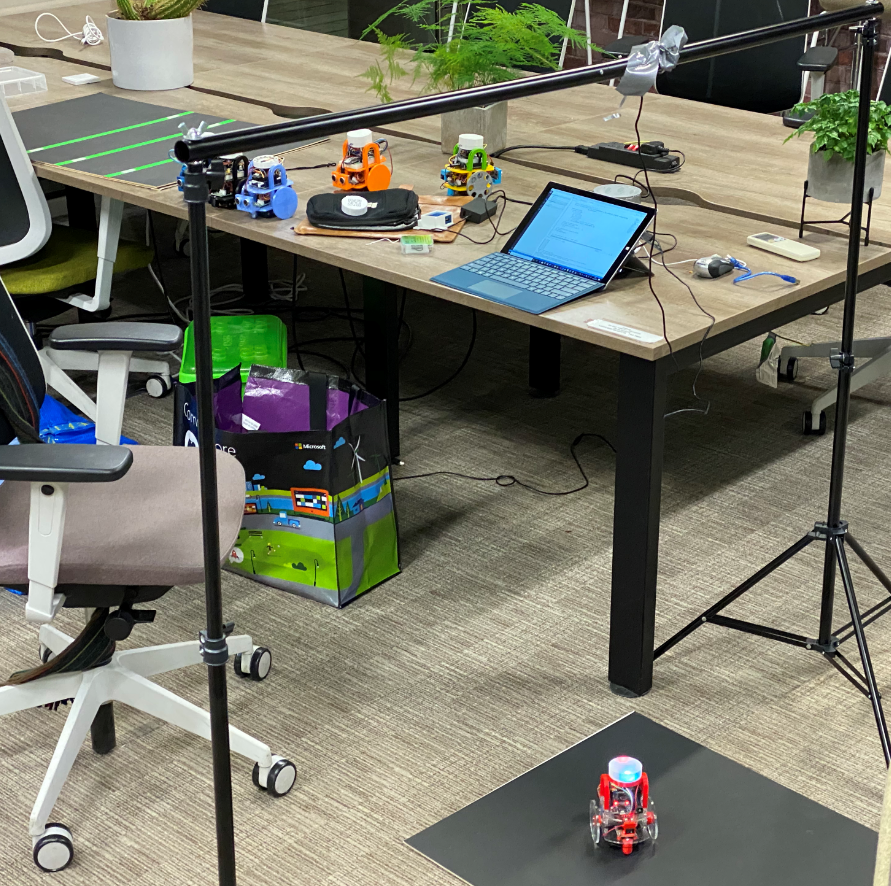
Tonight we did some robot tracking at the hardware meetup. This is all part of the “Robot Rugby” thing we are working on. Brian and I set up our cameras and got to work. Brian is reading QR codes from the top of the robot, I’m trying to find out if I can get position and orientation from two lit pixels on top of the robot.

We set up the supports (with copious duct tape) and started playing. Tests seem to indicate that I should be able to detect only the pixels on the robot by turning down the gain on the camera so that only very bright lights show up. Lots of work to do here, but we are making progress.

Environmental Sensor Filters

For a while I’ve been looking for air filters that we can use in sensors. The filters must have holes large enough to let air through, but not so big as to allow creepy-crawlies in. We’ve already had one sensor disabled by eggs laid by a tiny spider. For a while it looked as if water inlet filters for washing machines would do the job, but now I’ve found something even better.

These filters are actually for use by pipe smokers but I reckon that they will work a treat in our sensors too.

Buying overhead camera supports

As part of our Hull Pixelbot Rugby effort we need some supports for the camera that we will use to track the robot player positions. Searching for “camera supports” doesn’t work. But after a bit of bouncing around Amazon I came across the above. It’s supposed to be used by photographers to support backdrop cloths, but it provides exactly what we want, a portable means of hanging a small camera over a playfield. The price is very nice too. And I might even use it for photography.

Potato Clock

First thing yesterday morning number one wife told me that she was going to get a potato clock. This threw me completely. I remembered from years ago a demonstration which showed you can power a clock from a potato (you can buy kits) but I didn’t think that science experiments were on the agenda in any particular way.

Then the fog cleared. What I should have heard was “get up at eight o’clock”. Fair enough.

Project XCloud looks very good

When David came round last week he showed us some Xbox games running on his Samsung phone. Not directly of course, but via Project XCloud. This is presently in Preview and David had managed to join the preview program. Once he had connected to our WiFi and paired an Xbox controller with his phone we were able to see a perfect rendition of Forza Horizons running smoothly on his tiny device. It just worked. I had a quick go at driving and it seemed as responsive as the local version.

Of course we are quite lucky in Hull, what with our high performance fibre internet everywhere, but hopefully it will work as well in less well connected regions. It looked very good. It even inspired me to spend some more time in the Forza universe, which was great fun as usual. There’s nothing like going sideways down a frosty road at great speed in a top of the line BMW. I sat down for “a quick drive” and got up two hours later…..

Hull Pixelbot tracking for robot rugby

At the last hardware meetup we decided that it was time to get our robots playing rugby. The idea is that it is a team game, with members programming their robots to make plays in a playfield. .

We’ve no idea how it the game will actually be played but we have decided to find out by just doing it. Brian has done some sterling work (see above) with an image processing application that can now identify the top of the robot (see the bit in the green circle above. The next thing to do is to pick out the QR code and identify the robot. Then we send this position back to the robot to tell it where it is. This will make it possible to write programs that will make the robot head for different parts of the playfield.

We will be setting up our robot arena and doing some tracking experiments on Thursday next week (the 5th of December). If you want to come along and play your part in designing the game and how it works we’d love to see you. We start at 6:00 in the group work area in c4di.

Old game boys never die

There must be about twenty quid’s worth of stuff here….

A couple of weeks ago we went to Comic Con in Birmingham. As I remarked at the time, | didn’t buy much. One of the reasons was that I already had lots of things for sale on some of the stalls. Today I happened across a bag full of bits and bobs, including my beloved Game boy Color and printer. Amazingly it still had some of the pictures in the camera memory. The printer still works too, although the thermal paper seems to have given up the ghost. I wonder if you can still get paper for it?