Fiji Instax Mini Evo Cinema Review
/
It does look super cool
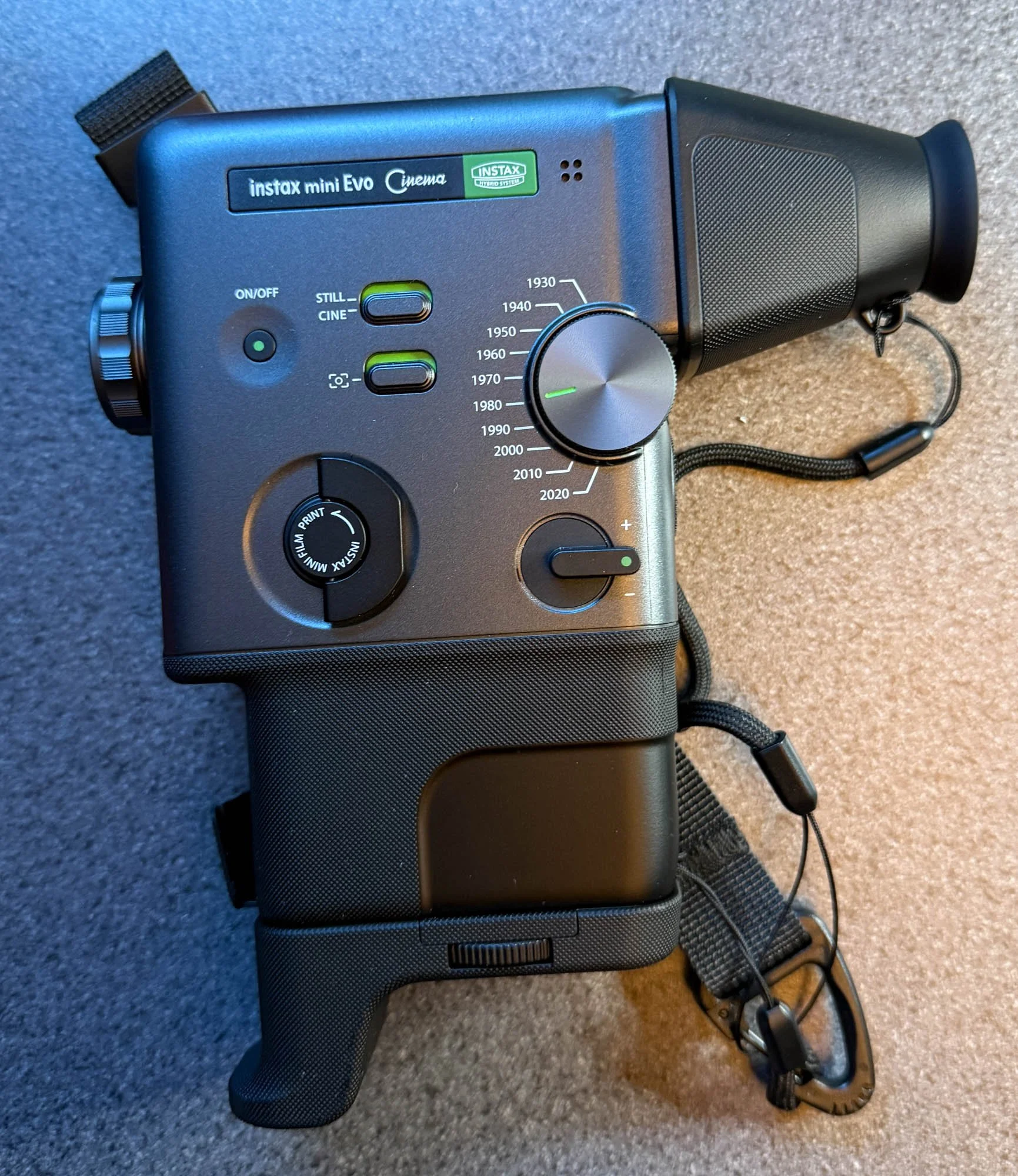
The instax mini Evo Cinema is a strange camera. And I quite like strange cameras so I got hold of one to play with. If you are the right age, you might think it looks a lot like an olde school home movie camera. And it takes genuine olde school movies as digital files. The viewfinder can be removed, exposing a small lcd touch screen that serves as the viewfinder and control input.
The big knob on the right hand side of the camera (known as the “eras” selector) lets you pick a decade and then the camera approximates the look and sound of cameras from that time, from black and white movies through old TV, home movie, video cassette and YouTube channel. You turn the ring around the lens to vary the intensity of the effect and a switch lets you add a border effect from that era as well.
Even I’m not old enough to have been around in some of the eras you can select, but the looks are always interesting and extend to the soundtrack and the image disruption that you get when you tap the camera during shooting. You can shoot scenes can last up to 15 seconds. If you prefer you can switch to still pictures, and these still retain the personality of the era.
The video quality is not great (although it reflects the quality of the time). If you turn the effects up to max you will have difficultly recognising people. Around half way works best in my opinion. If you select 2020 you have the option to double the image resolution but the quality won’t complete with your smartphone unless it is over ten years old. The camera does have another trick, You can print out pictures or still shots from a movie on the instax mini printer which is part of the camera.
If you connect your phone to the camera you can transfer movies and stills. One pro tip: Fuji use the same instax mini app for both the instax mini evo and the new cinema camera. You need to change the mode of the app in the settings to match your camera type or you will spend a while faffing around when the camera fails to connect. In the usual Fuji tradition you can only transfer clips and pictures that you’ve printed. This is super annoying, but of course you can take out the micro-SD card (which you have to buy and plug into the camera) and load all the files straight from that.
Once you’ve uploaded things to your phone you can assemble videos and upload them to the internet. You can print out a still picture with a title and a QR code which takes you to a page where you can view and download the video. Fuji will host the video for two years. This is quite nifty and would be super at parties and weddings, but I’d swap it in a heartbeat for an app which was more responsive, didn’t contain lots of unnecessary animations and used Wi-Fi rather than Bluetooth to move things around more quickly.
The camera is well made and fun to handle. The pictures and movies it makes are full of character. However, it is very slow to use. Switching eras takes a lot longer than it should. After you’ve taken a clip you are asked to confirm that you want to keep it. This is super annoying and adds no value to using the camera. And you can’t turn it off. The battery life is pretty poor. You’ll need to take a battery pack with a USB C cable if you want to film for more an an hour or so.
Would I recommend it? Tricky question. It does things that nothing else can do, although your smartphone might come close with the right filters. All the controls are wonderfully tactile and the sensation that you are using a machine from the past is well realised. And it is great fun to play with - if somewhat infuriating at times. I really wanted to love it, and perhaps I will grow to with more use. But as it is, I’d strongly advise you to have a play with one before parting with any cash.


