Getting Diagnostic Output from your Windows Phone programs

Birthday Phone

It is often very useful to find out what your programs are doing. You can put breakpoints into your code, but sometimes you just want print messages. If you are writing Windows Phone apps this is very easy, but it doesn’t use the Console.WriteLine that you might be used to. You can get messages from your Windows Phone program (even when it is running in the device) by using:

System.Diagnostics.Debug.WriteLine ("Your Message Here ");

The output appears in the Output window in Visual Studio 2010  (remember to ask it to show you output from the Debug stream). The best way to control debug output is to use conditional compilation to switch your debug statements on and off:

// Put this at the top of the program to turn debugging on
#define Debug

#ifdef Debug
System.Diagnostics.Debug.WriteLine ("Debug Message Here ");
#endif

Mystery Object Answer

Mystery Object

Now it can be told. The tool is for making holes in network cables so you can attach a Vampire tap to them. In the olden days Ethernet networks were made of a single thick piece of co-axial cable (the same stuff we use to connect TVs to aerials). This had a terminator at both ends and the way you connected a station to the network was to drill a hole in the side of the cable and push a pin into the central conductor.  These connectors got the name of “vampire taps” for obvious reasons.

Getting the hole wrong (too big or too deep) was bad, as you only had the one cable for your entire network. So we used to use a device with a drill bit which had been cut to just the right diameter and depth in the tool you see above.

This was in the “Good Old Days” of networking,  10BASE5 style (this means 10MBits/second, baseband signals and 500 metre maximum segment length).  Nowadays we are up to 100GBits/second on some networks. That is  10,000 times faster.

The tool has rattled around in my desk for a while and I probably should get rid of it.

Having said all that, it does remind me of a Veroboard track cutter. I used to have one of those too. It’s a tool which lets you make breaks in copper tracks on circuit boards by cutting through them with a drill bit. So, I reckon that Dave G is a winner here and if he wants to drop by he can have is Windows Phone lanyard.

Cheap Network Connection

Hull Building

Nice building in Hull today.

If you have an internet enabled phone and want the cheapest way to get on-line with it you really should take a look at Tesco Mobile.  These folks will send you a free pay as you go sim (it costs 99 pence to buy in the store) and you can put credit on it in all the usual ways. You can also have a 2 pounds a week “unlimited use” network connection for your phone. In this case I think “unlimited” means 500 megs in the week, which is OK unless you start streaming “Deal or No Deal” to it. But then again, why would you want to do that?

It does mean that you can have a fully working internet phone for around 8 pounds a month, which has got to be good value. I popped one of these into my Windows Phone and it works a treat. The network is actually provided by O2, which may or may not be good news depending on where you live.

Mystery Object Competition

Mystery Object

So, what was this used for?

Mystery Closeup

Close up of the pointy end

I found this in my drawer today. Not used it for a while. I’ve got a Windows Phone Lanyard (tastefully printed with a Windows Phone logo all along its length) to give to the first person to come to my office in Hull and tell me what is and what we used to use it for.

A clue, it is not directly related to phones as such…

Overlapping Display Elements in Silverlight

Blackjack in White

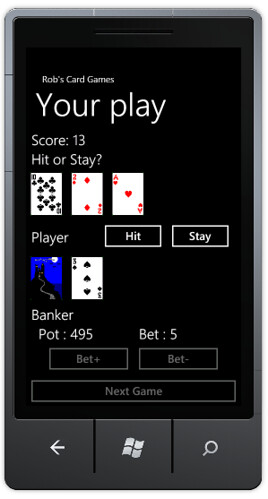
Overlapping cards in a white version of the game. I just changed the Settings to a white background, everything else was sorted out automatically.

I’ve solved my five card problem. I’m not sure if I’ve cheated or not, but I am sure that it works.

image

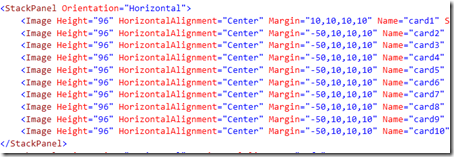
The way it works is by giving elements in the StackPanel a negative left margin, so that they go into the element to the left. The StackPanel only seems to use the width remaining width for each item in the panel, so I end up with all the card displays overlapping nicely.

Silverlight Blackjack for Windows Phone 7

Silverlight Blackjack for Windows Phone
Well, what would you do?

For no particular reason (perhaps because I’ve got lots of other, more important, things to do) I’ve been working on a version of Blackjack for Windows Phone 7. I’ve come across an interesting philosophical/moral problem.

At the moment my display has room for only five cards. If a player gets a lot of low cards then they can fall off the end of the screen. I can think of two ways to fix this.

  1. Spend some time re-arranging the display so that cards can overlap and I can fit up to 21 cards (the absolute limit given that you are playing with six decks in the shoe) on the screen.
  2. Make the fifth card you get always a king.

Creating Windows Phone apps on a Netbook

Capture

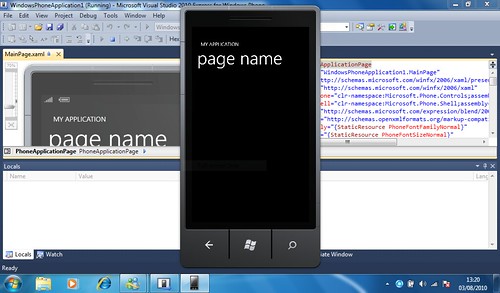
It does work, although you might want to attach a larger monitor...

I was wondering if it is possible to run Visual Studio 2010 and create Windows Phone applications on a very small machine, say a tiny MSI Wind netbook with a lowly Atom processor. Turns out that it is, and it is just about useable (as long as you take the precaution of upgrading the memory to 2G).

You can run Silverlight applications on the windows phone emulator but for XNA you need to find a machine with a bit more graphical grunt, since the graphical power in the phone is actually greater than the netbook, which therefore can’t properly emulate it.

Imagine Cup Poland Final Pictures

imagine-cup2010_572_DSC4207

Maria took this picture. Brilliant.

The Imagine Cup World Finals in Poland seem a very long time ago, even though they were just last month. If you were there and want to relive the moment, or you just want to see some excellent photographs, head of to here:

http://mariabielik.zenfolio.com/imagine-cup2010

Maria was one of the judges, noted for her ready smile and the Nikon SLR that was always around her neck. She has posted some of her shots and they are really, really good.

Windows Phone 7 Accelerometer Values

IMG_2120

I’ve been playing with the accelerometer in Windows Phone 7 and trying to make sense of the outputs. If you are interested (and, I guess if you are not) these are the values for the different orientations:

Flat on the desk: X=0, Y=0, Z=-1
Upside down on the desk:X=0, Y=0, Z=1
Standing like a tombstone: X=0,Y=-1, Z=0
Standing like an upside down tombstone: X=0,Y=1,Z=0
Landscape – controls on right: X=-1,Y=0,Z=0
Landscape – controls on left: X=1,Y=0,Z=0

The best way to visualise this is as a weight on a piece of string of unit length tied to the phone. If you hold the phone flat in portrait mode the the weight hangs straight down, giving X=0, Y=0 and Z=-1. Then as you tip the phone up to make it into a tombstone (as it were) the weight moves so that it is hanging directly below the phone, giving a Y of -1 and a Z of 0 and so on.

Apparently these values will be the same irrespective of how the program sets the orientation of the phone, i.e. they are set to give values as if you were using the phone in portrait mode. If you want to use different orientations you will have to transform these values.

I’ve found the readings to be quite accurate, at least as good as my real spirit level.

Windows Phone taskhost.exe error

(Thanks to Diego H for his solution to this one. He posted the solution on the Windows Phone Jump Start forum and I’ve found it very useful.)

image

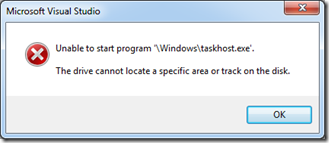
When I’m writing Windows Phone programs I’ve noticed that I sometimes get the above error when I try to deploy a Windows Phone 7 project to the emulator. This is usually after I have moved or copied the Visual Studio solution to another directory. 

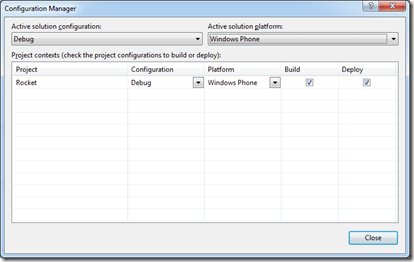
If I don’t get this error I might notice an even stranger manifestation, where changes I’ve made to the program don’t seem to be reflected in the running code. It turns out that this is due to a build setting getting corrupted. To fix it you must go to the Build menu and select Configuration Manager. Then re-select Windows Phone as the Active solution platform, so that the dialog looks as shown below:

image

Then your programs will deploy and run OK. I’ve no idea why this happens, but sometimes this gets set to “Any Platform” with no build or deploy options set, which stops programs from being built or deployed.

Quick Number Formatting in C#

IMG_2184

I’ve been playing with the Windows Phone accelerometer, and displaying results. Thing is, it gives me values which have lots of decimal places that I don’t really want. They make the numbers flicker in a way that hurts my head. What I want is a way to just display them to two decimal places.

I must admit that previously I’ve resorted to very dodgy behaviour at this point, such as multiplying by 100, converting to an integer and then dividing by 100 again. Must be my old assembler ways coming back to haunt me. Turns out that there is a much easier way of doing this in C# which is to use the string formatter:

message = "Accelerometer" +
    "\nX: " + string.Format( "{0:0.00}",accelState.X) +
    "\nY: " + string.Format( "{0:0.00}", accelState.Y) +
    "\nZ: " + string.Format( "{0:0.00}", accelState.Z) ;

This little block of magic gets the X, Y and Z values out of a vector and then displays them to two decimal places in a string I can display in my XNA program.

The key is the {0:0.00} bit in the format, which gives a pattern for the display of the first (and only) value to be converted. This pattern says a single leading digit and two decimal places.

If you want to do interesting things like put commas into numbers (so that you can print 1,234,567 type values) then you can do that too. You can find out more about how the format strings work in my C# Yellow book (subtle plug) starting on page 50.

Delegates, Events and Confusion

IMG_2283

Delegates and Events are really powerful parts of C#. They are also powerful confusing.  We can start off by making a new delegate type:

delegate void SimpleEvent () ;

This is a new type, called SimpleEvent. If we ever need to create a delegate that refers to a method that returns void and has no parameters, we can use SimpleEvent to do this. So, let’s do that. Here is our method:

void testMethod()
{
    Console.WriteLine("Test Called");
}

This method doesn’t do much, but it does tell us it has been called, which is a start. Now, to create something that refers to this method we can create a SimpleEvent instance:

SimpleEvent x = new SimpleEvent(testMethod);

This has created a delegate that refers to testMethod. We’ve given it the rather enigmatic name of x. We can make a call on this delegate if we want:

x();

Note that we have to treat x as if it was a void method that accepts no parameters (since that is the type of method that the delegate refers to). When x runs it will print out “Test Called”, since that is what testMethod does, and x presently refers to that method.

The name x is actually quite appropriate, in that when we call x we don’t really know what is going to happen, since it could be made to refer to any method. If it doesn’t refer anywhere we’ll get a null reference exception of course, and serve us right.

So, delegates let us create objects that can refer to methods we want to run. Great if you want to bind behaviours to events. (and this is where it starts to get confusing)

We can declare a delegate variable:

SimpleEvent eventList;

At the moment this refers nowhere (try to call eventList and we get an exception). But we can add methods that we want to be called when the event is fired:

eventList += new SimpleEvent(testMethod);

Now, when we do:

eventList();

- the testMethod is called. Wonderful. So let’s make this more confusing:

eventList += x;

This adds another item on to the list of delegates managed by eventList. The item added is the x that we created earlier, which refers to testMethod. Now, when we do:

eventList();

- the testMethod gets called twice (because when you call a delegate it works through all the methods that are presently bound to it).

If we want to unhook methods from a delegate then we can use –= to do this:

eventList –= x;

This would remove one of the calls of testMethod from the delegate, so that now if we call eventList it will only call testMethod once. And it works.

However, this works too:

eventList –= new SimpleEvent(testMethod);

I hate this. It confuses me so much. It looks like we’ve made a new delegate and minused (!) it from the list of events. There is some strong magic going on here which I really don’t like. What must happen is that the –= operator must go “Aha!, here is a delegate that references this method, I must remove one from the list of delegates”.

If x is the delegate that I originally created, it seems reasonable to remove that from the list, what confuses me is that you can also remove delegates by appearing to create new ones. I guess that this is because otherwise programmers would have to keep track of event references that they might like to remove later, but I still don’t like it.

Clothes Shopping with Jetlag

gum

We got back to the UK first thing this morning, had a quick nap and immediately decided to go clothes shopping. As you do.

There was actually method in this madness, in that we were in Bristol, which is home to one of the few shops that sells clothes in my size. And they have a sale just right now. So it was off to purchase a whole bunch of outfits. Took number one wife with me to stop me buying anything purple or orange.