What Computer should I get for University?

Seattle Museum.jpg

We got an email last week asking what kind of computer works best at university. Here are my thoughts on the matter:

Netbook

Netbooks based on the Atom processor are very cheap and great for web surfing, email and writing essays but they are a bit underpowered for the more demanding stuff like image editing and HD video. While you can use large tools like Visual Studio on an Atom powered Netbook it will not be a particularly enjoyable experience, particularly if you only have 1G of RAM in the machine.  However, they are great for taking notes, very portable and their batteries should see out a day on campus if you are careful. And they are so cheap you won’t suffer an enormous loss if you drop or lose yours.

Laptop

If you are buying a laptop I would go for at least a Core 2 of some kind. Machines based on the i3 processor are becoming affordable and are worth a look. If you are buying a laptop make sure that it has (or you can upgrade it to) at least 4G of RAM. If you want to write games with the machine it really needs a separate graphics adapter, those with built in graphics might work, but their performance will not be good. Take a look here for details of requirements to write XNA games:

http://msdn.microsoft.com/en-us/library/bb203925.aspx

Such a machine need not cost too much, I got an Dell Studio 15 with ATI graphics for around the 600 pound mark last year, and I’m sure things have moved on since then. Of course the snag with buying a “proper” portable computer is that it is properly heavy and scarily expensive to cart round with you.   This might mean that it gets left back at your house most of the time, which kind of negates the purpose of a laptop.

You should also look very carefully at the battery life. Bear in mind that although there are some charging stations on campus these are the exception rather than the rule and so a machine that can last all day is a good plan. I used to have a rule of thumb that I would take the manufacturers’ claimed life and halve it, so a machine that was supposed to be good for 3 hours would actually give only 90 minutes. However, I think things are improving a bit. My latest little machine claims 9 hours of use, and pretty much gets there.

Desktop

I’m in the process of returning to my desktop roots at the moment. I moved onto a laptop a while back because I loved the idea of having all my data with me at all times. It meant that I could pretty much work anywhere.  However, I can now have my data anywhere by using Live Mesh and Dropbox, and I fancy having a go with two monitors, so moving back to desktop makes sense. If you are buying a desktop now you should take a look at the new Intel “SandyBridge” I5 processor, which is not that expensive and provides a big leap in performance terms. Such a machine with at least 4G of ram and a 1T hard disk  and a reasonable graphics card should come in at around that magic 600 pounds (if you shop carefully)  and will provide a big leap in performance over a laptop of similar price. 

Some students have a great big hulking desktop at home and carry a tiny cheap netbook around during the day to take notes. This can work very well, particular if you use one of the cloud services (see backup below) to keep everything synchronised.

Apple

Apple seem to have figured out what makes something a pleasure to own and use, and then bottled it and sold it. All their machines run Windows really well, although the native OS X operating system has a lot to commend it and gives you access to wonderful programs like Garageband which come free with each Mac. And of course if you have a Mac you can write programs for the iPhone. 

I would place a slight question mark over the reliability and longevity of their hardware though. My MacBook Pro has been through two batteries, a power supply and a main board since I got it, and my little MacBook is on its second battery. I've bought machines from lots of other suppliers, Dell, Sony, Toshiba and Acer, and never had this failure rate with them.

If you are in academia make sure that you buy using the Apple academic discount scheme, you will save a little money but you will also get three years of Applecare warranty, which is well worth having. 

Software

Don’t forget software when you are pricing your systems. All our students get Microsoft Academic Alliance usernames shortly after they arrive with us and you can get Microsoft Operating systems and development tools for free from this:

http://msdn.microsoft.com/en-gb/academic/default

The only thing that you will miss from this is Microsoft Office, which you can get quite cheaply from here:

http://www.microsoft.com/uk/education/studentoffer/

If you want to try Linux I’d recommend taking a look at Ubuntu, which provides one of the best turnkey Unix experiences.

Backup

It seems that you have to lose a big chunk of work before you appreciate the importance of making backups of your data. One of my project students had their hard disk crash the night after they had just finished writing a very important report. Of course they hadn’t backed up the files…. 

These days, rather than remembering take a backup I use Dropbox and LiveMesh to make sure that files on my computers are all synchronised. During a working day I’ll probably move between two or three different platforms and these technologies make sure that the data on all of them always lines up. They are also provide browser based interfaces, so that you can get at all your important files anywhere you can find a web connection. 

http://explore.live.com/windows-live-mesh

http://dropbox.com/

The main problem with these services is the limited amount of space they offer. Live Mesh will give you 5G of online storage for free, with Dropbox you have to make do with 2G for free, although you can have more if you pay. However, this is not an issue for me. I don’t put any of my music or video on them, I simply use them to store “work in progress”, which for all the taught content and presentations that I gave last year only amounts to around 2 or so gig.

Insurance

If you do buy lots of fancy hardware do make sure that it is insured. Sometimes home insurance needs to be modified to cover expensive single items and if you move away from home you may need to get a policy of your own to cover your gadgets.

Final Words

Don’t spend too much on a computer. You don’t need a huge powerful machine to do our courses at Hull, actually most of the work (apart from 3D game writing) could be performed on a fairly basic system costing less than 300 pounds. We do have machines on campus which you can use, including some really powerful ones in the games lab which are available to students who need a lot of horsepower. Remember that anyone who tells you that you need the most expensive and powerful system they have is probably a computer salesman….

Double Sided Printing Satisfaction

Light Sabres

Is there anything more satisfying than spending a Sunday afternoon managing to make your HP printer actually print on both sides of the paper?

I suppose the answer is getting a printer that works as it is supposed to do out of the box with the drivers as supplied.  And don’t get me started about how it is impossible to get Photoshop Elements 9 (latest version) to print out on paper exactly what is shown on the screen….

Platform Expo–27th March at KC Stadium

PlatformExpo

Lindsay West...a man with a plan.

We had a planning meeting today at the KC Stadium. We were sorting out the arrangements for Platform Expo in March. You can find out all about it, and even sign up, here:

http://platformexpos.com/index.html

Every time we talk about the event it gets bigger, and better, and more awesomer (if that is a word). Today we found out more about the laser show, live bands, interactive art and virtual costumes that are going to be there. Along with Microsoft Kinect, Nintendo 3DS, showcases and sessions on making your gaming ideas into reality. And of course we will be having the final presentations of our 24 hour game development at the expo as well.  It is going to be such fun.

KC Stadium Pitch

The hallowed turf of the KC Stadium, home of Hull City and Hull FC.

No More Nissan Cubes

Bye Bye Cube

Even on the Nissan website it is driving away from us….

Looks like my Nissan Cube is going to be even more special than I thought.  Nissan have stopped importing them from Japan, blaming a fall in the value of the pound against the yen which made the profit margins too thin.  I’ve had my Cube for a while now and I love it. Even the reviewers are deciding they quite like it.

Apparently there are still a few to be had at Nissan dealers, so if you really want to drive round in a conservatory then you might be able to snap one up if you are quick.

…and you may now start writing

Exam prep

Before the fun starts….

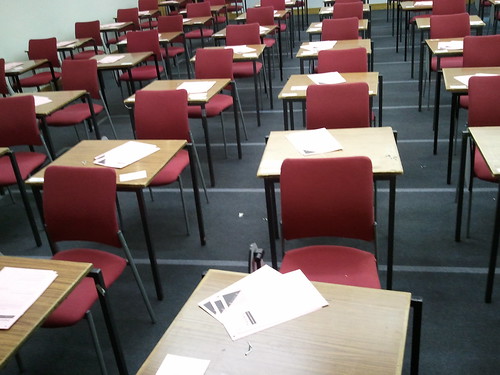
Did my turn in the exam hall today. Something to do with micro-Biology. I’m glad I didn’t have to answer the questions, although the students there seemed to find plenty to write about. One candidate was very careful about erasing things that they thought were wrong. They must have gone through about a pen’s worth of ink crossing things out. A tip, never do this. Just put a single line through the text so that it is still readable. I’ve been known to give marks for crossed out stuff as long as it leaves me with the impression that the candidate knows something about the subject. If I can’t read what you have put then you have no chance of getting any credit for it.

I had this plan to turn up with a bunch of examiners, one dressed as an American  Indian, another as a construction worker, a third as a motorbike cop and so on… When someone asked who we were I could have said “Oh, we’re the ‘Invigilation People’”.

Anyone for Bletchley Park?

Bletchley Park

We still have some places available for the trip to Bletchley Park. If the price seems a bit steep remember that it includes all transport and also entry to the park itself.  Bletchley Park is pretty much the birthplace of the computer and also housed the code-breaking work that allowed us to win the Second World War. All in all, well worth a visit. I’m looking forward to going.

They also have a card punch machine just like the one I wrote my first programs on. (wipes away a manly tear).

Hello Bulgaria

image

I’m giving a couple of sessions at MSDays in Sofia in Bulgaria at the end of March. You can find out more and even book your place at the conference (assuming you are Bulgarian) here:

http://www.msbgregistration.com/

There is also a Facebook group:

http://www.facebook.com/MSDays

I’ve even had a write up in couple of Tech News web sites in Bulgaria:

http://technews.bg/article-20532.html

http://news.expert.bg/n331344/

This is part of one of them…..

Специален гост в сесията за разработка на игри ще е и Роб Майлс, Microsoft Most Valuable Professional (MVP). Той е лектор в Hull University във Великобритания. Преподава програмиране, софтуерен инженеринг и вградени системи. На „Дни на Майкрософт” ще говори за Windows Phone и платформата за разработка на игри XNA.

If anyone can read this, I’d love to know what it says. I hope it is nice. It looks like Rob Miles in Bulgarian is Роб Майлс. Whatever. I’m very impressed that I could just cut and paste the text off the web site and into the blog and it all just works. You’ve gotta love UNICODE.

Anyway, I’m really looking forward to travelling out to Sofia and giving a couple of sessions, one on Windows Phone development and another on the .NET Microframework.  Should be fun.

Platform Expos 2011 is coming

image

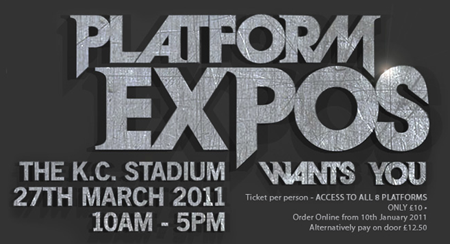
A date for your diaries folks. Sunday the 27th March 2011. That’s the day that Platform Expos 2011 is running. We had a meeting today about what we are going to do as part of the expo and it looks like it is going to be a really good gig. With 8 platforms on show, from Business through Culture to Education, there is a whole lot happening. We are going to be running another 24 hour mad game development to coincide with the event, and I’m going to be giving a session on Windows Phone game development. We will also be showing off the latest developments on Microsoft Kinect and home 3D technology.

You can find out more here:

http://platformexpos.com/index.html

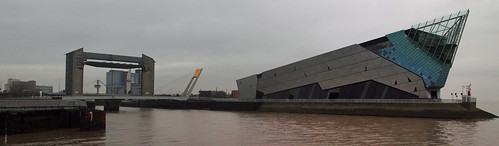
The meeting was down at the World Trade Centre in Hull,  which has a fantastic view of the Humber Estuary and The Deep just outside.

Deep Panorama 

The weather was a bit grey, but I did my best.

SyncToy and Drive Letter Setting Fun

image

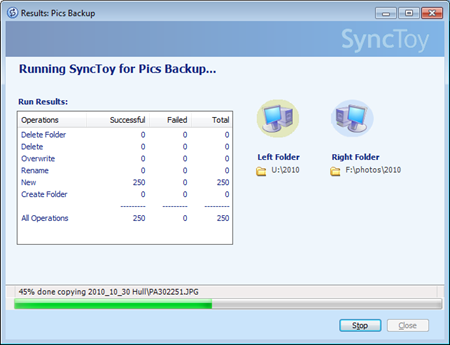
At the end of the year I have to go through my marathon photo tidying up session. I keep all my writings and other important stuff on SkyDrive, Live Mesh and DropBox but there is just not room in the cloud for all the pictures that I take. And so this is the time when I go through the pictures directories of all my various machines and pull them all together to make a final, definitive set of all my photos that I can copy across a bunch of hard disks.

And when I’m doing this I find SyncToy very useful. I can use it to bring together files from lots of different disks and also make sure that two disks hold exactly the same set of files. It doesn’t seem to mind being pointed at directories that hold many gigglebytes of files and I can just leave it to get on with the work.

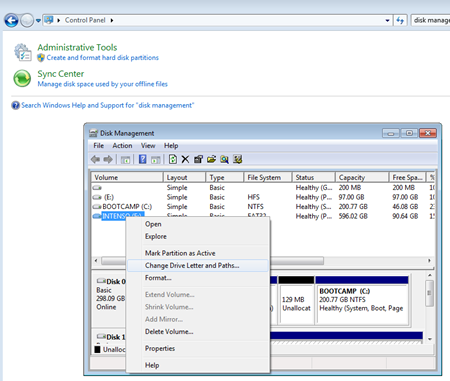
Oh, and when I’m using external drives I find it very useful to be able to make sure that when I plug the drive in it gets exactly the same drive letter each time. You can do this using the Disk Management tool. Open up Control Panel and then for “Disk Management” Then open the scary “Create and format hard disk partitions” option to bring up the Disk Manager tool:

image

Select the drive that you want in the list of volumes and right click it. Then select “Change Drive Letter and Paths..” to bring up the Change dialog box.

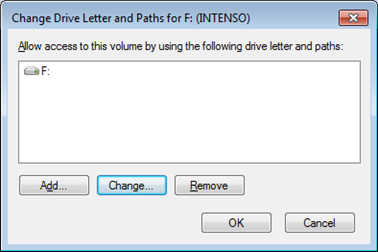
image

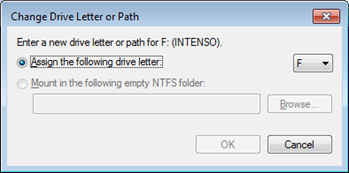
Then click Change and nominate the letter that you want to use in the combo box on the right:

image

Once you have done this you just click OK down all the menus and, presto, your drive has the letter you chose. And even better, the letter is remembered for next time you plug the drive in. Great stuff.

Boggle Flash Game Review

image

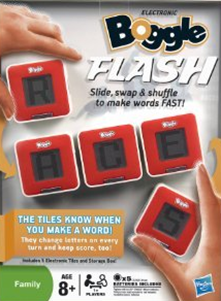
Found this today on sale cheap and just had to buy a copy (although I prefer the phrase “invest in” rather than “buy”.

Very clever hardware has been shoehorned into five little battery powered boxes. Each shows a particular letter and when you put them in a row that makes a valid word you hear a beep and the game gives you some points. There must be a bunch of little radio serial ports and some RFID devices inside that let the blocks work out where they are, along with quite a reasonable sized dictionary.

Of course number one wife cares little about how it works, but she does enjoy playing the game, as do I. Well worth the investment. Comes with a nice little box you can carry the letters round in, along with some rather good party play modes.

Running Ruby on Windows Phone

Ruby on Windows Phone

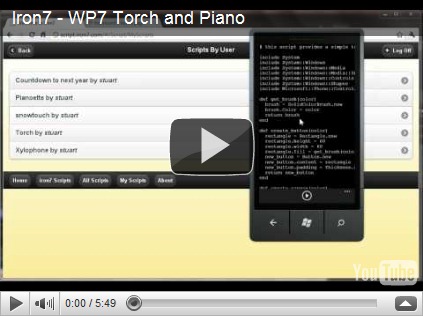
If you are interested in modern languages you have got to get this for your Windows Phone.  For a mere two pounds you get a Ruby runtime and editor which lets you create and run programs on the device itself. Let me be clear about this; it means you can create brand new programs and store and run them on your phone, without using a PC or anything else. Astonishing.

The installation comes with a bunch of programs including a Twitter client and a passable Tetris clone.

I’ve not played with Ruby much, but I’m always fancied having a go,  and now I have the perfect platform. You can find out more at http://www.iron7.com/

Wonderful Adobe Reader

image

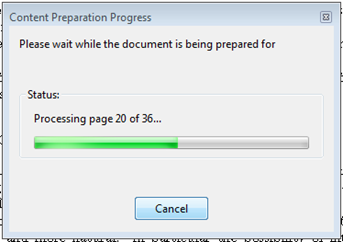
Does anyone know why Adobe Reader still does this? And why it takes so long? And why the document looks rubbish when it has finished? And why the message is wrong, even though it has been been wrong for the last few versions of the stupid program? (all of which have a stupidly laborious upgrade procedure)

There. I feel much better now…. Oh, hang on, the reader has just crashed..