Disney Infinity

WP_20130826_13_09_55_Pro.jpg

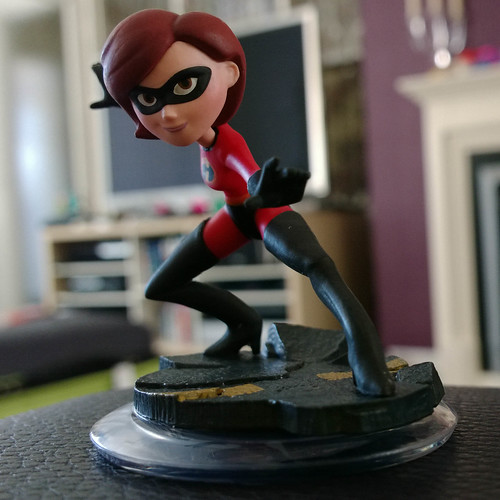
Mrs Incredible (anyone know her first name?) I bought her so I could have two player action in the Incredibles world. I guess over time I’ll acquire the whole darned set..

Some time back I was lucky enough to be able to make a trip to Disney World in Florida. The place is amazing. The design and execution of the buildings and the rides and the way the experience is packaged is just fantastic. You can have great fun just looking for the places they have have hidden the iconic outline of Mickey Mouse and his big ears. Those three loops are in the paths, on the walls and even on the water tank. Everyone at Disney World is committed to giving you a great time, from the cheery train drivers who welcome you in the morning and say a heartfelt goodbye as you leave to the “cast” members in costumes who are happy to sign autographs all day long.

And yet, and yet, the place is really a great big machine that has been designed with the purpose of taking as much money as possible from you during your short stay. Around every corner are hot dog stands, ice cream stalls, souvenir shops and ride photo booths. While in theory it is possible to pay nothing once you have entered the park, in practice it is actually darned difficult. Particularly with kids.

Which bring us to Disney Infinity, the new release from Disney Interactive. It is a computer game and toy series that seems heavily influenced by Skylanders and Lego City, but able to draw on the vast reserves of Disney characters. For your money (and you will need money) you get a video game, high quality plastic models of Disney characters and a base that you can plug into your video game console of choice.

Each figure contains some RFID cleverness that lets the game recognise the figure so you can play them in the game, and also store game stats. In addition there are “power up” disks that you can add to give extra items, such as a horse to ride or boost a character health by 25% or so. There are also “world” models that give you access to different worlds.

In the starter set you get characters from Monsters University, Pirates of the Caribbean and The Incredibles along with a “world” block that gives you access to those three words. In no time at all you can be wandering round the campus as Sully, scaring all and sundry.

Each world sets you a number of challenges, very like the Lego City game, although for me the interaction with the environment isn’t quite as smooth as the Lego world and the narrative is nowhere near as interesting or well presented. When you complete challenges you “power up” your character, get cash you can spend on more toys and also tokens to unlock game elements that you can use to build your own worlds.

And therein lies the really interesting part of this enterprise. Because the Disney Infinity folks have also been taking a long hard look at Little Big Planet and Minecraft, and have included a mechanic that lets you build and share worlds. The only snag(and I reckon it is a big snag) is that you have to work through lots of mildly diverting, but not great, gameplay to get all the pieces that you will need to construct your creations. And a lot of the time it feels like work. And that is not what a video game should feel like.

The underlying engine seems able to handle the worlds very well. For me perhaps the most impressive part of the game was the very first stage, where you travel through a landscape that builds itself as you walk towards it. I’ve not really got far enough into the game to be able to make much interesting yet. My characters are slowly ascending through the ranks and making appearance in the “Hall of Heroes” that you must visit, simply to view the huge number of empty pedestals for heroes that have yet to be purchased…

Disney are in this for the long haul. They have spent a lot of money building their virtual theme park and the have huge amounts of back catalogue on which they can create new scenarios and sell us more pieces of quality painted plastic. The power ups provide a nice swapping mechanic (you are never quite sure what you will get in a bag) and the prices are enticing rather than completely extortionate.

If you went to Disney World and enjoyed it then you will love Disney Infinity. The starting pack is a very well thought out entry point, in that it gets you into the game but leaves you wanting more, and the beautifully painted models are an end in themselves. And if you really want to create your own fairy castle, complete with race track and pirate cove, you can use Infinity to do it. Good for children of all ages I reckon.
Deep Projection

IMG_7336_7_8.jpg

Last night the chaps at C4DI were doing some trials of video projection onto “The Deep”. So a bunch of us went down to take a look. It was a lovely evening when we arrived and so we wandered round taking a few pictures. Today I got them out of the camera and took a look.

IMG_7411_2_3.jpg

This is a slightly processed image of the footbridge over to The Deep.

IMG_7450.jpg

This is a nice way to brand a building.

IMG_7478.jpg

And these are jellyfish.

The test was for something big coming in November. Keep an eye on the C4DI website for more details.

Lumia 1020 Sky

WP_20130822_08_23_46_Pro__highres.jpg

I took this picture on the way into the office this morning. I just love that sky. The picture was taken with my Lumia 1020 phone. I was going to do an HDR version, but in the end I just used the one shot.

The picture is also interesting because you can do a “brick wall resolution test” with it. If you look at the bricks as they get smaller and smaller moving away from the camera they stay as individual items (you can click on the image above to view the full sized on on Flickr if you like). On some cameras the brick lines turn into a messy blur, but here they are perfectly resolved. Lovely.

I can bring any system to its knees

Earlier this year I bought a new computer. And now I seem to have broken it. I appear to have a rare talent, I can over time reduce any computer to abject uselessness. I have behind me a trail of Dell, Novatech and even Apple machines which have slowed down to a snails pace and become much harder to use. Just because I’ve been using them for a while.

My lovely Sony Ultrabook is still mostly lovely, but the touch screen driver has acquired an irritating habit of suddenly tapping the touch screen rapidly and making the mouse unusable. I can get rid of that problem by using CTRL+ALT+DEL to bring up the lock screen but it is still irritating. I’m not sure if it is hardware or software to be honest, it seemed to start after I took the (apparently stupid) step of enabling the automatic download of updates and the machine turned itself on in my bag and tried to commit thermal suicide.

I can live with the occasional touch screen foibles though, what I’m finding much harder to deal with is the way that the “Anti Malware Service Executable” will suddenly and violently take my machine away from me by pushing the hard drive activity to 100%. This happens after a reboot and when I’m trying to get something done and is very annoying. The stupid process seems to have no way of working out that “Robert is actually using the machine now” and just wades in and breaks everything.

While it is amusingly ironic that a program designed to protect me against my machine becoming clogged and unusable is actually making my machine clogged and unusable, it is also darned annoying.

Verity Stob writes of cruft, which builds up and slows down a machine, and I’m probably suffering a bit from that. I think that when Windows 8.1 shows up I’ll do a complete re-install and see if that sorts things out.

Fun at C4DI

WP_20130820_16_03_30_Pro__highres.jpg

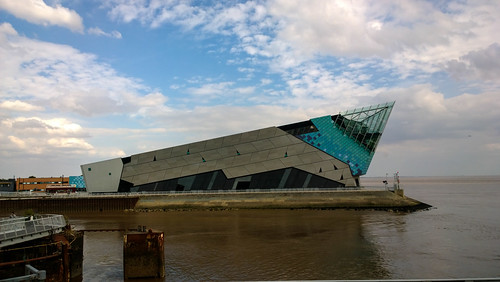
This is the view from the window at C4DI down in the Fruit Market part of Hull. This is definitely a region “on the grow”, what with Platform Expo and a bunch of other tech folks setting up shop around there. As you can see, it is a stone’s throw from The Deep, a fantastic looking building (although I don’t think they’d appreciate you throwing stones at it…)

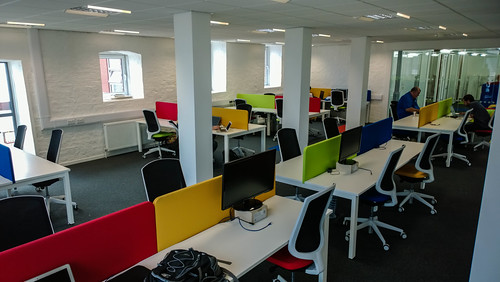
Anyhoo, C4DI provide space for business to start, grow and flourish. For a monthly fee you can get access to a desk, power, a fast (and I mean really fast) network connection and ample coffee.

WP_20130820_16_03_47_Pro__highres.jpg

You are also surrounded by like minded folks, and so there is tremendous scope for mentoring and collaboration. Jon Moss, one of the folks behind the project, will be coming up to the university to talk about what they are doing as part of our Rather Useful Seminar series next semester. They have some amazing plans for the future.

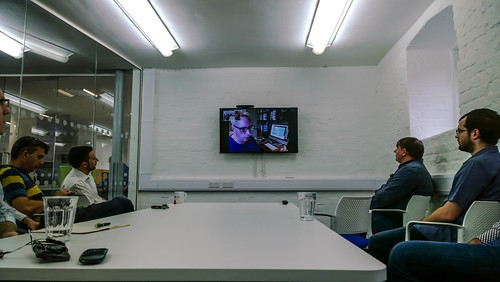
Peter and I went down to C4DI to talk about taking part in session about 3D printing that we hope to set up in a month or so. While we there we sat in on a Skype call with Brendan Dawes, which was very illuminating. I know what I want to do when I grow up now….

WP_20130820_17_49_55_Pro__highres.jpg
My view of the call

Brendon takes stuff, fiddles with it to find out what it can do and then uses it to make interesting things. I sometimes build things “for no reason” or to see what they do, and I love the idea of being able to do that for real.  He has been doing some neat things with Electric Imp devices. I saw these a while back but the cloud based model that underpins them worried me a bit as I’ve bought a couple of devices (Chumby and Nabaztag rabbit) that turned into paperweights when their supporting companies went bust. However, if you think of them as a bit of fun you can have for less than the price of a video game, they start to get a lot more interesting.

I’m going to get one or two to play with when I get some free time. And I’ve paid for the new washing machine that I seem to need…

Excellent Windows Phone Development Book

image

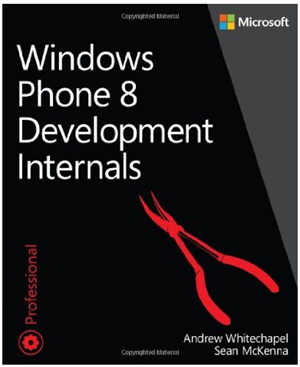
Sometimes you can’t beat a great big book. The internet is great for answering questions, but often you don’t know exactly what question to ask. In the Good Old Days™ you could thumb through a big thick book on the subject and find the answer you want. And Windows Phone 8 Development Internals brings back the good old days for Windows Phone developers. The content is well organised and presented and the coverage is vast.

The book will not teach you how to program. It is a book for seasoned developers who want to know how to make proper Windows Phone 8 applications. I managed to get my copy from an “alternative supplier” off the UK Amazon site for around 25 pounds. At that price it is an absolute steal. Strongly recommended.

High Dynamic Range Photography with the Nokia Lumia 1020

WP_20130818_14_27_18_ev0_Pro__highresAnd4more.jpg 

I really wanted to try some High Dynamic Range photography with the Lumia 1020 so today I took a walk around Cottingham and took some shots. High Dynamic Range photography is where you take multiple pictures of the same scene at different exposures. Then you use software to merge the images, taking the best exposed bits of the different shots and making one “perfect” pictures. 

You can see the effect in the photograph above. In a picture taken at normal exposure the dark shadow in the foreground would be completely black. This bit was taken from some of the overexposed shots, with the bright bits of the church being taken from the underexposed ones.

The Lumia 1020 is a good bet for this because it will automatically shoot the “bracketed” shots. In fact you can get it to take five pictures over a range of up to 3 EV (exposure values) each side. This means that you just press the button and the phone takes all the shots for you.

There are a couple of problems with this though. The first is the obvious one, in that shots take a lot longer to complete. The phone does a good job at shunting the enormous amounts of image data from the sensor into storage, but you still have to hold the phone up for 30 seconds or so while all five pictures are taken. Actually, I’ve not found the results of using 5 exposures to be much greater than 3, and so I’d just take 3 in the future.

The other problem with the Lumia 1020 HDR photography is that you have to select this “bracketing” mode before each shot. This is probably sensible, in that you don’t want the camera get stuck taking normal snaps five times, but it is a pain when you forget.

WP_20130818_14_28_28_Pro__highres.jpg

This is a single “ordinary” shot taken from the camera and just cropped slightly. You can compare it with the shot at the top of the post, which was made from five separate exposures.

I used Adobe Lightroom to import the pictures from the phone and this works fine. I plugged the phone into my laptop and then uses the normal Lightroom Import command to bring the pictures in to my collection. Then I used Photomatix to combine the different pictures. Photomatix also does all the tone mapping to get either a fairly natural result as in the top picture or a more artistic one like the one below:

WP_20130818_15_12_47_ev0_Pro__highresAnd3more-Edit.jpg

This was taken from five images and then tone mapped using a “Painterly” pre-set that gives quite a nice effect. I’d be quite happy to print an A3 version of this, and from the look of the pixels, it would print out great too. Amazing.

In short I’m very impressed with the Lumia for HDR photography. I’d like to have the camera grip to make it a bit easier to hold the phone steady though. This also has a tripod fitting that would also be useful for longer exposures.

If you are into photography but bored with carrying your camera around, then you should take a look at this phone. The results really are impressive.

Lumia 1020 at Movie Buffs Fair

WP_20130817_10_49_45_Pro__highres.jpg

I’ve managed to get my hot little hands on a Lumia 1020. It arrived on Thursday, but owing to van driving commitments I’ve only just managed to pick it up.

I love it.

Now, remember that you are reading the words of a Microsoft MVP and Nokia Phone Champ, so you might expect me to like it a lot. But I really, really, do. People have been muttering that the Windows Phone operating system isn’t developing as fast as they might like, but I think that what has been happening is that everyone has been busy behind the scenes making it into a really “proper” phone contender.

For example, the installation of my new phone simply meant telling it which old phone backup that I wanted to use (it is going to replace my Lovely Lumia 920) and then letting the phone get on with it. Contacts, applications, SMS, call history, all magically appeared over time. The only things that caused the tiniest amount of grief were my own applications that I’d put on the phone because I’m a developer, and the ones from Windows Phone Application Studio, which couldn’t be restored because the new phone didn’t have the certificate. I can always put these back on later.

I told number one son about this and he just said “Hmm. Just like my iPhone does”. And yes, that’s precisely the point. Microsoft and Nokia have realised that for the phone to be a contender it has to be at least as good as the other offerings, and on the basis of my experience setting up my new device, it is getting darned close.

WP_20130817_10_49_45_Pro.jpg

I took the phone to Hull Movie Buffs Collectors Fair, which was very, very busy with huge queues to get the signature of “Darth Vader”, or David Prowse as the man in the suit was called. There were loads of people in costumes. Above you can see the Ghost Busters striking a pose. This picture is interesting because it is actually a crop from the high resolution shot at the top of this post. If that doesn’t bear out the claims about digital zooming, I don’t what what does. I had my camera with me too, but in the end I didn’t bother with it.

WP_20130817_10_29_47_Pro.jpg

It’s kind of intimidating when they all turn and face you at the same time. Although the Stormtrooper on the left did rather spoil the effect by then asking me how tall I am.

WP_20130817_10_51_27_Pro.jpg

These guys were guarding the way out….

Anyhoo, I had a great look round and bought a 1966 vintage Thunderbirds board game that I’m looking forward to having a go with.

There’s another Collectors Fair on 30th November. I’ll be there and I won’t be bothering to take my camera.

Driving Home

WP_20130731_00320130803100948.jpg

If you have a white van, you have to go to Ikea. I’m sure it’s in the handbook somewhere.

We drove the last leg of the journey today. Used my lovely Lumia 920 for navigation and it worked really well, except for one bit where the program threw a strop on the way out of Ikea. Probably because I inadvertently asked for a walking route down the M62.

Anyhoo, I used to think that I’d never buy a car without a SatNav built in, but the Here Drive application has totally won me over to phone based navigation. It was very, very good. We even amused ourselves by watching the speed limit display on the phone change at exactly the point where we went past the speed limit signs. And it makes warning noises when you exceed the limits. At one point I had a light on the dashboard telling me to change up a gear, and the phone beeping to try and get me to slow down. Talk about mixed messages.

I think now that I’d never buy a car without a phone holder built in. Which I’m not sure they make. Rather strangely modern cars these days have magical unfolding cup holders that spring out of the dashboard, but nothing you can easily slip your phone into. I had to resort to buying a plastic clippy thing at a motorway service station and then wedging it on the dashboard with a pack of tissues. Well worth it though, made the journey much easier.

And now I’m back in Lovely Hull, the van has been returned, and I’ve just taken delivery of a box which should, if I’m lucky, contain a Lumia 1020 phone.

Nine Thoughts of a Van Driver

WP_20130815_006.jpg

Weapon of choice.

For the next couple of days I’m leading a nomadic existence. Just me and a Bedford Luton van, hurting down the country, filling the van with stuff and then driving it all somewhere else. I’ve done this quite a bit in the past, helping families and friends move. and I quite like doing it really. There’s something about driving a great big van that is rather nice. You learn things:

  1. People are more inclined to get out of your way if you are driving a big, rented vehicle with out of town number plates towards them at speed.
  2. British roads are very lumpy. The number of bangs and crashes that we experienced on the M1 was quite surprising. The van suspension did the best it could, but we did have some teeth jarring moments.
  3. You can plug your smartphone into the audio system of a Transit van, but the socket is right at the bottom of a glove compartment, and looks exactly like a bolt which is fitted at the bottom of another, much easier to get to, cubby hole.
  4. Van sound systems are surprisingly robust and can go very loud indeed.
  5. Smashmouth Astro Lounge is absolutely great driving music.
  6. So is Pet Shop Boys Actually, although the first track has driving sound effects that can mask the siren of a police car coming up right behind you. Which can be scary.
  7. After a while you stop missing the rear view mirror and just get good at using the wing mirrors. And looking for shadows of cars that might be behind you.
  8. Nothing (speeding up, slowing down, going round corners etc) happens suddenly in a fully loaded van.
  9. The sound of the sack barrow crashing about in the back of an empty van when you stop at traffic lights is very scary, until you figure out what it is.

Kids Can’t Use Computers?

DSC02256_7_8.jpg

A while back I read this post titled “Kids Can’t Use Computers – And This Is Why It Should Worry You”. It depressed me. Not because I agree with all of the sentiments of the author, but more because I worry that people may take this kind of viewpoint seriously. The underlying tenet of the article (I’ll save you the bother of reading it) is that only a few people can actually use computers, especially kids. And this is apparently a bad thing.

The author brings out a collection of “horror stories” of people who “can’t use computers” for one reason or another, including not knowing that their laptop has a WiFi off switch. It says a lot for the nature of computer folk that a good portion of the debate following the post is an earnest discussion of whether or not laptops should have such a switch. I’ve actually been caught out by this myself, and therefore, by definition, am unable to use a computer. Oh well. Back to the drawing board for me.

The author completely misses the point that it is perfectly reasonable to expect that things should just work. Engineers have been very good at producing products that “just work”. I can remember when starting a car in cold weather was a tricky affair which was involved lots of fiddling with the choke and pumping the accelerator pedal. Nowadays you just push a button.

Cars have been around for well over a hundred years, and their fundamental function has not changed over that time. Computers have been around for much less than half of that and we are still discovering new things we can do with them. I think it is safe to say that we have a much better handle on how to make a useable car than we do a useable computer. Which means that people will sometimes have problems getting their systems to do what they want.

The current generation of computer hardware and software is very prone to failure when confronted with frailty of human nature in all its forms. But people will translate their experiences with their cars to computers. Why should the computer not just work when I press the button?

It is interesting to watch kids use technology, to see them running their fingers over the TV screen and expressing surprise when it doesn’t respond to their touch. To see them start watching a video on an iPad and then become confused when the video doesn’t just continue on the TV when they turn it on. They are going to see these things as omissions that need to be fixed, not evidence that they are too stupid to use those devices. And quite right too.

So what do we do about it? The author suggests a “back to basics” approach so that everyone can learn as much about the low level functions of computers as he is evidently proud of knowing. Then we can all argue about the best version of Linux to run on a mobile phone while our kids throw things together and build the future out of what sticks. Just like it ever was.

It is very important to learn the low level stuff, to have an understanding of the limitations of the computer, what they are really good for, and how you get them to work for you. Learn to program. Absolutely learn to program. But then use that ability to make things and have fun making things. Take ideas (silly and otherwise) and give them life. Spread them round. Build solutions and games that make people happy (or at least smile). Learn about the technology by playing with it. If it turns out that your ultimate interests lie outside the realm of processors and memory then that’s fine, but an understanding of what a computer is good for and how you make it work is always really useful to have.

Never regard your skill with computers as marking you out as in any way special unless you can do everything else as well. I can write code, but I can’t draw for toffee. If an artist comes to me with a computer problem I’ll not call them stupid if I can solve their problem and they can’t. Because I can’t do what they can. 

A proper computer professional is as good with people as he/she is with computers. In fact, bearing in mind that a lot of computing is finding out what people want and then making a happy ending from their wishes, I reckon that good inter-personal skills are more important in computing than they are in just about any other field. Work at these as you would a new programming language. And learn to write well.

For me computing is all about having fun making stuff and engineering happy endings. I’m not looking for a future where everyone is “clever” enough to use a computer. I’m looking for a future where we have enough people around who are able to produce compelling and useful applications for those who want to use computers to make their lives better. In other words, computers should “just work” and we should have folks around who are skilled enough to make this happen (and enjoy doing it).

Surface Decals Arrived

DSC02253_4_5.jpg

The skins that I ordered from Decal Girl arrived earlier this week. Each one has on it a link to a download for a background that exactly matches the “hole” in the screen border. This means you can get effects like the one above. I really like this, although if I use the same background for my desktop it makes things confusing, as I try to drag things into side of the device.

If you want to make your devices nicely unique and protect their surface a little (note the play on words there) then I reckon they are well worth a look. The picture, since you asked, is of a rock pool at the seaside on the Isle of Man. I liked the shape of the cracks and the blue sky above.

Windows Phone App Studio Screencasts

image

I’ve done a little screencast about getting started with Windows Phone App Studio. It covers making and deploying your first application, and actually shows you to build something that is useful. I’ll record a few more over the next week or so. You can find the screencast here.

Windows Phone App Studio

image

If you fancy making a Windows Phone application but you’ve not done much programming then you might find the Windows Phone App Studio worth a look. It starts from a web based interface you can use to create applications that bring together your favourite web sites, RSS feeds and lumps of data. You can turn out very professional looking applications with menus,  custom lock screens and tiles. What’s more, you can distribute them to any Windows Phone owner who scans the QR code that is produced when your app is built. And the apps that you build can be the basis of Marketplace your Products because you can download the entire solution and add your own behaviours alongside the pre-built ones.

If you are planning a party, want to tell the world about your amazing pizza collection, need to keep track of places you have visited or just want a quick way of finding all your favourite web sites and blogs, then you can create an application of your own to do just that. In around ten minutes or so.