Fun with Fonts in FreeCAD
/I hate it when reality breaks. I hate it when I have two facts, both incontrovertible and mutually exclusive. It happened today in FreeCAD. I’ve got a program that makes 3D wordsearches. At one point the program goes off and finds a font file it then uses for character designs. I wanted to make a version that runs on the Raspberry Pi, so I did some due diligence (had a look in the fonts folder on the Pi) and found a path to the font file I wanted to use. I then put that path into my program and expected it to just work. It just didn't. The font file was not found. Which was annoying. After I’d convinced myself that the filename was correct (which took a while) I asked FreeCAD to show me the files it could see in each environment:
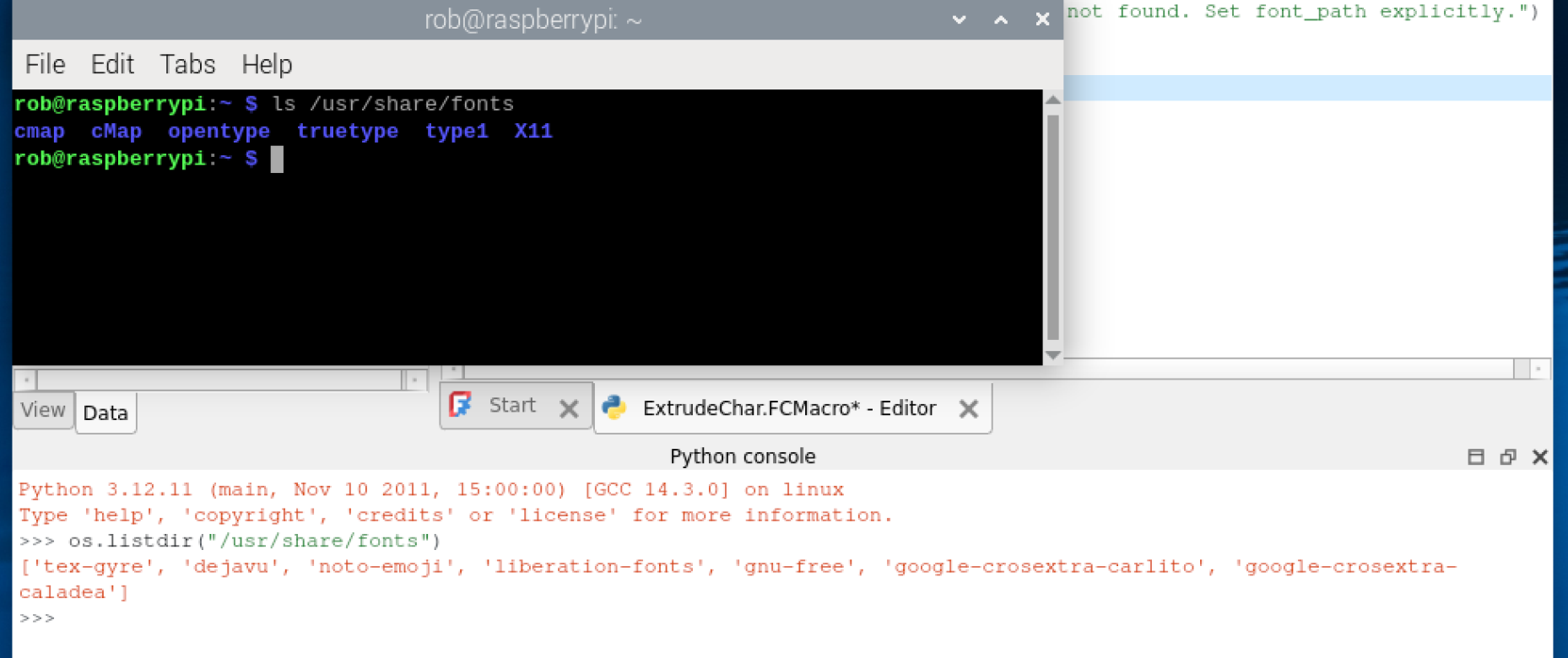
Shurely Shome Mishtake..
The screenshot above shows what I got. In the console at the top you can see the files that the Raspberry Pi has in its font folder. Underneath you can find the files that a Python program running in FreeCAD can see. I’ve got two different views of what should be the same part of the file system. Wah!
After a few minutes I figured it out. The easiest way to get FreeCAD to run on a Raspberry PI is to install it as a Flatpak application. I even explain how to do it here. It works a treat. Unfortunately, Flatpak exposes a different reality to programs that run within it it. This is all to do with making them portable across different platforms. So my fonts weren’t where I was expecting them to be. All I had to do was use a font path which made sense in the Flatpak universe and all was well.
There’s useful lesson here. If things don’t seem real, it might be because your program might be running in a different reality.