The iTunes Experience

IMG_0984-Edit.jpg

Apple make carefully designed and beautifully presented products that amaze and delight their owners. They also make iTunes. Which is amazing, but not in any good way.

Yesterday number one dad got a new iPad. I heard the news with dread. Because it meant that I’d be the chap installing it. In theory this is easy, just back up the first iPad and then restore the backup to the new iPad. A doddle. Except….

The new iPad refused to talk to the version of iTunes on dad’s laptop. So I fired up the Apple Upgrade Manger. Which found an upgrade for itself. Which failed. Eventually I figured out that it was trying (and failing) to uninstall the old version. Nothing I could do would persuade the darned thing to get out of the way so that I could upgrade iTunes. Time for Plan B. Install a new version of iTunes on the desktop and use that to do the upgrade. Installation went well, tried to sign into iTunes and authorize the computer. Turns out that iTunes is incapable of remembering dad’s password for more than ten minutes. Go through the password reset. Authorize the computer. Plug in the old iPad to perform the backup. Fail. The iPad will only talk to the iTunes library on the broken laptop. One wrong press now and I wipe the iPad by restoring an empty library onto it. At least you get the warning now. I’ve known people wipe their iPods when they get a new computer. Why Apple persist in such a stupid library arrangement in this cloud connected world is beyond me. Anyway, no dice.

So decide to just register the new iPad so that we can do something with it. Find that that iTunes has forgotten dad’s password again. Get another password.  Finally get the registration completed and start restoring applications onto the new iPad. Three hours in and we now have something working.

I’m going to have to back up and rebuild dad’s laptop so that I can do a clean install of this idiotic program. I looked up the procedure to back up the iTunes library. It seems that there are two ways you can do this. Copy the files and hope or buy a program to help you do this.

I’ve thought for a while that Apple are probably quite happy to give users a horrible experience if they use iTunes on a PC. I’ve found PC installations to be very fragile and completely impossible to get off a machine. There’s no way I’d install iTunes on any of my PCs, in fact I keep an “emergency Mac” around with iTunes on it that I use to keep my Apple devices up to date. I’ve found the Mac version of iTunes to be a lot better behaved, thank goodness.

One of the great things about iOS 5 is that you can do pretty much everything without using iTunes. As for me, I’m off for a lie down….

My Two Dogs

IMG_7423-Edit.jpg

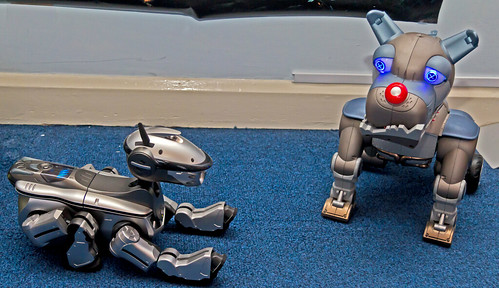
Digby and Wrex

Simon Grey has been posting about his dogs. So I thought I’d post about my two. On the left we have Digby, who is sufficiently autonomous that he can fall downstairs unaided. On the right we have Wrex, who doesn’t do much by himself but has a really cool remote control.

Digby doesn’t get out much these days. But today I powered him up and let him wander around for a while. The best comment about him that I ever heard was from someone who actually owned a dog. “That’s just what my dog used to do” she said as she watched him wander around. It is a crying shame that Sony stopped making Aibo robots, they were just getting interesting when the company pulled the plug.

With all the sensor and processor developments taking place at the moment Aibo 2.0 would be awesome.

Imagine Cup Captains Blog Post

image

I did a post for the Imagine Cup Blogs this week. I thought I’d copy it here too. 

Hi. I’m Rob Miles, Competition Captain for Software Design. I teach Computer Science at The University of Hull and I’ve been involved in the Imagine Cup for all of the ten years it has been around. I thought I’d write about a few things that might help you make your great entries even greater.

More is Not Always More

Sometimes when you are building your entry you start to think about what you can add. However, adding extras is not always a good plan. If you are thinking about adding an extra feature you should ask the hard question “How does this new feature build on the central theme of our entry?” If the answer is “it doesn’t really” then you should probably not include it. Every time you increase the “footprint” of your solution you dilute the central idea and add to your workload. I’ve seen lots of entries that have a great central idea which is then bogged down by lots of other details that aren’t really important. If you want to add value to your solution the best way to do this is to make it more credible. Spend more time getting it into the hands of the users and getting their feedback. Make sure you have a strong story on how you are going make the system viable. Find sponsors if you need them, or get professionals in the field to praise your solution and continue to build your solution based on that feedback. Remember that adding a feature doesn’t mean that it will add value to your solution.

Show Your Solution to People You Don’t Know

Your friends, family and teachers all like you. They care about you and worry about giving you critical feedback. Therefore they aren’t the best people to evaluate your solution, as they won’t always tell it like it is. What you want are people who have never met you before, and have no reason to like you other than the system that you are showing them. This might hurt the first time you do it, especially if they tell you they can’t understand what your solution does, or how to use it. Nevertheless, you should capture their feedback which will likely add a huge amount of value to your solution, and you’ll get some great stories that you can use to improve your entry.

Go End to End

Make sure you and your teammates have worked through your solution all the way from the start to the end. You might have lots of separate parts that fit together to make the entire solution. Make sure you can take a user all the way through your system from start to finish, from creating the first username (if that’s what the system does) to printing out the last report (if that’s what the system does). I’ve seen systems demonstrated as “snapshots” of different parts of the design that don’t give a feel for how the whole thing fits together. Make sure you have gone through the entire lifecycle of an interaction with your system.

Do Things That Scare You a Little Bit

Sometimes you have to leave your comfort zone to get the best results. This might mean approaching sponsors for help, asking people you’ve never met what they think of your idea or standing up and speaking in front of an audience when you’d really rather not. The Imagine Cup is not just about solving some of the world’s toughest problems; it is also about your growth as a person. Don’t be afraid to do these things. One of my favourite sayings is “What doesn’t kill you makes a really good blog post”. Remember that whatever happens, you’ll still be standing afterwards, you’ll have learned something from it, and maybe have a good story to tell. And sometimes you will get what you want out of the exchange.

Enjoy Yourself

The Imagine Cup is about using technical innovation to solve problems. But it is also about fun. Make sure you take time you enjoy yourself. You are with your friends, doing something you really enjoy. Ensure you make the best of it. And remember, your Imagine Cup entry is not the only great thing that you will do in your life. It is just one of the first ones.

Rob Miles
- Imagine Cup 2012 Software Design Captain

Platform Expos Debate

DSCF7589.jpg

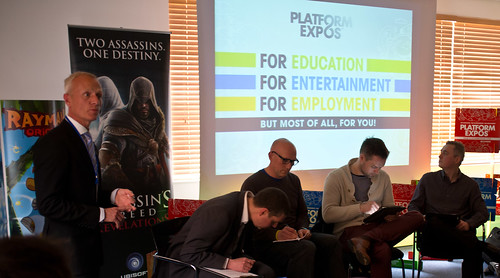
Lindsay West counts off the good stuff, while the panel prepare for the debate.

Three good reasons to live in Hull.

  1. The University of Hull (of course)
  2. Chip spice.
  3. Platform Expos.

The first two are pretty much self evident. (Although the second one only really makes sense once you’ve had some fast food locally). If you’ve not heard of Platform Expos, they are the folks that run digital events to promote Hull. The last Three Thing Game competition took place during Platform Expo 2012 on the University campus. Recently there was also Platform Doha, a very successful event at Qatar University.

And today there was the first Platform Debate, themed on how to break into the games industry. We had a roster of speakers including Jon Purdy, ex Hull and now University of Bradford, Simon Iwaniszak ex RockStar and now of Red Kite Games and Paul Rayment, the PR Manager at Dubit who put together interactive games for BBC Enterprises among other customers. The discussion was led by Jamie Sefton of Game Republic, with Lindsay West doing the introductions. There was some very interesting discussion of how to get into the games industry. Some topics that emerged.

  • A good portfolio (collection of things you’ve done) is crucial. And it should be content that goes beyond your coursework.
  • If you send your portfolio anywhere, pay attention to presentation and delivery. Make sure it is properly addressed to the person in the company you are pitching to and make sure it is a well presented disk, in a case, with a properly printed label. It all helps to build your brand.
  • An on-line presence is useful, but make sure you keep it up to date. Nothing looks worse than stuff that has obviously not been touched for years.
  • Networking is hard but crucial. Going up to someone you’ve never met before and giving them your business card is really difficult (especially for a computer scientist). But you must do this. You will feel very stupid the first few times you do it, but it gets easier. And it gets you work.
  • Conferences are useful, but you don’t have pay the huge entry fees to meet up with those in the business. You can often meet up with the movers and shakers just by dropping into the right hotel bar when the conference is in full swing.
  • The business is going places. Things are in a state of flux, studios come and go, but there is still a need for people who can do this stuff. And it is still fun.

And so, after a couple of hours of high quality discussion we reached the end and I had to whizz off to the dentist….

HDMI to VGA in one Easy Step

If you have a nice new laptop with only an HDMI output, and a rather old monitor with only a VGA input, then I’ve got some good news. I’ve just discovered that you can now get an adapter (like the one above) which for a lot less than the iPad one (like around 15 quid) will convert your twenty first century digital output into twentieth century analogue signals. This is particularly useful if you work somewhere where every lecture theatre has VGA connections for laptops. Like The University of Hull. The adapter I got was from a UK seller with good feedback, you can get them directly from China for even less.

Important Note: There are a lot of people selling HDIM to VGA cables that purport to connect HDMI and VGA systems together. These will not work. The kind of thing you want must have a built in chip that performs the digital to analogue conversion. Make sure that the thing you buy looks like the picture above (with quite a big lump on the VGA socket) and look for phrases like “with chip” and discussions of which video modes are supported in the description.

Protecting your data for free

IMG_1084-Edit.jpg

What’s the most important component of your computer? The cpu? That expensive graphics card? The three monitors that you’ve plugged into it?

Wrong.

The most important component in your computer is the data that you put into it. If you lost any of the others it would be a simple matter of getting another lump of hardware. Sure, it might hurt a bit, but the fix is an easy one. Just replace the missing piece.

If you lose your data you not only have the problem of restoring the information, but frequently you don’t know just what you have lost. The importance of that little file of test data or the original of that letter you wrote nine months ago will only become apparent long after you’ve replaced the failed disc drive.

That’s why you should use Dropbox, Live Mesh or Skydrive (or all three if you have a lot of files you want to look after). These systems put your data in the cloud for you. Dropbox is good because it also does versioning, you can even recover when you damage a file by overwriting. The other two are good because they provide a bit more free storage. Google are also getting into the cloud storage act with Google Drive, which is available in the US but not the UK yet.

I keep all my files in the cloud. I can fit all my important documents and presentations into the few GBytes that they provide for free. All the above systems let me easily move my files from one machine to another, so if I get a new machine I just have to sign into the account for that particular service and then wait as all my files are magically loaded onto it. This makes the hardware pretty much incidental. I can use any machine to work on since the latest versions of my files will arrive from wherever I was working before. The decks I’m going to present on my “twisty top” tablet will move onto it in the time it takes me to walk to the lecture theatre.

All these systems are free and there is no excuse for not using them.

Don’t Forget the Sanity Check

SF Street.jpg

I sent out a bunch of emails today with the details of the lab demonstrations for the First Year programming course. Last time I did this I managed to make the final part of the schedule repeat, so that I had some students down for multiple sessions. At the time I remember thinking “Better not do that again”.

Of course I did though. I had all the sessions spread over four days, which is a long time. Too long. If I’d done a simple Sanity Check – e.g. “If we can mark 66 students in one day, how long does it take to do 170 or so?” then I’d have figured out that something was wrong. But I didn’t. I just blindly copied down the slots and pasted them into the timetable document. Idiot me.

This illustrates an important point. Just before you press send, or submit the file, or do whatever it is that sends your work off, you should do a quick “Sanity Check”. Just make sure that there is nothing obviously wrong. Quite often you’ll focus on all the small bits (like I did) and not check the big picture. See if you can come up with some simple test that you can use to make sure that nothing is stupidly wrong – like creating 240 slots for 170 students…..

Kinect Manager available for download

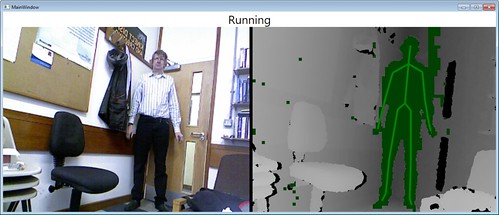
Kinect Mgr Demo
You’d think I’d look more pleased that it is working…..

Today I finished all the chapters for my upcoming book about the Kinect SDK. As part of the book I’ve made a wrapper class that makes it a little easier to use the classes in the Kinect for Windows SDK. You can use it to start a Kinect running and then bind to events that driver generates when new frames are available. The frame events are processed on a “round robin” basis so that the driver will not get new data from the sensor until it has been processed by your application. This makes it work well even on low performance machines that might not be able to keep up with the events generated by the Kinect sensor. The manager also generates status messages.

You can download the class, along with a program that demonstrates it, from here. For it to work you must have installed the Kinect for Windows SDK from here. And of course you’ll need a Kinect sensor – either the Xbox 360 one or the Windows one will work fine.

Everybody’s Golf for PS Vita

certificate

I think I’ve bought Everybody’s Golf on pretty much every Sony game platform I’ve ever owned. I like golf games, but I don’t like to be too fanatical about them.

The great thing about Everybody’s Golf is that underneath the cutesy graphics and wealth of options there is a rock solid golf simulation with some impressive course design. On the PS Vita it looks really spiffy, with very nice graphics and animation.

If you are after a high quality portable golf experience, you need look no further.

Sony PlayStation Suite Available

image

Looks interesting, in spite of those scary heads.

The Sony PlayStation Suite is now in “Open Beta”. This means that you can download the SDK and start writing games and applications which you might eventually sell via the PlayStation Store. The way I see it (although I’ve not tried yet) you should also be able to get programs running on your own PS Vita using this kit and the PlayStation Suite Development Assistant. The path to market looks like it will be very similar to the App Store or Windows Phone Marketplace, with developers paying an annual retainer (the traditional 99 dollars) to allow them to unlock devices for testing and to sell their wares.

The good news is that the development language is C# and the way that it all works is not a million miles away from XNA. In fact it works so well that we had quite a few teams in our Three Thing Game end up making games using it.

Gadgets Going

p1

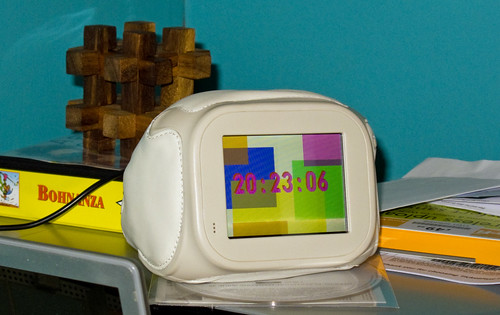
It looks like a couple of my gadgets are going the way of all things. My Chumby, which I got for myself a couple of Christmases ago may shortly turn into a paperweight rather than the Flash Powered internet connected appliance that I’ve had on my desk at home for the last couple of years. This illustrates a flaw in the business model of companies that sell these devices. Once you’ve had the initial hit of profit from the customer buying your product you are then committed to a lifetime of support for it. Advertising doesn’t always work in these situations and so once your funding runs out it is time to shut down those servers. And all your customers become paperweight owners. It’s not all doom and gloom I suppose. The servers are staying up at the moment and there is always a chance that some enterprising folks will stop in and provide their own solutions, but I think that would require some “unlocking” of the devices themselves that might not come to pass.

Then I find out that Alienware are discontinuing the M11x range of high performance gaming netbooks. I got one of these last year, mainly because a student had one and I loved the way the keyboard lit up. I’ve carried it around the world on trips and it has never failed to turn heads. It is a genuinely nice machine, that benefitted greatly from the solid state drive I dropped into it to speed things up a bit. Battery life is good and you can play games on it too. Having said that, I think it might be a laptop too many for me just at the moment. I can get by on my little “twisty top” machine most of the time. So if anyone wants to make me an offer…..

Undercover Laptop Sleeve

image

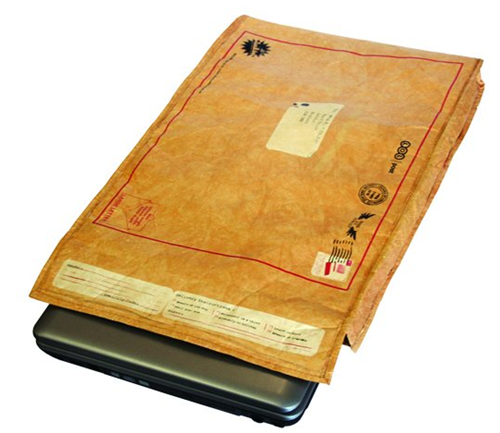
If you want something to carry around your big laptop (or even your tiny Butterfly Touch) you could do a lot worse than the Undercover Laptop Sleeve. I got mine last year while I was in the ‘states, and I was quite surprised to find that they are actually made by a UK company. They are basically a thick, padded envelope with a nice soft lining that you can put your laptop in. The envelope is printed with lots of (rather amusing) fake stamps and address stuff that make it look like you are carrying an old envelope, rather than your super expensive laptop.

If you have a tiny tablet like mine you can fold the whole thing double for even better protection and the top uses velcro to keep everything nicely sealed. It is perhaps a bit expensive just for a laptop sleeve (although I’ve seen some with really eye-watering prices) but if friends or family are looking for things to get you for your birthday this would make a really nice present. They also do a smaller envelope that would fit an iPad.

My iPad Beater

image

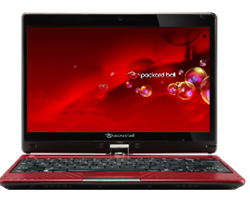
A while back I got myself a Packard Bell Butterfly Touch laptop. It reminded me a bit of the Toshiba M200 I used to know and love, with a twisty screen that made it into a tablet or a notebook. I quite liked the machine and found it much more useful to carry round than any device whose name begins with i. A few weeks ago I popped a solid state drive in it (you can get the OCZ Agility 3 120G drives for less than 100 pounds now – excellent value) and loaded it up with Windows 8. Result = happiness. I’m in the process of getting used to Windows 8 (I keep starting up Internet Explorer rather than the Start button) but what I’ve got now is a really useful device with a battery that seems to go on for ever.

I took this machine to Singapore and, although it is a teensy bit underpowered to run Kinect programs, it did everything else I asked of it with aplomb. I did quite literally a whole day’s work at Schipol airport using the device. I really can get 10 hours of useful battery life out of it.  And it can boot faster than my iPad.

Windows 8 on the touch screen works very well, it seems to support the swiping gestures very well, and the fact that I can open it up and start typing into Word, or PowerPoint, or Visual Studio, is just wonderful. I even wrote my first Windows 8 application on the device while I was at the airport, along with my sessions for CampFire.

There are not many “twisty top” laptops out there at the moment, perhaps this will change when Windows 8 gets going. And while I was at CampFire I got a look at Shane’s really nice Samsung Series 7 Slate. But for now this is my weapon of choice for carrying around and doing stuff.

Singapore Rocks

Street.jpg

Before I went to Singapore a few people said that I’d like it there. They were right. I’d go back tomorrow if I could. For a Brit it has a weird “Abroad without being abroad” kind of feel. The cars drive on proper side of the road. Lots of the streets have familiar, English sounding names. Even the mains sockets look the same. And yet, unlike the UK, there is a vibrancy about the place that is really rather nice.

They have lots (and I mean lots) of shopping malls. They have Prada and even Mont Blanc shops like other places have Starbucks. And they have Starbucks as well. I’d love to have had more time to take a bit more of a look around, most of what I saw was basically like a tidy, well run city anywhere in the world.

My advice; if you get the chance to go, just go. Even if it means a 30 hour journey.

Heading Home from Singapore

Bangkok Airport

Bangkok airport, although it could really be any one of them.

Of the last five days I’ve spent three of them travelling. Today it was time to go home, which meant another day or so sitting in a metal tube. Kudos to KLM for moving me to a seat which I could actually fit into for the 12 hour flight from Bangkok…

On the way out I thought I’d play a game by posting pictures of departure lounges and getting folks to spot where in the world I was. Of course some of the sharper people out there just went straight for the GPS data that my phone puts in each image and told me, to the nearest foot or so, where I was when the picture was taken. Most impressive, if a bit scary….

Anyhoo, all the flights and connections were on time and worked, and I even got my luggage home too.

Back at work tomorrow.

Singapore Imagine Cup Finals

winners

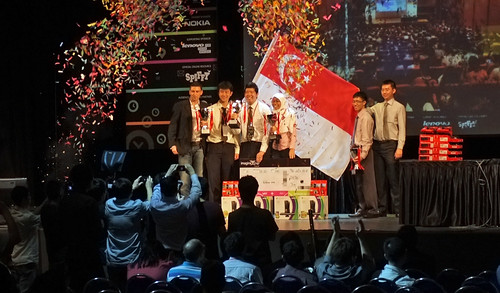
These are the winners, congratulations to the four team members from NYP-School of IT who are about to get covered in celebration bunting…

I was lucky enough to be invited to help judge the 2012 Singapore Imagine Cup Final presentations today. Yesterday a series of sessions had taken the teams down from 16 to 4 and today we had to pick the winner from these. For the teams in the room it must have been especially nerve wracking because the finalists were announced just before they had to present and had a scant 10 minutes to prepare for their session. Not that it showed.

Every team delivered a very professional result which brought home to me just how much the standard has improved in the competition. All the presentations were what I would call “world standard”, in that they were the equal of ones I have seen at the World Final level.

However, there was a standout winner and so congratulations to Eustace Zheng Xiangwen, Nur Nadiah Binte Zailani, Koh Kai Wei and Mong Xunheng (hope I got your names right) who made up Team AlphaWaves. Their system, the Dementia Assistance and Recall Engine (DARE) provides support to sufferers of one of the nastiest things that can happen to a person. I wish them the best of luck in the world finals in Australia later this year.

If you want to find out more about the competition and get some tips about preparation for the next rounds I’ll be hosting a Live Meeting on Wednesday 18th of April at 16:30 GMT.  You can sign up here for the meeting.

After the finals I had a quick look around Singapore and then we headed off for a really posh meal. Thanks for inviting me folks, it has been great. My only regret is that I’m in town for such a short time.

I’ve not bought many souvenirs, but that’s because I’m definitely coming back some day…

Campfire Fun and Games

Campfire Audience

A great audience to die in front of…

Did my keynote session today at Campfire. It was great fun, once I’d got over my nerves and lack of sleep.Pretty much everything worked as it should, apart from my “bomb proof” Kinect driver wrappers blowing up. Oh well. I said I’d put some resources up here for you to take a look at:

Slides and (mostly working) code from the presentations today - here
C# Yellow Book, Windows Phone Blue book and other free stuff - here
.NET Micro Framework embedded development - here
Gadgeteer embedded development -  here
Three Thing Game student madness – here
Windows Phone development - here
Dreamspark, free software for students - here
Microsoft Robotics Developer Studio – here
Kinect For Windows SDK – here

I think that is everything, if you remember something I forgot, let me know and I’ll add it. Once the presentations were over I went for a wander round the city. After some fun and games on the transit I managed to get all the way down to the bay. I took loads of pictures which I’ll play with properly when I get home. In the meantime here are just a couple.

harbour1

Lovely

boat Crop

A boat on a building? And why not.

More tomorrow, I’m off to bed now…

Flying to Singapore–Day 2

DSCF7464

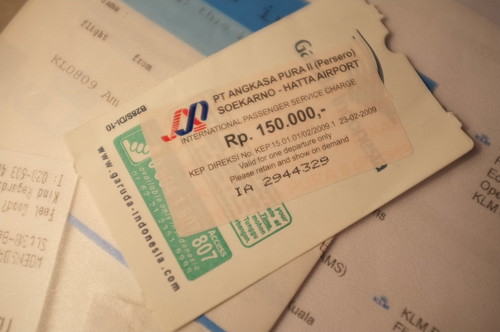
A rather expensive sticker...

This was a bit nerve wracking. I was transferring planes in Jokarta (another airport that looks very like all the airports I’ve been to on this journey) and the chap at the desk asked if I’d paid my “airport transfer fee”. ‘No’ I said nervously, ‘How much is it?’. Turns out that the sticker above costs 150,000 rupees. This was seriously scary. I had visions of having to sell the house just so I could get onto a flight to Singapore. ‘How much is that in US dollars?’ I asked eventually. Turns out that it is 20, which I can just about raise without selling anything major. After that things went swimmingly. and I got to my room in the Fairmont Hotel in time to go straight to bed. Session starts at 10:30 tomorrow morning. Can’t wait.