Fixing Una

Whenever I start to think of my 3D printer as an appliance it promptly breaks. Actually, this time it was my fault in that I started a new print without removing a completed one. The resulting crash was quite noisy, as the rubber belts did what they are designed to do, and slipped.

The printer itself seems undamaged, which is a relief, but I figured it was time to show Una some care and attention. After all, she is nearly eight years old. And I have got a replacement set of belts and a new print nozzle to fit. So I took everything to pieces…..

One of the principles of 3D printing is that any given job on a 3D printer will take a day. Even if you think it will take a couple of hours. This one was no exception, but by the end of the day I had the belts replaced and print head back in position.

Next I just have to level the bed and adjust the distance of the head so that it prints properly.

Robot Tracking and Python at the Hardware Meetup

Another good hardware meetup. Brian was showing off a properly working robot tracking solution, which means that Hull Pixelbot Robot Rugby is getting closer…

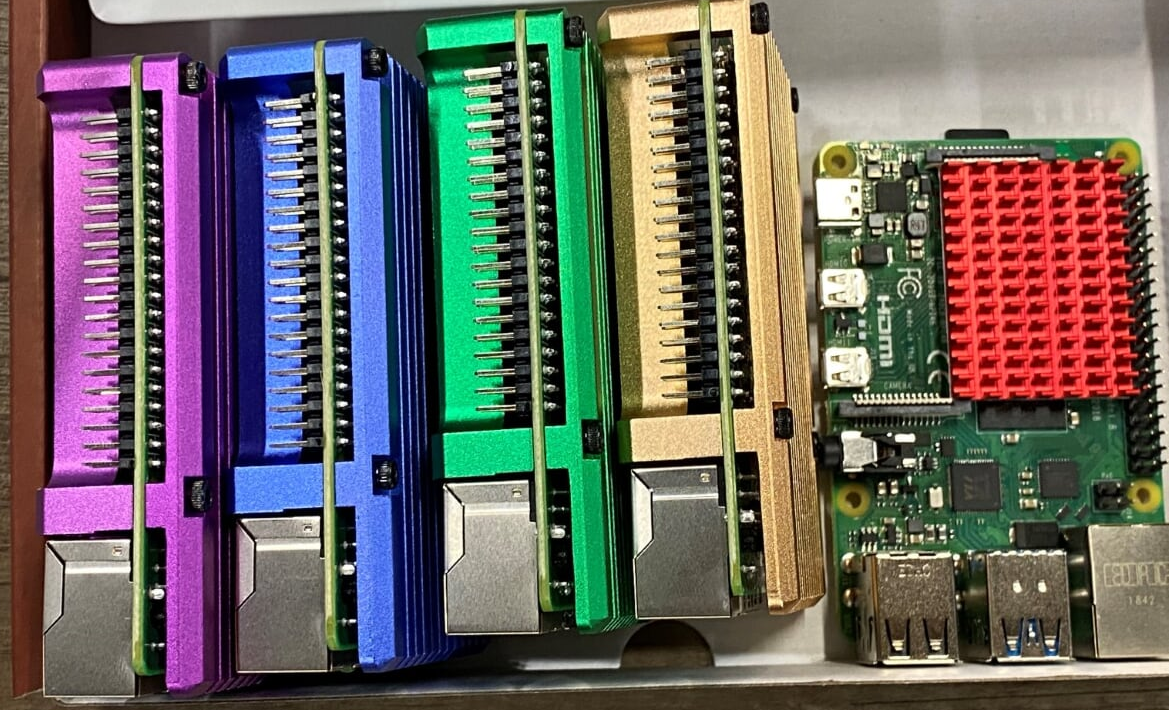
StarbeamRainbowlabs was showing off a Raspberry Pi cluster in the making. Love the colours.

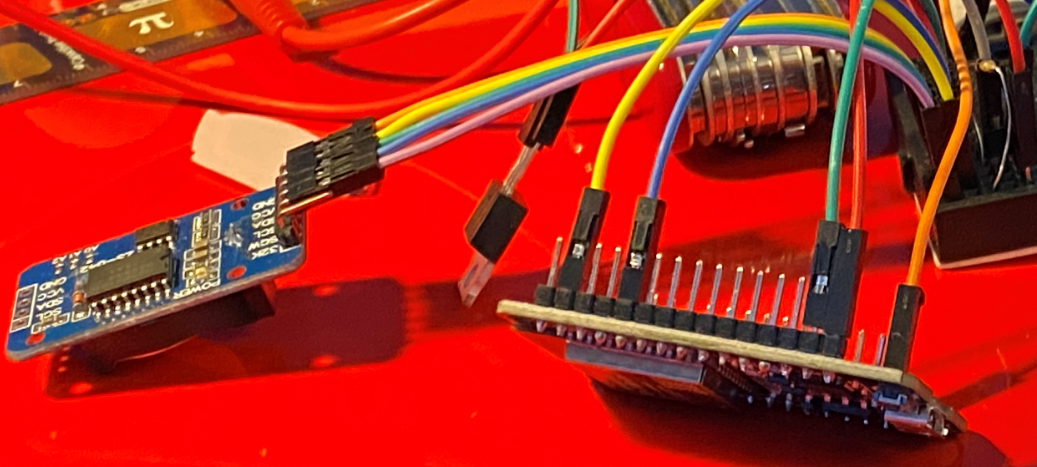
Karen had brought along some devices that she wanted to play with, including the one above. But what does it do?

Finally, Ben and myself did a bit of Micro Python. Each time we have a Hardware Meetup I’m producing a little briefing document about the subject. You can find these documents here.

Silver Cloud Inn Folks are Wonderful Folks

Yesterday I found out that the MVP Summit was cancelled. Wah. And I had pre-paid for my room at the Sliver Cloud Inn on a non-refundable tariff. Double wah.

I emailed the hotel cancelling my booking (no sense in leaving the room empty) and noting that I wasn’t expecting any refunds. Today they emailed back saying that because the cancellation is due to the CoronaVirus they are refunding everybody. Which is awesome. It must be costing them a pretty penny to do this, what with them having lots of bookings cancelled, but they are doing it anyway.

I’ve always loved this little hotel. And now I love it a lot more.

Update: Sorry about spelling Silver Cloud as Silver Could, but then again I think this may be kind of poetic tribute.

MVP Summit 2020 Cancelled

One of the best things about being a Microsoft MVP is the way you can meet up with other Microsoft MVPs, along with Microsoft staff, at the MVP Summit. I missed out last year, so for this year I made sure that I booked my flights and sorted out my hotel nice and early to ensure that I got to go.

And the summit has just been cancelled. Wah.

I agree with the decision. It’s a lovely occasion, but not something that should put your health (of that of anyone else) at risk. I’m sad that I’m not going to meet up with lots of great people but I’m sure that, given the talent of MVPs for invention, there will be a bunch of virtual events and synchronised pub-crawls going on over the week of the event. And with a bit of luck we might even get some T-shirts sent through.

Here’s to Summit 2021.

The evil of HEIF

Picture the scene. You’ve just bought yourself an expensive Windows 10 powered computer. You’ve got it going and find the experience smooth and hassle free. You’ve put the wonderful OneDrive application on your iPhone and you decide to view some of the pictures you took with your iPhone on you shiny new computer.

And they look horrible. Finally, after a bit of searching on the internet you discover that to fix this you have to go into the Settings page for the Photos app and follow a link to install the “HEIF media extensions”.

Then you find out that the extension costs 79 pence. Just so you can view pictures that you took with your phone. At this point you’d probably be getting a bit cross with Microsoft who seem to be rather desperate for your money. I suppose it is a tiny amount of money, but that is really the point. I wonder how much Microsoft makes from this, and whether it is worth the damage to customer goodwill.

Oh well, I’ve just had to do this for my newly imaged PC. I must have installed a free solution last time. The strange thing is that I don’t remember doing it for any of my Surface devices….

Mid-life computer upgrade

Four years ago I got myself a “proper” desktop PC. With help from number one son I specified a beefy processor, speedy motherboard, oodles (for the time) of RAM and a fast SSD.

Over the last few months it’s been slowing down though. The first thing that happened was that I noticed I was running out of memory. Mainly due to the penchant of some browsers (I’m looking a you here Chrome) for finding out how much memory you have and then trying to use all of it. The second thing that happened was that I ran out of space on my main disk so Windows 10, without asking, moved my swap drive onto a hard disk that I was using to store files. These two things together meant that I would get lots of hard disk rattlage when moving between applications and if I decided to run Chrome and Lightroom together the resulting ram turf war brought the machine to its knees.

So today I shut the machine down, popped the lid off and dropped in a couple of slabs of memory and a new internal SSD. The SSD uses a new connection - M2. I’d bought an expansion card that I could use to link my new drive to the bus in my motherboard, only to discover when I actually opened the box that my motherboard already has interfaces for this kind of drive. Oh well, the card can go back to Amazon.

Once the chips were down (as it were) I unplugged all the other disk drives, fired up the system and did a brand-new Windows 10 install. That went a treat. I had a working system before my cup of tea had cooled down. Once I’d got Windows working I then plugged in the other disk drives and put the case back together.

This is kind of cunning, in that my original system disk is still running so I can boot from there at a pinch if I really need something from the old installation. It is also kind of not cunning, in that I’ll have to install all my applications and files onto the new disk drive. I’ve started doing that now, with most stuff being on Onedrive it shouldn’t take too long.

First impressions are that the machine is much more sprightly.

DDD North was awesome

The DDD event today was wonderful. So good that I forgot to take pictures. The only pictures that I did take were of links to more interesting content. The picture above is from a session by Pete Gallagher about .NET Core 3 on Raspberry Pi.

…and this is from the session that followed, all about Blazor (which looks wonderful).

Then I went to sessions about VR, C# for the lazy and Kubernetes on the Raspberry Pi. I don’t have pictures for them because I rather stupidly sat too far back…..

Everyone that went (and the place was packed) had a great time. Thanks to all the organisers, a perfect day. There’s another DDD event later this year in Nottingham, you can find out more here.

Using the DS3231 Real Time Clock from MicroPython

If you ever have a need to connect a DS3231 Real Time Clock device to an ESP32 running MicroPython then I have just the blog post for you.

All you have to do is download the driver from here:

https://github.com/adafruit/Adafruit-uRTC

I then used Thonny to copy the driver file onto my MicroPython device and then I could use it in my program.

Don’t use the one from upip (which is usually a neat way to install libraries onto your MicroPython devices) because it is at version 1.0 which contains some statements that don’t compile. Once you’ve got this running you can now create MicroPython powered devices that can keep track of time.

Note that if you are using one of the DOIT ESP32 boards (these are very cheap and easy to get hold of) you will need to use pins 22 and 21 for the I2C interface:

i2c = I2C(-1, scl=Pin(22), sda=Pin(21))

Recycling for fun and HP's profit

I had to do it at some point. So today I replaced all the toner cartridges in my printer. It’s been moaning for a while abut low toner and today I noticed that the print quality was getting patchy. I can’t complain too much, because the low capacity free cartridges did last quite a long time.

I thought I’d try and recycle them. This turned out to be quite easy. HP has a site where you can go to print out a postage label. Then you just bundle the cartridge boxes up, stick on the label and drop the package off a the Post Office. This is good news for the planet, and even better news for HP who can put fifty pence worth of toner in them and then sell them again for sixty quid. It would be nice is there was a formal scheme where you got discount on replacement cartridges if you’ve sent back the old ones, but I’ve not seen anything like that just yet.

Children's University at c4di

Future technologists

“They’re a lovely bunch” said Tina as we went up to the board room in c4di. She was right. A patient bunch too. Because the connection to my robot broke as soon as I tried to use it. So there I was, with a wonderful audience and nothing to show them. Wah.

This was a good time to show grace under pressure. After deploying some really terrible jokes I managed to get things working. Turns out that my Bluetooth driver had deployed some serial ports that were interfering with the robot. This was not something that happened last night when I was testing the presentation but today it did. So after killing the offending connections we were off.

One day I’ll practice…

Actually, it turned out that this was a good time to make the point that working with computers, like a lot of other things, ends up being all about persistence. I told the audience about my guitar, which is presently hung on the wall (see left). I can’t really play it because I’ve never really bothered to practice. It turned out to be a bit harder than I expected (and a tiny bit painful on the fingers) so I gave up and found other things to do (like mess around with computers).

When you work with computers you have to learn how they see the world. And you have to get good at dealing with tiny details. This can be hard work. Having said that, we did get to the point were we had made a cowardly robot, so I’m counting the event as a success.

begin
forever
  move 10
  d = @distance
  if d < 100:
    red
    turn 180
    move 100
    continue
  if d < 200:
    yellow
    continue
  green
end

This is the “cowardly code” that I was demonstrating. The robot creeps forwards in 10mm steps. If it sees something too close it sets its pixel to red, turns 180 degrees around and runs away.

Thanks to the Children’s University for Inviting me and the audience for being so wonderful.

A mathematical puzzle....

This is not a picture of the right rolls. If I had brought the right rolls home I would have been able to take a picture of them. Then again, that would have meant I would not be blogging about them….

It turns out that “buy two for a reduced price” deals only really pay off if you remember to take both items home with you.

Last week I went to the Co-op to buy some bread rolls. The packs were 1.20 for one pack or 1.50 for two.

So I bought two packs. I’ve no idea why you would only buy one. Anyhoo, when I got home I found that I’d left one of them at the shop. Idiot. There are a number of ways of looking at this:

  • I’m 30 pence worse off because I’ve spent 30 pence more than the price of buying one.

  • I’m 1.50 worse off because that is the cost of replacing the pack I lost.

  • I’m 75 pence worse off because that is the cost of the pack that I lost.

I’m going for the 30 pence option….

I've made a cube

It looks like I’ve made a cube. Although it occurs to me that I could have just joined three squares together, since you’ve no way of seeing the back from this photograph. After a week or so of pretty solid 3D printing and assembly I have learnt two things:

  • it looks really cool

  • it’s very hard to photograph

I was going to make it into a totally portable cube that could be passed around. However, I’m re-thinking this for a number of reasons:

  • it will be rather hard to fit all the electronics and the battery into the cube interior

  • the battery life will not be that great

  • somebody might drop it

So, I’m thinking of just mounting the cube on a plinth and turning it into a rather cool light.

Update: Change of plan (as if you care). Anyhoo, I’m going to make the full fat, chuckable cube and then fashion a base which I can use to turn it into a lamp.

Tiny Sony Speaker

I picked up this tiny Sony speaker today in HMV in Hull for not much cash (even less than Amazon are selling it for). I’ve been looking for something to use with small musical instruments and this looked like it might fit the bill. It has Bluetooth connectivity and even contains a tiny microphone so that you can use it for handsfree phone calls. However, it also as a 3.5mm jack socket that you can use to connect any audio source that you fancy. It’s battery powered and also waterproof (as long as you remember to put in the rubber plug that seals the connectors.

The sound is much nicer than you would expect from such a tiny device. I wasn’t expecting floor shaking bass, but what is there is very clear. And the rest of the frequency range is very well catered for as well.

If you are looking for a slightly beefier sound than you get from your phone it is well worth a look.

No need for PuTTY

I seem to be spending more and more time talking to command line interfaces (CLI) these days. I think this is because I’m messing around with the Raspberry Pi that controls my LED panel cube and I’ve left off the desktop interface because it slows things down.

For years my weapon of choice for getting a command prompt on a remote system has been the PyTTY program. But no more. Later versions of Windows PowerShell for Windows 10 have an ssh command that just works. I found this lovely blog post from Scott Hanselman that shows how to create keys that let you connect without needing to enter a password. I’m especially impressed with the cunning way that he pushes the key file from the PC to the remote device.

Last night at the Hardware Meetup I discovered that you can use the ssh command to connect to a remote system without needing to know the ip address of the target machine. This meant that I was able to use the mobile hotspot in my phone to give a network connection to my Surface Pro and my Raspberry Pi and then use:

ssh pi@raspberrypi

.. to get a command line on the Pi. Very useful.

Connected Humber Hardware Meetup

Lots of activity tonight at the Connected Humber Hardware Meetup including circuit building, Raspberry Pi development and robot tracking (that’s the big camera rig at the back of the picture).

We also had lots of computer chat, which I love. As usual I left with a bunch of ideas for things to try out.

This is the inside of my LED cube with two panels joined together. I’ve printed the corners that link them. Now I just need some more corners and panels.

This is the two faces in action. Next step is to start writing my own programs rather than using the demo code.

This is Brian’s robot tracking software. He is using an overhead camera to track robot location using a specially printed robot hat. It’s getting quite good.

This is one of the robots being tracked. You can see the dot pattern on the top that the software is looking for. The square around the pattern is to stop the other leds on the robot from interfering with the image.

If you want to come to our next meetup in 2 weeks, when we will be taking a look at super-cheap Python powered devices, then you can sign up here.

And remember that we have a Facebook group for the hardware meetups too. You can join in the conversation here.

Winning and losing with the led cube

It turns out that sometimes the only way to find out how to do something is to try and do it. That’s what I’ve been doing today. I’m building a cube out of LED panels. And today I ran out of reasons not to start assembling the parts. Above you can see one of the led panels that are going to be the faces of my cube. I’ve removed the original chassis from the back of the panel and fitted one that I printed yesterday. The new chassis is slimmer and has bevelled edges that let the sides fit closely together.

My printed panel fits exactly (more power to you Una the Ultimaker). I just had to remove the teeny tiny screws that secure the panel to the original chassis and then refit them into the the newly printed chassis. This is a fraught business. The screws engage with really tiny holes in the panel circuit board. If the screws miss their holes they tend to cut through tracks on the panel (that’s one panel broken). If you try to line up the panel with the chassis by pushing a pin through the hole in the pcb board this can catch on the leds on the front of the panel and remove them (that’s two panels broken)….

I managed to fix one broken panel by scraping the paint off and then re-making the connection with a blob of solder. The other panel has three LEDs on one edge which don’t light up red. Oh well. I ordered one extra panel in case of problems like this and I can still use my “broken” one in a picture frame as I just have to crop out that three pixel column from the side. On the whole, I’m going to call this progress…

If you want to see the work in progress I’ll be taking all my bits to the Hardware Meetup tomorrow. You can sign up here.

All Hail the Battery Monster

John came round to see me today. He’s been working on hardware for our environmental sensor. We’re hoping to put a few of these around the village to get a feel for particle counts and how they change over time. The aim has been to create something that can be left on a building for as long as possible and just work.

My experience with making these devices is that power is often your biggest problem. Our lamppost sensors have it easy because they can use a local power supply. But our devices are going to be self contained by the cunning use of sleeping software and the biggest batteries we can find. John has put together the above. It should run for a few months or more.

With a bit of luck we should have them out and about soon.

The Edge browser is ready for prime time

For a few years now my browser of mostly choice has been Google Chrome. I say “mostly choice” because I don’t really want to use it, but it is the one browser that most things seem to work with. The Edge browser had a few advantages. The two main ones were that it was a tad faster and wasn’t linked to Google. However, it also had problems where it would not quite work with sites, which was super annoying.

However, the new Edge is based on the same rendering engine as Google Chrome. And I find runs it faster than Chrome. And I can be fairly sure that it isn’t sending all my browsing activity back to Google. “Oh yes.” I can hear you saying “Instead it is sending all your browsings back to Microsoft”. Well, that might be a bit true, except that the default reporting settings for Edge give me a bit more confidentiality. And the settings themselves are much easier to manage. And furthermore, I reckon (said the Microsoft MVP) that Microsoft has a relationship with its customers which is also based on making stuff/services and selling them, which I think is much healthier than trying to figure out what I want and then selling these leads onto other companies.

Edge is still in beta, but I’ve been using it as my “daily driver” for the internet and it works a treat for me. You can find it here.