Installing the Windows Phone SDK on Alienware Laptops

M Shed Panorama

I love my little Alienware MI1x notebook. It has oodles of power, a good battery life and a keyboard that lights up with different colours. That’s a keyboard that lights up with different colours, always the first thing I look for in a laptop.

Anyhoo, while putting the latest version of the Windows Phone SDK on it I hit a snag. Although it seemed to have finished, if I tried to run the emulator I got silly messages about the emulator already running. Worse still, after a reboot of the machine (always the weapon of first resort) the Windows Phone emulator came up with a “Windows Phone Emulator is doing a complete OS boot”. For ever.

Not good. A quick search of the interwebs through up various solutions, none of which worked. Until I found one that mentioned the dual graphics cards in these laptops, and the problems that they can cause. The Alienware has two graphics cards inside. A “Clark Kent” one that us used for meek and mild applications and good battery life and a “Superman” one for high performance games and stuff. For some reason (perhaps because I’d been fiddling) this had got itself set to “high performance”, and this was breaking the installation,and subsequent use, of the emulator.  If you are having problems installing the Windows Phone SDK on your laptop I’d advise you drop it into “Clark Kent” or low performance mode and see if that fixes it. Worked for me.
A Floor in the Plan

WP_000265

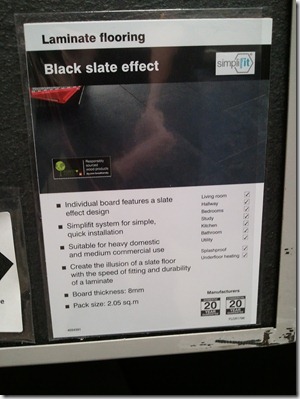
Spent some of today looking at kitchens and tiles. Great fun. No, really. Very useful to have a phone with a good camera. Whenever we saw something we wanted to remember we just took a picture. No messing around writing down names and numbers, just a quick click and there you are. These pictures are then dutifully uploaded by the phone to SkyDrive where they will probably stay for ever…

Windows Phone Breakout Game

image

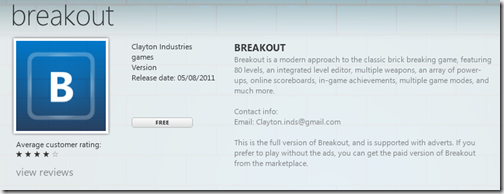
I seem to doing PR for all the Windows Phone games written by Hull Students. I don’t have a problem with this. If you are Hull student just send me an email with the deep link to your program and I’ll give it a mention. Michael sent me an email and here is his breakout game. Looks fun. You can get a free copy here:

http://windowsphone.com/s?appid=04db085e-d301-4cb9-8f0e-92d78229766e

Win a Private Jet with Windows Phone

image

Last year Andy Wigley and myself had enormous fun doing some Jump Start Live training sessions. They were very intense, and horribly hard work, and we are doing the same thing all over again. Just to prove we still can.

If you want 14 hours of intense Windows Phone Mango training over 2 days, plus a whole bunch of old jokes and the chance to win your own private jet (Fact: We did give away two private jets last year) then clear your diary for the 23rd and 24th of August and sign up here. It will be fun. Trust me.

Amazing Micro Framework Offer

image

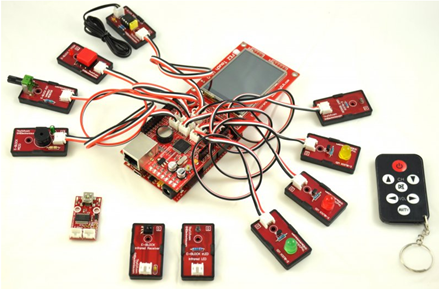
I was talking to Gus at GHI Electronics today about Gadgeteer (which looks totally wonderful) and he made a very interesting offer. The Gadget hardware is a little way off, and he is prepared to offer an amazing deal on the current Fez Ultimate Kit you can see above. This gives you a colour touch screen, a bunch of lights and switches, SD card storage, network connectivity and even a remote control keyfob. They are priced on the site at $150 but Gus is happy to offer a special “Robs Price” which is a lot less than this. A lot less. Snag is, I have to get a bunch of orders together so we can all benefit from this.

Actually, at $150 this would be good value, bearing in mind that you get a complete microcontroller development kit you can program in C# using Visual Studio. You can even spin up a web site on the platform if you want.

I’m looking forward to Gadgeteer, which will give us some slightly more powerful boxes, but I reckon at this price it is really hard to turn down this kit.

If you are interested in paying an amazing prize for this kit, and you will be at Hull some time in the future, send me a message at ultimatefun@robmiles.com and I’ll let you know just how much you could save. Then, when you get to Hull, we can get together and have fun making them do stuff.

Gadgets at Microsoft Research

Gadget 1

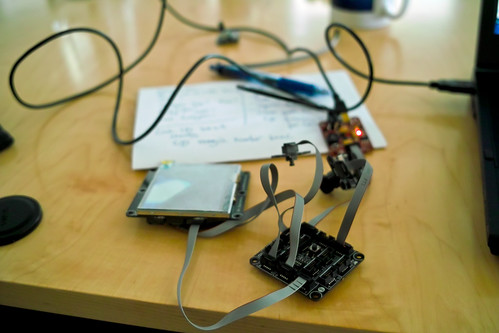
My first gadget. Zero to digital camera in around 10 minutes…

Anything with the with the word “Gadget” in the name is going to be a win with me. Especially if it also includes the .NET Micro Framework. Enter the .NET Gadgeteer. The aim of this project from Microsoft Research is to make it really easy to create embedded devices. It is based on work performed by them to make it easier to go from ideas to functioning hardware. The cunning stuff is not just in the underlying software, but also in the way that the different hardware elements can be quickly and easily connected to the central “spider” processor board, which you can see in the front of my picture. You can just about make out the switch that is used to take a picture, the LCD panel that displays the results and a camera (presently taking a picture of the desk…).

Your gadget programs are written in C# and deployed like any other .NET Micro Framework application, using Visual Studio and a usb connection to the target device. However, the Gadgeteer system makes it very easy to interact with complex devices like cameras and displays, providing a well designed object interface that sits on top. The bottom line is that if you can program with objects, you can now use their software representations of objects to create working embedded devices. Furthermore, since all the software is shared source (based on the Apache 2.0 licence model) it is possible for to make products based on this technology which you can sell or distribute how you like.

A number of hardware vendors are on board and will be producing the processor boards and the peripheral devices. The shape and form of the components has been standardised so that it is easy to make cases to hold them so creating very professional looking, but low volume, product using the new 3D printing technology is now easy. And fun.

I’m keen to be first in the queue to get some kits for teaching and playing with when the first devices hit the stores soon. If you have an idea for a thing you’d like to make, but are put off by the difficultly of plumbing the hardware together and creating a good looking finished product, you should take a look at Gadgeteer.

Optimus Quest 2 Winner

winner

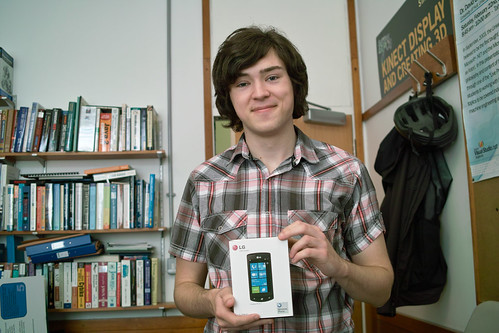
Joseph with his prize

Joseph Appleyard came into the office today to pick up his prize for the greatest number of Windows Phone Marketplace downloads up to July.

If you want to add to his number, and get hold of his DND companion application, you can find it here:

http://windowsphone.com/s?appid=effe0566-c375-e011-81d2-78e7d1fa76f8

I’ve got another phone to give away at the end of August. If you didn’t win this time, and are still a Hull student, you can enter then. Don’t forget.

HypnoCube

cube

Ages ago I found out about the Hypnocube. And recently I’ve actually managed to buy a version. If you are wondering what they are, they are made from a cube of 4x4x4 multi-coloured leds soldered to steel wires as you can see above. There are a number of projects for making them and now you can even buy them from Firebox in the UK, although they are a bit more expensive than the price I paid. They go through a very impressive animation session that runs for around 90 minutes or so.

What I want now is an 8x8x8 one…..

Super 8 Movie Review

image

Super 8 is a movie about a group of plucky kids that sort of save the day. And manage not to be too annoying along the way. Good special effects, a very good recreation of the time it is set (late seventies) and some good “jump out of your seat” moments at the beginning. 

If you do go (and you should) stay at the end during the credits to see the “film within a film”, which is absolutely great.

Bristol M Shed

Boat

Outside M Shed they have this rather nice boat

M Shed is a really good industrial museum in Bristol. You should go. It’s free and the whole setup tells the tale of commerce and trade in Bristol through the ages. The cafe is nice too, and they have a rooftop terrace with some really nice views that will find their way onto these pages once I’ve tidied them up a bit.

Raleigh

Inside they have some very interesting exhibits with roots in the area, including this Raleigh moped.

Captain America Movie Review

image

We actually saw Captain America some time back, in the best possible place to view such a film. America. I love American cinema audiences. In the UK the audience usually sits fairly quietly, unless something really amazing happens on the screen or they feel the need to “Shhhhh” someone nearby who is making too much noise with their sweet wrappers. In the USA the audience likes to join in. This includes sharp intakes of breath, cheers and even clapping at the end – although it is unlikely that the director or any of the stars can hear the applause. Great stuff.

Anyhoo, this film has been tailor made for the American audience. The clue is in the name. All the baddies are pretty much bad all the way through, and very easy to spot. Parts are played with gusto, although the cartoon origins of the characters do tend to show through a bit. The special effects are up to the job and the whole thing hangs together as well as a superhero movie needs to. If you are prepared to suspend your disbelief from the highest American flagpole then you will have a great time, as we did.

Optimus Quest 2 July Winner

Optmis Quest2

I’d nearly forgotten about the Optimus Quest 2 that I set way back in June. I’ve got two LG Optimus 7 phones to give away, and they are going to the students who show me the most impressive download stats in Windows Phone Marketplace for their applications. Fortunately Joseph Appleyard hadn’t forgotten, and of the entries I received his was the one with most downloads. Well done Joseph, send me your postal address and I’ll get the phone sent out for you. As you are a registered developer you can then upgrade it to Windows Phone Mango and have all kinds of new fun.

If you want to enter again, I’ve got another phone going on the same basis at the end of August. The only person that can’t win it is Joseph…..

What’s Wrong with this Picture Answer

image

Why is this stoopid?

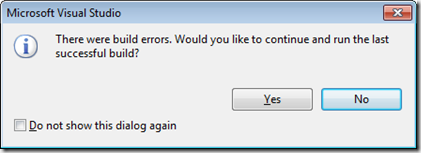
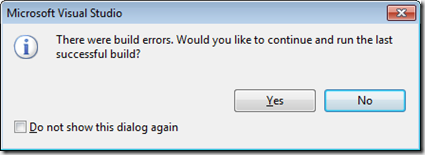
There is nothing wrong with letting you run the program from the last successful build. Perhaps you want to quickly show somebody what your program looks like, but you are in the middle of editing it. In this case you just click Yes and that person can see your program running, even though it won’t build at the moment.

The problem for me (as some of you have already spotted) is the nasty “Do not show this dialog again.” check box. If you check that it means that Visual Studio will always run your last successful build without giving you a message. The scenario where this bites you is as follows:

  1. Run program, notice an error.
  2. Edit source code, fix error but forget to type semi-colon, leading to a compilation error.
  3. Run program again to see if error has been fixed. Program fails to compile, so Visual Studio runs the old old version without telling you. The error appears to be still there.
  4. Go nuts trying to find the error that you have already fixed. Every change you make has no effect. Give up programming and become a beekeeper.

An experienced programmer will be looking out for compiler errors and will know that they are running old code. But not everyone will. You can get a similar effect by working on the wrong source file. In that case you got the fix right, but a file somewhere else is being used in the build. If I suspect a “reality fault” like this I do something that is guaranteed to break the build:

wobble;

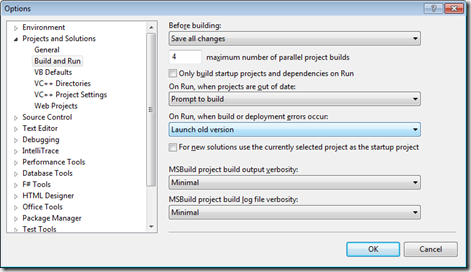
This should not compile and run. If it does, something else is happening. If you want to put this back to how it should be (in my opinion) you can go to Visual Studio Tools>Options and find the following entry:

image

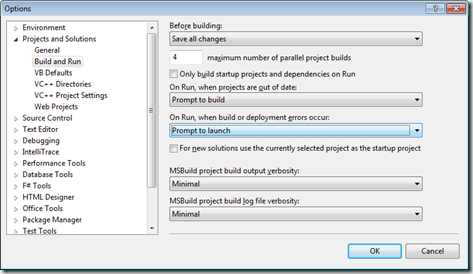
Change “Launch old version” to “Prompt to launch”.

image

If you want to get rid of the dialog box completely, and never have the program run when it won’t build, change it to “Do not launch”.

I’ve been racking my brains as to why you would want to hide the dialog box and always run the old version. To be honest, I can’t think of a reason why you’d want to do this, and I’d be a bit happier if the folks at Visual Studio hadn’t.

Foveon Sensor Fun

Thermometer

Ian collects guitars. I seem to collect cameras. I’m playing with a second hand Sigma DP2s that I picked up as a kind of birthday present to myself. This is a neat looking compact that uses a Foveon sensor. This sensor works in a different way to the ones in most cameras which use a “Bayer” design. With this each sensor is covered by a coloured filter that lets the sensor read only that colour. So to get the colour of a particular pixel you need three sensors, for Red, Green and Blue. Actually most cameras use two Green sensors, since that is colour that has the greatest effect on brightness as far as the human eye is concerned.  So that makes four sensors in total.

But anyhoo, this means that to get the colour of a pixel the camera must read the brightness of a bunch of pixels and then combine them using some clever maths. Then the camera does something even cleverer and works out the colour it would be at each of the Red, Green and Blue positions, based on the readings from those around it. This is a bit sneaky, in that it means that your 16 megapixel camera isn’t actually reading 16 million coloured dots. It is actually working a lot fewer colour values and then spreading these back over 16 million points. This can lead to pictuers with artefacts (funny shapes that appear as a result of the averaging process) and noise (because the maths is really only a form of guessing).

The Foveon sensor doesn’t do any of this. It uses a cunning silicon sensor that reads all the colour values at each pixel position. The bad news with a Foveon sensor is that it doesn’t have quite many pixels as most “Bayer” designs, so the ultimate resolution is a bit lower than what you get from other cameras. However, all the dots are “real” dots, and I think this counts for quite a lot in terms of picture quality, as you can see above.

If you want a camera that is quite a challenge to use (the sensor and lenses on the Sigma camera are very good but the electronics and user interface are a bit of a pain when compared to more popular offerings) then you should take a look at the DP1 and DP2 devices. They are also a good way to learn how photography really works, in that to get the best from them you have to take things like exposure and focus very seriously.

You can pick them up second hand from ebay at reasonable prices, and they are great fun to use.

Setting Ringtones in Windows Phone 7.5

image

When I upgraded my Samsung to the latest version of Mango I lost my beloved custom ringtone. I’d used the Chevron tool to set the ringtone ages ago, and the “undocumented feature” that made it work must have been withdrawn/fixed. Anyhoo, nothing is going to keep me from my precious ringtone, so I set about fixing this.

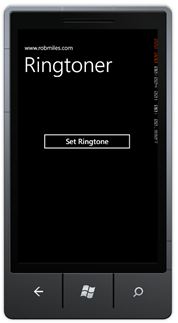
One of the improvements in Windows Phone Mango is that it lets you set your own ringtones. There is even a sample application here that does this. However,it is a bit too complicated for me. I just have a wma file that I want to make into a ringtone on the phone. That’s what this program does. Just add your wma file in place of Ringtone.wma and build and deploy the program. Run it and press the Set Ringtone button and follow the instructions. If all is well you should get a toast pop up telling you the ringtone has been deployed.  You can then select the ringtone on the phone.

Of course your phone needs to be developer unlocked for this to work. Just one more reason to become a Windows Phone developer.