Taking One From The Team

IMG_5551_2_3.jpg

One of the Second Year courses that I help deliver is our Software Development module. As part of that we put our students into teams and get them to write some software for a picky customer. They have to deal with dodgy legacy software and the fun and games that is associated with working as part of a team.

One of the rules that we have is that everyone in a team should write some code. Not all of it, but some of it. One of our worries is that in a team of 6 people we might get a couple of folks who will say “We’re the best programmers here, we should write all the code” and then go ahead and try to do just that. This is bad in many, many ways.

For a start, they might not be the best programmers there, just the ones with the biggest egos/mouths. For another thing, they might not be able to do all the work with just two people. But most importantly, if they are the best programmers around, and they could write all the code they should still not try to do it. Because from a learning outcome point of view they are missing out on a huge opportunity.

If the “great programmers” just churn out the code all they’ve done is reinforce their high opinion of themselves. But if instead they decided to piece out the work sensibly and then spend some of their time mentoring those who are less confident coders so that everyone gets better at development, then they are picking up an incredibly valuable skill. The ability to teach people stuff is really useful, even if you have no intention of going into teaching. When you try to explain something to another person you have to try to put yourself in their position and then find a context which they understand, into which you can put the information you are delivering.

The skill of being able to explain something to another person is very valuable, and it is just the kind of thing that employers are looking for. It also makes you more confident in interview situations, just because you are better at talking to people.

So, don’t think that offering to write all the code is “taking one for the team”. It is more like “taking one from the team”.

Raspberry Pi Arcade Table Nearly Finished

IMG_5569.jpg

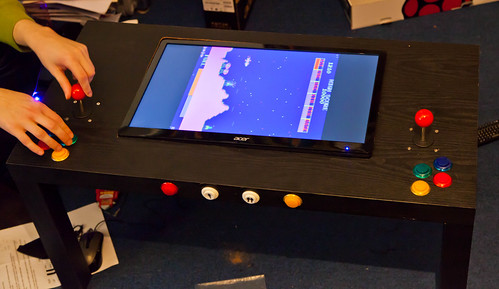
This is how it looks now, not too shabby eh?

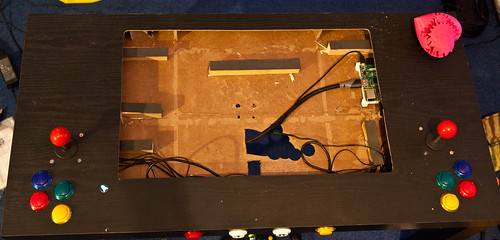
I spent a chunk of today finishing off my Raspberry Pi powered tabletop game machine. Because I swapped monitors I had to rework the monitor support but fortunately the size and shape of the hole in the surface was the same.

I did have all kinds of plans to rework the joysticks, but I’ve changed my mind (mainly because I’m lazy) and so I’ll keep it like this for a while.

IMG_5557.jpg

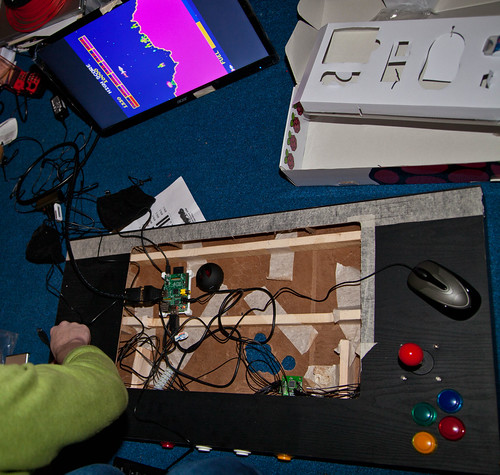
This is the work in progress. I covered the wooden parts with foam plastic to make a better support. I’ve found that my favourite fool suppliers (www.toolstation.com) also sell 0.5M HDMI cables which made it much easier to fit the monitor. You can just see the Raspberry Pi on the top right hand side, the USB hub and the joystick interface are under the front panel. Since I took this picture I dismantled a pair of USB powered speakers and put the drive units and amplifier under the screen as well. Here is a parts list of sorts:

The only thing left to buy now is the glass which I’ll have to get cut to cover the monitor. I also need to tidy up the wiring. One of the nice things about this design is that all the voltages actually in the table are low ones. These are the things that I’ve learned from the exercise:

  • Test the monitor angle of view before you buy it. Don’t assume that it will work.
  • Think about how the joystick and buttons are to be arranged, and how you see the device being used.
  • Cutting the surface is easy, but watch out for metal staples that connect the surface to the wooden bracing inside. You can actually do the cutting of the top and bottom panels with a craft knife if you are careful.
  • You have to cut a hole in the bottom of the table and push the joysticks up through it. Removing the shaft and trying to slide the joysticks in between the top and bottom is pretty much impossible. I took off the metal mounting bracket and screwed the joysticks directly to the surface, otherwise there was not quite enough clearance for them inside the table
  • Making physical things is quite a bit harder than writing software (at least for me) but very satisfying

Windows Phone Jumpstart Dates Out

tidal barrier

The Windows Phone Jumpstart sessions are something of an institution. Myself and Andy Wigley did the first couple and they were great fun. The dates for the next sequence have just been released and you can register here.

Unfortunately, due to reasons completely beyond my control I can’t be there to present this time, although I have helped out with some of the content (A clue: look for the bits with cheese in). However, we do have a stable Rob count, in that Rob Tiffany will be taking my place. Rob knows a whole shed load about Windows Phone, although I doubt he actually keeps his knowledge in a shed. He is also an accomplished author and even writes stories about submarines. (true fun fact). Andy is still playing in a band, I think, unless they’ve taken his guitar away from him. Between them you can expect plenty of detailed and engaging content.

If you have any interest in learning about Windows Phone development you should take part. It’s free and fun. The decks, demos and presentations will be available later, but there’s nothing like seeing it live.

Voice control for your Windows Phone 8 Music

VoiceMusic

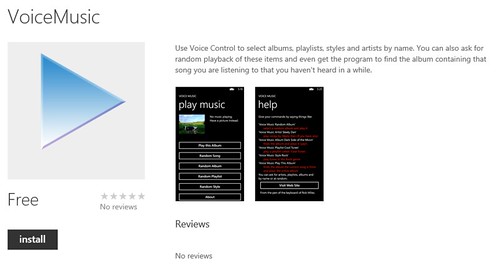
My super-secret application is now on Windows Phone Marketplace for Windows 8 devices. I call it Voice Music. It lets me do something I’ve always wanted to do. I can ask my phone to play music for me. I can say things like “VoiceMusic artist Steely Dan” and it will play tracks from the Dan. If I hear a track and fancy hearing the album it came from, I can say “VoiceMusic play this album”. I can ask for albums by name by saying things like “VoiceMusic album Dark Side of the Moon” and request random albums, tracks, styles (genres) and artists. And it works over Bluetooth in the car. And if it can’t find the album artwork it shows you a random picture. And there is a picture of a cow in there. And a pig.

It’s free too. Download your copy from here and let me know how you get on.

Turning Yellow

image

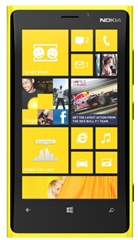
It is a truth, universally acknowledged, that a man in possession of a black Lumia 920 will instantly want a yellow one. Or at least, it is true in my case.

I’ve had my black Lumia 920 for four days. And I love it. Works a treat, screen is lovely. Apps are great.  It only has one problem. It is not yellow. Today the phone shop called me up and uttered the fateful words “We’ve got a yellow Lumia in stock for you…”. Just the one. For me. So I went up town and bought it. It would have been churlish not to.

The black one is heading for ebay. I feel terrible about this (as well as a bit poorer), but I reason that I needed a production phone this weekend to test my Top-Secret Windows Phone application which is even now heading for certification. And the Lumia is super, shiny, yellowy lovely. It is a very similar colour to a car I once had. The car didn’t start off yellow, I made it so, using a cheap spray gun and some “Daytona Yellow” paint. I also managed to make all my tools, the tyres, some of the windows, and my dad’s garage yellow as well, so I think you can see that getting a yellow phone is just something I had to do.

Gadgets at the Rather Useful Semiar

IMG_5527_8_9.jpg

The Rather Useful Seminar today described how you can use your C# and Visual Studio smarts to create embedded gadgets using the .NET Gadgeteer system.

Most of my demos worked, apart from the ones that didn’t. You can find the slides from the talk here.

I’m really looking forward to the seminar next week. Simon will be telling us all about the Unity framework for game creation.

Smart Glass Fun and Games

DSC_0125-Edit.jpg

I fired up my Windows 8 mobile and used it to talk to my Xbox this evening. I used the new Smart Glass application and was able to find and stream music very handily. I’m on the monthly pass thing which used to be called Zune, but now probably isn’t. This means that I can have “all I can eat” music and store the stuff on 4 devices. I can also stream content onto other devices things too, including the Xbox. The range of music has got nice and wide, I even managed to find all the albums by Brian Protheroe, a particular favourite of mine in the ‘70s. (search out the single “Pinball” if you want to hear some really good stuff).

Virtual Barber Shop for Windows Phone

image

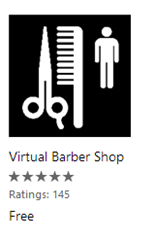
I had my hair cut yesterday. And not before time I hear you saying. My hair had got so scary that only the chap in charge of the hairdresser wanted to take it on. It is a lot tidier now, and hopefully a bit less frightening.

I found the place to get my haircut using the Local Scout in my new Lumia 925 (have I mentioned I’ve got a new phone?). I also found the above application in the Windows Phone store, which is astonishing. It is just a short audio track really, but it has been recorded in such a way that if you listen using headphones you would swear that there is actually someone walking round your head and cutting your hair. It’s a free download and if you have a Windows Phone you really must check it out. Amazing.

Rob gets a Lumia 920

Untitled

Well, I managed to get my Lumia 920 today. I had this idea that I might fancy one of the bonkers yellow ones, but they are a bit hard to get hold of, and so I’ve settled for a rather nice matt black one which actually looks very distinguished and doesn’t show fingerprints, which is nice. The man in the shop was very keen to show it off and said there had been quite a lot of interest in the platform (but then he would say that I suppose, he is selling them).

Of course I like it. Windows 8 has a bit of a turn of speed compared with earlier Windows phones. Some of this is down to the fact that it has a hairier, dual core, processor and some of it is down to the way that the applications are now deployed in a faster way. Whatever, all I know is that the apps snap into memory and run real fast. The phone itself is very solid in the hand and has a nice balance to it.  The screen quality is excellent, although for screen contrast I reckon the Lumia 800 just beats it. The Lumia 920 does have an LCD panel with lovely resolution and colour rendition though. And being LCD means that you can display bright whites without flattening the battery.

I’ve not had the chance to try the wireless charging yet. The shop I bought the phone didn’t have any of the chargers in stock yet, I should get a free one soon. However I have played with just about everything else on the phone. The camera is very good, pictures are perhaps a bit flat in normal light (although I’ve got a program that I can use to give them a bit more punch). In darkened conditions the results are really good.  Moving videos are great. The audio output quality is the best I’ve heard from a smartphone (except perhaps the very first iPhone, which was amazing) and they have this funky equaliser which you can use to fiddle with the sound if you want. They also have a Dolby gadget which didn’t do a lot for me when I tried it but you might like the phasey spaced-out feel it seemed to add to the music.

I’ve unlocked the phone for development and slapped a few programs on it which worked fine. Next thing is to fill the phone with music. One difference in Windows 8 phones is that they don’t use the Zune program to talk to the PC. You can just plug the phone into your PC and it will show up as an external drive you can load up with content. There is a ‘Windows Phone’ application you can get for Windows 8 that makes it slightly easier, but you don’t actually need this to get content onto your phone. I’ve moved a few files over. If they are in the MP4 audio format (i.e. they came off a Mac) the transfer process offers to transcode them (which implies they need to be converted for phone use) but I said “no thanks” and the music worked fine. Being a Windows 8 phone I can actually take screenshots now (touch the Windows key and then press the Power button) and you can see what my phone home screen looks like above.

I admit it, I’m a Windows Phone kind of person. I had iPhones for a while and loved them all, but I prefer the user interface of the Windows Phone. And I reckon that the Lumia 920 is an absolutely cracking phone by any standards, including those of the folks from Cupertino.

Angry Birds Star Wars

Untitled

They seem to be slapping the Star Wars brand onto just about everything these days. We’ve got Yoda selling mobile phones (for YodaPhone – that can’t be a coincidence) and various other droids going round Currys making eyes at washing machines etc.

And now we have the franchise extending to Angry Birds. Getting into the game only cost me 79 pence on my Windows Phone (although you can of course spend more) and I spent the money thinking that worst case it was the kind of outlay that I could walk away from. The good news though is that the game is really rather good. They have the genuine sound effects and you can use the Jedi force and light sabre to good effect in some levels. Well worth the price, and a lot nicer than I expected.

Surface Type Cover

Untitled

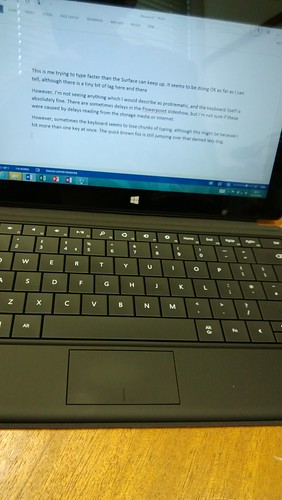
I got my Surface Type Cover earlier this week. It makes the Surface even more useful, in that I can touch type up a storm on the device now. There have been some mutterings on the interwebs about performance and how things slow to a crawl when you are typing into the Word program. I’ve not noticed this. I did notice that the day after I received the Surface it did a dirty great upgrade of the Office 2013 installation, which might be why I’m not seeing problems.

I’ve been using the Surface for presentations and it seems fine. I even got one presentation directly off Skydrive, which was a little bit slow to render, but it worked well apart from that. The presenter view in Powerpoint 2013 is actually quite nice to use.

One Surface tip: I wanted to put a SD card full of music onto the Surface but adding content from removable drives into the Music folder doesn’t work. It seems you are not supposed to do this. Fortunately, with the whole thing being based on Windows you find that someone else has already figured out a way of doing this, which is rather nice.

Very Useful Seminar

image

We did our Rather Useful Seminar today about presentation skills. You can find out more here. Then I went over to a student presented seminar about game development. This was run by the Video Game Society. It was excellent. I had to leave early as I had to go off to a meeting, but what I saw set out very well what we had been talking about earlier. There were some nerves, but one of my rules is that the day I don’t get a bit nervous before I go out before an audience is the day that I retire from this job. If you don’t worry about doing it right, then you might not do it right.

Great work guys, looking forward to the next one. You can find the slides and sample code here.

IPS Monitors and the Pi Arcade Tables

IMG_5504.jpg

Yesterday I ordered up an LG IPS224V 22 inch LED Backlit IPS Monitor from Amazon. Today, thanks to another free trial of Amazon Prime that I’ve signed up for (and set a reminder to cancel before I have to pay anything), it arrived. I joked to James (who is also building a PiArcade table and has ordered an IPS monitor) that I was worried that it might be a really good picture, and I’d have the problem that my arcade table monitor was better than my computer one.

Well, I’ve got that problem. This monitor is simply stunning, and has instantly replaced my trusty HP computer monitor of several years standing. The contrast is amazing, the angle of view very impressive (see the picture above) and the extra pixels really serve to make things easier on the eye. Since I spend a lot of my time staring at a screen I figure that this is a good investment and I’d advise anyone thinking about changing their screens to take a good long look at this one.

So now I have two monitors to get rid of, and another order out there on Amazon Prime……

Presentation Skills and Rather Useful Seminars

IMG_5446-Edit.jpg

There will be a seminar on Presentation Skills on Wednesday 7th November at 1:15 pm in Lecture Theatre D (LTD) in the Robert Blackburn Building. Myself and David Grey will try to tell you how you can hone your presentation skills to win over an audience, or interview. I just hope we get the presentation right, otherwise we’ll look very silly.

The Most Complicated Game I’ve Ever Played

IMG_5488.jpg

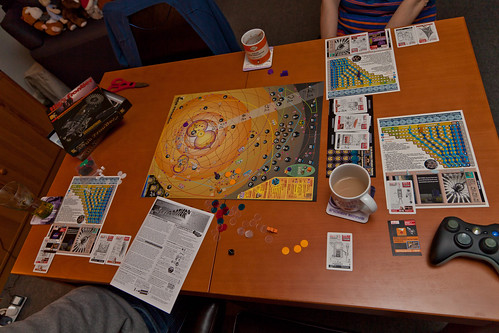
Tonight we had a go at “The Most Complicated Game I’ve Ever Played”. It’s called “High Frontier” and boy is there a lot going on. The aim of the game is to colonise space, build up your fleet, explore planets and asteroids and boldly….. Well, you know the rest.

The board is full of incredibly detailed descriptions of places to try and reach using rockets which you need to carefully provision and fuel if you are going to get anywhere. I think it would take a day to play it properly, we only really managed to scratch the surface of the gameplay. But I did manage to colonise Mars, which I’m rather pleased about. The game is packed with proper science about space exploration, and much of the gameplay is really a simulation of the things you’d need to do if you really wanted to explore space. Great fun.

Pi Arcade Table Complete but Flawed

IMG_5470.jpg

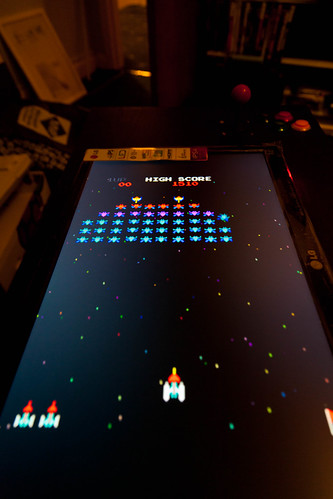
This isn’t a great picture, in more ways than one.

Today we put the finishing touches to the Pi Arcade table that I’ve been building. It was just a matter of fitting the wiring for the switches, fitting the Pi and then dropping the monitor into the slot. And finding out that it doesn’t work quite as well as I would like. The problem is not with the Pi, or the software, or the controls, or even the cardboard table top. The problem is with the monitor. Although the picture is good and the device runs cool thanks to its LED backlight, it doesn’t have the angle of view that you need to have if you want to sit and use the table as it is supposed to be used. You can see it in the photograph above. The bands at the top and bottom of the screen are supposed to be black and yet, from the angle of view that we have they look grey. The fact that most of the games that I want to play are on black backgrounds doesn’t help either so, while this is not a glorious failure, it is not quite the glorious success that I was after.

But it is of course not the end. Since I bought my monitor the price of IPS monitors (which use a better pixel switching technology) has dropped quite a bit. I’m going to put my LED monitor out there for sale (any takers?) and see what difference I get with one of those.

IMG_5458.jpg

I guess you’d call this “integration testing”…

Hull Platform Expo Meeting

DSC_0115-Edit.jpg

I was invited to a Platform Expo meeting in Hull today. One way to make an entrance is to arrive late and then sit right at the front. So I did. Chairing the meeting was Alan Johnson, Labour MP for Hull West and Hessle. The meeting was all about Platform Expo, an on-going effort to put Hull on the digital map. Now, I’m on record as not liking meetings much. But this one was different. Everyone was pointed in the direction. And every one added value to the effort.

We’ve got some great plans for the future, I’m looking forward to getting involved with them. If you are Hull student, all I can say at the moment is that there are some interesting things coming down the tracks….

DSC_0128_9.jpg

On the way out I saw quite a nice sunset over the quayside.

Windows Phone 8 SDK Now Out

image

Along with the release of Windows Phone 8, the Windows Phone 8 SDK is now available for free download. You can get it from here. With this you can create applications for the new Windows 8 devices and use lots of yummy new features. And they are yummy. I’m using a couple of them in a “groundbreaking new application” that I’m working on in top secret. It’s so secret that I’m only allowing myself to see every other character of the code. And no, the groundbreaking part is not that you can use it as a shovel.

Mild health warning.

You will need Windows 8 64 bit version to run the Windows Phone 8 SDK. Since the phone actually runs bits of Windows 8 this is quite understandable. The emulator also requires a processor that provides Second Level Address Translation or SLAT. No, I’ve no idea what that really means either, but I’m happy to nod and smile whenever it is mentioned. The bottom line is that if you have a processor with an i in the name, for example i3, i5 or i7 then you will be fine. If you have an older processor this might mean that you can’t run the emulator. You’ll also need to enable Hyper-V on your system, which sounds like something Captain Kirk would ask for, but actually is to do with the processor virtualisation that is now used for proper emulation. Of course, if all this fails you should be able to deploy and debug inside that Lumia 920 you are going to rush out and buy (but not before I’ve got mine). There is help on the download site about all this. There are also versions for Windows 7.1 development. And now, if you’ll excuse me, I’ve got some downloading to do…