Grand Prix Sunday with Lights
/
Spent the afternoon watching the Grand Prix and making lights come on when we pressed buttons. Good times.
Spent the afternoon watching the Grand Prix and making lights come on when we pressed buttons. Good times.
While I was in the 'states I got myself a new mouse. My beloved Presenter mouse from way back has reached the point of no return I think. Mind you, it must be quite a few years old now. The replacement one is a Sculpt Comfort Mouse with a fancy blue tag that you can use to scroll between open applications and open the start menu. A great match to my blue keyboard and a really nice device to use.
So nice that I nearly lost it.
I left it in Lecture Theatre A after the last Rather Useful Seminar on Wednesday. I remembered this as I was walking past the theatre on Friday and thought I'd drop in and see if it was still there. It was, along with around 100 students who were expecting a lecturer, not someone who would bound up to the lecturn, exclaim "Ooooh Goody. And it's still working", show the bright blue light underneath to the assembled multitude and then leave cackling.
Actually, I've just had a horrible thought. Perhaps there was somebody in there lecturing at the time I burst in. Oh well.
Which brings me to my business idea. It might have been done before. I don't know. But what I really needed was a program on my PC that told me when the Bluetooth mouse had gone out of range. We can do this with things like the Nokia Treasure Tag, so why not with mice?
(If you make a million from this idea good luck to you, just a few percent will keep me happy)
While I was up town recently I noticed these rather stylish boxes in Tesco that you can get for a reasonable price.
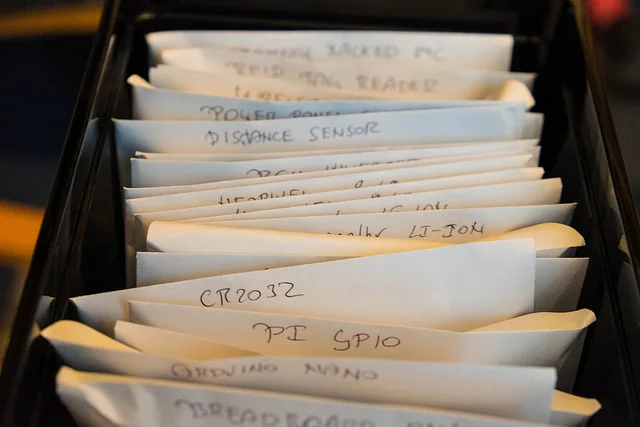
I'd been looking for some way of storing my increasing collection of electrical components. I have this worrying (but, fortunately not very expensive) habit of searching ebay for the word Arduino and then being completely unable to resist buying things I find at amazing prices, post free from China.
My plan was to fill each box with envelopes containing particular components. I stole the idea from the excellent Arachnid Labs blog.
It works really well. When I want something I just have to flick through the envelopes to find it. The Computer Scientist in me will probably sort the envelopes into alphabetic order at some point, but for now I've not got enough devices to really make it necessary.I don't have any anti-static envelopes, so I just used ordinary stationary ones.
Almost worth tidying my desktop for...
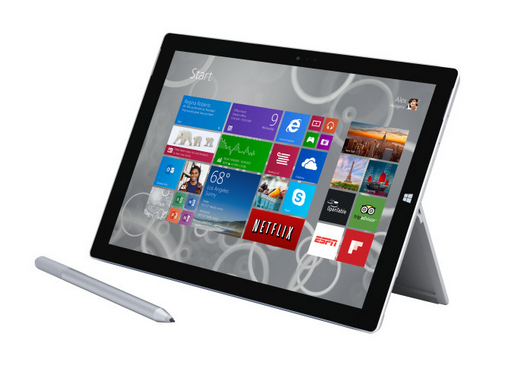
My Surface Pro 3 arrived earlier this week. I ordered it when they were released because I really, really wanted one. I'm going to have to sell lots of things to pay for it, but from the look of things it will replace my iPads and desktop machines.
The hardware is lovely. It's as if they've listened to all the complaints about earlier versions and acted on them. The power plug is no longer designed to gouge lumps out of the expensive paintwork, the kick stand tips all the way back to make it work really well on your lap and the touch pad on the keyboard is actually usable (like it was on the original Type keyboard before they broke it with the 'improved' version).
I've spent a happy evening or two loading software onto the machine and it has finally got all my working files from OneDrive. For this new machine I'm trying a new trick. I'm writing a log of all the software that I install and all the funny settings changes that I make to get things to work. This will be useful to me if I ever move to a new machine (it has been known). I always end up having to remember where I got that program from, or what it was that I did to make it work properly. And writing the log gives me something to do as the progress bars drag themselves across the screen.
I've not noticed any problems, except for one. The Surface Pro 3 has a feature called InstantGo. This makes the machine wake really quickly from sleep. It also enables a neat trick where you can start the machine and open up OneNote just by clicking the button on the active pen that comes with the machine (and is lovely by the way). Problem is that this feature doesn't work if you enable Hyper-V on the Surface. So, why would you enable Hyper-V? Well, you need it to use the Windows Phone emulator among other things.
If you install Visual Studio 2013 it enables Hyper-V automatically, which causes a couple of bad things to happen. Firstly InstantGo (and Sleep) disappear from the Power Options, which become really confusing. Secondly the machine doesn't reconnect to the WiFi at all well. I had a nervous few minutes thinking I had a broken machine before I did some searching and found the cause of the issue.
This is not a huge problem for me just right now. Without Hyper-V enabled I can debug Universal apps using the local machine (although the simulator doesn't work) and I can deploy programs into the phone to debug. To make life easier for myself I've written a couple of batch files that turn Hyper-V on or off and reboot the machine. I just right click on them and run them as administrator (or I could create a Start Menu shortcut that does that). This makes it easy for me to flip between the modes. If you have a use for them you can find them here.
One thing about the Surface Pro 3 that is completely wonderful is the way that it works with Xinio. I signed up for Xinio a while back and earlier this week they had a 40% discount event (I think they have discounts quite frequently). I managed to get subscriptions to four titles that I normally buy for around 45 quid for the year, which I reckon is very good value.
Magazines look lovely on the screen and the pages are pretty much life sized. The 4:3 aspect ratio of the screen is just right for reading and the Surface itself weighs a bit less than one magazine, particularly if you unclip the keyboard. I think the days of me having a big pile of paper by the bed are now numbered.
This really does look like the "everything device" I've been after for a while. I reckon that it should replace my desktop and I should be able to use it as a proper tablet too. The OneNote integration is very useful if you want to scribble a note or capture something off the screen and use it somewhere else. In fact it has left me looking at OneNote anew. I've never really got to grips with it, finally this platform might be the one that makes it part of my life.
If you are looking at your iPad and thinking "Wouldn't it be nice if I could actually use it to make things" then the Surface Pro is for you. I've got the i7 version (I'm going to have to sell a lot of things) but my old i5 Surface Pro 2 ran all the power applications I could throw at it, including Photoshop, Visual Studio, the Office Suite, FreeCad and Cura. Sometimes all at the same time. So I reckon you could quite comfortably get the i5 Surface Pro 3.
I hope they sort out the Hyper-V issue. I've a feeling that a machine like this will be lapped up by serious developers and it is a shame that their lives are being made more difficult by this problem. But apart from that, strongly, strongly recommended.
I hate it when I plug something into something and I've no idea what is going on. Is the device taking any power? How much? Is the supply holding up?
Some time back I ordered one of these. The price was amazing (and delivery was free). It arrived today and it works a treat. The case is a bit flimsy, but I'm not going to submit it to anything too rough, and so it should do just what I want.
What does it do? You plug it between a USB device and a power source and it tells you the voltage that the source is providing and the current the device is consuming. It can tell you if your phone is charging or not. It can tell you if your Raspberry Pi is taking too much current out of the adapter. For the price, well worth picking one up and adding it to your toolbox.
I spent a very happy afternoon making up an ArachnidLabs MiniShift that I got a while back. At least I was very happy until I got to the point in the instructions where it said "Now, take one of the spacers and fit it to the circuit board..."
Of course I'd lost mine.
However, the good news is that I happen to have a 3D printer. And so I was able to design and print a set in a rather attractive blue colour and then continue the build. I've not tried firing them up yet. That's for next week.
This is not exactly why I got it, but it is nice to know that it works...
I have a bit of a thing about sound quality. When I was younger (and had much better ears) I was very into High Fidelity sound and would spend many happy hours fiddling with big vinyl disks, turntables, cartridges, amplifiers and speakers to get the best possible sound.
I've continued being a bit snobbish about recorded sound. Most audio devices around today actually sound extremely respectable, including of course my Lovely Lumia 1520. But I can always convince myself that there are better things out there.
Which brings us to the Sony Web Enabled Multimedia Walkman, or if you prefer, the NWZ-F886. This is best regarded as an Android phone without the phone bit, but with really good quality audio hardware and the ability to play uncompressed audio file at lots of bit rates.
I've been after an Android device for a while. I want to use it to remote control my camera (see above) and also as the target for Xamarin apps that I fancy having a go with. So I've invested in one.
The sound quality is really, really good. The Sony comes with a pair of noise cancelling earbuds that work really well. I dragged some of my MP3 files onto it and they sound great. Then I used dbPowerAmp to rip some of my CDs into lossless FLAC files. These are audio files that are a lot bigger than compressed ones, but have all the data still present. The difference is definitely there. They sounded truly amazing. The next step is to download some high definition master tracks from somewhere like HDtracks and I'll have something that is far, far, better than my ability to hear it.
The only pitfalls in my quests for the ultimate in audio are the cost of the files themselves, the fact that hardly any are available in the UK due to licencing issues and the limitation that the Sony device only has a comparatively paltry 32G of internal storage. Having said that, I once made the awful mistake of putting all my purchased audio onto one of my devices. This made random play a minefield containing some horrible stuff that I should have been ashamed of owning. By carefully curating the limited space I should be able to guarantee a great experience every time I press play.
The device itself is small and sleek. It runs Android apps well enough and has the usual Sony high standard of construction. Unfortunately it also has the usual Sony insanity of a completely bespoke USB cable that I am bound to lose sooner or later. At the moment I'm solving that problem by leaving the cable in the player at all times, but this makes it a bit less portable.
The trajectory that is making your phone the centre of everything means that things like portable music players are going to end up as fringe devices I guess, but this is a really, really good one. If you are serious about carrying high quality sound around with you it is well worth a look.
Oooh. Tempting. Sooo tempting.....
Spent yesterday afternoon watching Colombo and assembling the legs for a hexapod. As you do. Spent some of today putting the servos on the base, next thing to do is attach a battery pack and see what we can make it do...
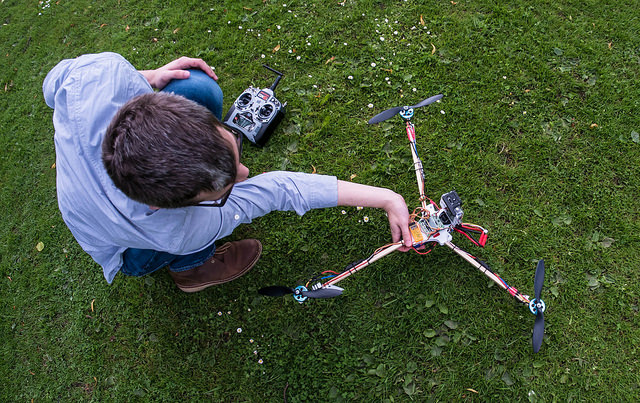
Yesterday we took number one son's home made tri-copter for another spin. Last time it flew very well, and so we thought we'd add a GoPro camera to see what kind of pictures we could get. We fitted the camera by the simple process of just sticking it on the front plate of the device. This seemed to work OK, although for the first few shots we had the battery wire in the frame.
Turned out that there was more than enough lift to take the camera into the air, although it is a tiny bit more wobbly than we'd have liked. The video came out pretty well, all things considered.
What happens when you strap three motors, a battery and some bits of electronics to some lumps of wood? You get something that flies, that's what. After overcoming our initial nerves from a while back we managed to get some quality flying time in on Sunday morning. The amazing thing is that it all worked.
Number one son now has a fully working tri-copter. It seems to be happy to hover on around a third power, which means that it should be up for camera lifting duties quite soon.
I must admit I really fancy a Surface Pro 3. One thing about the tablets that I've used in the past is that although they have a stylus I hardly ever touch it. The reason is that the pen experience is just not compelling or useful enough. The pen functionality always seems to be tacked on to the user interface and it is never quite good enough to make it worth the effort. The ink doesn't line up with the pen tip, the resolution means that I end up writing text that is too large to fit on the screen and the business of writing is just not fun.
I think that the Surface Pro 3 will change that. The display is close to the surface and the pen is now active so that it can make a much better job of position tracking. This, along with a high resolution screen, means that I should be able to write tiny text if I want to. And the way that OneNote is opened by just pressing the button on the pen means that I should be able to pick up the device and start writing.
The devices are on sale real soon, but they will not be shipping in the UK for a little while.
Which gives me time to start saving.
The Autographer is a strange device. It is a little camera with no shutter button. The idea is that you clip it onto yourself and then head off and have interesting experiences. The Autographer will take a picture every now and then when it thinks something interesting is going on. It uses its compass, PIR sensor, accelerometer and GPS to keep track of what you are doing, and it has three levels of "alertness".
From a photography buff's point of view the pictures are nothing much to write home about. There is a 5 megapixel sensor, but the lens has a very wide angle of view, which means that you can often find lots of stuff in the frame. The thing that makes the Autographer interesting is that it lets you get pictures that you could not obtain any other way. And you just don't care that lots of them are rubbish. The 8G internal memory can store literally thousands of shots that might be taken during the day and there are smartphone, PC and Mac applications that let you pull out all the best shots and make them into animated gifs and videos.
I wore the device during some of the "Wedding of the Year" and I'm very glad that I did. Some of the shots are lovely.
You can clip it to your shirt or hang it from a lanyard, but what I really wanted to do was stand it somewhere. Sadly it doesn't have any kind of stand, so I've designed and printed one, as you do.
This will screw onto one of those tiny tripods that you can get, which means you can use it for time lapse photography, something it does rather well.
I've put the design on Thingiverse if you are lucky enough to have one of these neat little devices and want to stand it somewhere.
I'll post some pictures I've taken in some later blog posts.
..and the red version are a perfect colour match to my Lovely Lumia 1520
There are actually not a lot of good things that come out of having your suitcase stolen when you travel. The only really good thing that came out of the whole episode was that I had to replace the headphones that were the sole "gadgety" thing that got taken. I'd heard very good things about the SoundMagic E10 phones and so I thought I'd get a pair.
They. Are. Amazing. Way better than the much more expensive ones that they replace. The bass is very solid, the high frequencies are smooth and the midrange is nice and clear. And you get seven different sizes of rubber earpiece, so there is a very good chance that you can get a good fit.
The only thing I don't like is the cable, which is attractive and sturdy looking but also transfers vibrations into your ears so that if you brush the wire against anything when you are wearing the phones you will hear quite loud crackling and rumbling sounds. But apart from that, they really are magic.
Number one son was around over Easter and spent quite a chunk of time building a tri-copter. This is like a quad copter, but operating in reduced circumstances as far as rotor count is concerned. However, in some ways it is more interesting to fly, because the third rotor is pivoted so that you can use it to vector the thrust in a way that quad copters can't.
Anyhoo, he started with just three bits of wood and a bag of motors and controllers and stuff, and I printed some parts to help hold it all together. By this evening he was ready to take it out into the field and see what happens.
The answer, on this occasion, is not much unfortunately. Although the good news is that everything is plumbed together fine and it all worked as expected, the bad news is that a different kind of propeller will be required. I'm a bit sad that I won't be able to see the maiden flight of the device (it goes back down south tomorrow), but I think there is a good chance that it will come back to Hull in one piece at some point in the future. And I'm seriously tempted to have a go at building one myself.
I've fancied having a Nest controller for a while but they've only been available in the 'states. Then this week I found out that they are now out in the UK. It's taken a while for them to arrive here, mainly because of the differences between US and UK heating systems.
Mine arrived yesterday, complete with a set of instructions on how to install. I'm very tempted to have a go, but this would probably be a daft thing to do just before we go away for a week or so. But I think it will make a nice Easter project.
If you are at all serious about electronics you probably need to get a multimeter. This is a thing that lets you measure electrical items of various kinds, voltage, current and resistance. I got my first one a very long time ago. In fact, they were quite expensive and I actually ended up buying the bits and putting my own box around the thing.
Nowadays you can get them very cheaply, and they tend to be digital. They show their readings as numbers. This is fine, but I much prefer one with a needle, like the one above. With a needle it is easy to see if something has just gone up or down. With digits you have to start comparing numbers. Most of the time when I'm testing a circuit I'm really checking to see if something is there or not and I don't really need an accurate value.
I thought you couldn't get cheap multimeters with needles on them, but it turns out I was wrong. You can get the above for less than five pounds from here. So I did. It works well enough and I'm already finding it useful to have around the office.
One important note though. As you can see above the dial has settings that indicate that the meter can read up to 1,000 volts. This is true enough, but you really, and I mean really should not be poking those kinds of probes into signals at that level, on account of a mistake making you suddenly, and electrically, not alive any more. For battery voltages and things like embedded controllers its fine, and it can also measure resistance. But for high voltages I'd suggest you look at much higher specification tools that will have better insulated cables and probes.
I've been looking at little headphone amplifiers for a while. These are things that do a better job at driving your 'phones than the overworked, made for a price, components you find in most things with headphone outputs. To be fair, the output of my Lovely Lumia 1520 sounds splendid, particularly if I plug it into an amplifier, but as someone with pretensions to High Fidelity (tm), I thought that a little extra amplification might make things even better.
And then I found this on Tindie. I think I'm becoming addicted to Tindie, in that they have lovely stuff and buying from all over the world is very easy. Apart from the pesky import duty thing of course.
I must admit that the packaging had me won over before I looked into the quality of the electronics. The device is packed into an Altoids tin (you can choose your design) and the board is beautifully made and assembled. The total price, including import duty, is well less than a video game, and listening tests have revealed (at least to my ears) a more solid bass and clearer midrange to the sound.
If you are into sound quality, want a bit more volume to your music, or like the idea of having a tin packaged gadget like this, then I reckon they are well worth the money.

Tonight it was time for some Retro Fun at C4DI. Nothing on the agenda as such, just bring along your retro gear and be prepared to tell its story. We had some great stuff turn up, including a laser disk system and a Theramin.
Peter had brought the Apple II (by the way, the missing key is the | key) and a Palm Pilot. Ian brought the Sinclair Scientific calculator and I brought the hand cranked calculator. (did you know that people that used these were actually called computers?).

You can play "How many of these did you own?" here. I had two, and I really, really wanted an Apple Newton....
It was very interesting to see just what people had brought. There were Sinclair Spectrums, Walkmen (Walkmans?), Amstrad Portable Computers and all kinds of tech. It is sobering to reflect that these were all state of the art in their time, and that the iPhone that you adore so much is destined to become just as retro as these gadgets in a few years time.
Thanks to Jon for setting it up. The next meeting of the Hull Digital is Thursday 16th January, when they are having the first Hardware Meetup, which should be very interesting.
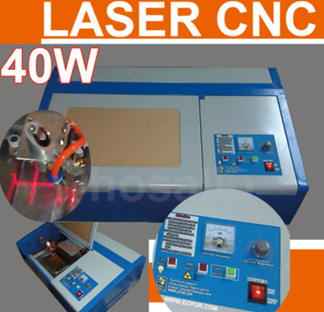
Ian came around today and we played a kind of “dangerous purchase chicken”, each trying to persuade the other that what we really need in our lives is a laser cutting machine. Turns out you can get these from ebay for a few hundred pounds, which for a device with a 40 watt C02 laser is actually amazing value we reckon.
The one we looked at can cut paper, card, leather and most other non-metallic materials. Including fingers and thumbs I suppose. The vendor page shows a video of the machine happily burning through card, with the lid wide open and presumably all the safety interlocks (which I hope it has) turned off.
It would be nice to be able to precisely cut plastic parts and the device might be a nice complement to Una the 3D printer. But bearing in mind that the thing is water cooled and needs a hole cutting in the wall to install the vent that gets rid of all the nasty smoke, I think I’ll pass for now.
Rob Miles is technology author and educator who spent many years as a lecturer in Computer Science at the University of Hull. He is also a Microsoft Developer Technologies MVP. He is into technology, teaching and photography. He is the author of the World Famous C# Yellow Book and almost as handsome as he thinks he is.